posted in Technology

F-Droid gets its biggest update in a decade with new UI and smoother app installs
arstechnica.com/gadgets/2026/09/f-droid-gets-its-biggest-update-in-a-decade-with-new-ui-and-smoother-app-installs/posted in Technology
F-Droid gets its biggest update in a decade with new UI and smoother app installs
arstechnica.com/gadgets/2026/09/f-droid-gets-its-biggest-update-in-a-decade-with-new-ui-and-smoother-app-installs/
Replying to @return2ozma@lemmy.world
Now that’s a name I have not heard in a long time…
Replying to @kboos1@lemmy.world
You haven’t? I always check F-Droid first if I want a new app.

Replying to @Quacksalber@sh.itjust.works
Can’t speak for the person you’re replying to, but I always check the F-Droid repository first, too… but not using the F-Droid app because it’s been a sub-par choice for years.
Droid-ify is what I use, but there are others. Many include/allow other FOSS repos and have additional useful features.
Replying to @Quacksalber@sh.itjust.works
The repo, yes. The fdroid app was pretty shit for a long time. You had to update apps individually, for instance (I think that’s fixed now?)
Replying to @non_burglar@lemmy.world
My F-Droid app has been able to bulk-update for two years now. Sometimes you have to trigger the update process manually, but the apps all get updated.
Replying to @Quacksalber@sh.itjust.works
Ah, that makes sense. I’m on droidify now, maybe I’ll check out fdroid again.
Replying to @non_burglar@lemmy.world
I had an issue with that on older android. On lineage mass update is fine.

Replying to @return2ozma@lemmy.world
Isn’t everybody using Droid-ify anyway?
No. Team neo store represent

Replying to @amlor@piefed.social
+1 for neo store. I wonder if the new f-droid overhaul catches up as neo is pretty fantastic.
Edit, just looked at the screenshots, looks better than before but I’ll stick with neo.

Replying to @amlor@piefed.social
Does Neo Store have a way to make apps only use the official F-Droid repo for updates unless you downloaded them from a different one? Because it seems to just want to update from any repo, so I ended up splitting F-Droid Basic for official F-Droid apps and Neo Store for IzzyOnDroid and other third party repos.
Haven’t noticed it doing that, maybe they fixed it? There was a new release a few days ago
I’ve just been rawdoggin it with the OG f-droid app

Replying to @ShutUpWesley@piefed.zip
mines been on no updates for years after they removed the ability to downgrade apps inexplicably.
Replying to @statelesz@slrpnk.net
I get pretty much everything through obtainium

Replying to @xylol@leminal.space
It is a chore to re obtain everything on a new phone… If you didn’t make a backup.
Replying to @statelesz@slrpnk.net
I love that I’ve never heard of Droidify. Open source offers a buffet of alternatives.

Honestly the new ui is nice enough I may be switching back to the official F-droid app.
We’ll see where I stay. I love the simplicity of droid-ify but sometimes have some issues with minor jank
Replying to @Cris_Citrus@piefed.zip
That was the reason I switched back to F-Droid. Had serious problems with updating and stuff, no problems with F-Droid so far. I don’t use it that much anyways, most of my apps are already installed. When searching for new apps F-Droid has a big category selection which is nice.
I’ve mostly been happy to just put up with the jank but if I get a nice interface without any I won’t complain :)
Plus it feels nice for the f-droid projects own app to be in a good state and I’m excited for that ☺️
Yup

Replying to @statelesz@slrpnk.net
First I've heard of it tbh. I'll check it out, thankyou
Replying to @statelesz@slrpnk.net
Foxy Droid here.

Replying to @statelesz@slrpnk.net
Yes, but now I want a comparison of F-droid 2 vs Droid-ify.
Replying to @statelesz@slrpnk.net
I’m using F-Droid Basic.
Replying to @statelesz@slrpnk.net
I tried it but i ended back up with the official fdroid for some reason i don’t recall.
Replying to @statelesz@slrpnk.net
I’ve tried alternative apps but they sometimes just break or stop working with the f droid repo, so I gave up and went with f droid basic.
Replying to @return2ozma@lemmy.world
When you find an app, F-Droid 2.0 will make the installation process easier. Google has long put up roadblocks for sideloaded apps, citing the security implications. This is also the rationale behind its upcoming developer verification system. For now at least, apps will be easier to install from F-Droid thanks to the use of Google’s pre-approval API.
That answers my question if those smoother installs already account for Google’s insistence in making “sideloading” way more annoying. They do not.
Replying to @return2ozma@lemmy.world
Nice. There’s just a FOSS alternative for almost everything these days. I get 80% of my apps from F-Droid.
Same. Its great!
The only non foss apps that I use are banking apps and whatsapp (forced to use it…). Everything else is foss.
Replying to @morto@piefed.social
Look at Beeper as a alternative, let’s you bridge your WhatsApp chats.
Replying to @NarrativeBear@lemmy.world
The only way you should trust anything bridging is if you self host it.
Matrix with WhatsApp bridge is the only way to properly use that.
Replying to @hornedfiend@sopuli.xyz
Absolutely, make sure to self host the bridge yourself on your own hardware!
Replying to @NarrativeBear@lemmy.world
I don’t take advantage of Beeper nearly as much as I should, I saw that they give you a Matrix handle when you sign up which I think is cool.
They give you a Matrix handle because everything is Matrix. The problem is Beeper is nothing to do with Beeper but exactly the kind of thing we saw with Apple: malice. They don’t want you to use their apps this way, and for that reason, it just sucks to use. Plus you’re lowering the privacy of whatever platform you’re using to that of Matrix.
Replying to @NarrativeBear@lemmy.world
WA bans your account for using it.
Curious. Do they easily find you that you use it?
If meta automatically detects that you use beeper and bans you then there is no point using it with WA. But in this case beeper wouldn’t advertise bridging to WA, right?
Almost exclusively use F-Droid. Great news!
Replying to @return2ozma@lemmy.world
well … i’ll stick with droidify
Replying to @return2ozma@lemmy.world
Been using it since the alpha came out, absolutely love what they’ve done with the app. The installation flow is much smoother with the instant prompt for confirmation, the more granular categories and improved search make browsing so much better. I tried other stores before, but I couldn’t get myself to like any of the actively maintained ones, v2.0 is good for me.
I’ve only started using F-Droid recently, but it’s UI is a clusterfuck. I welcome an overhaul.
Replying to @shirasho@feddit.online
it wasn’t really a clusterfuck, but whatever. yeah, sure it didn’t have rounded corners and large empty spaces, if that’s what you mean
Replying to @return2ozma@lemmy.world
This kind of news always terrifies me. Will see though.

Replying to @return2ozma@lemmy.world
I have been using droidify for some time now since the updates and install part has always been a bit weird and the notifications too. Hope it is better now. Not super happy with my current option either.
What I really want is a way to use it properly on the TV, because all the current store apps are so, but so so bad and horrible in a screen controlled with a remote control that is almost a joke.

Replying to @return2ozma@lemmy.world
Can anyone ELI5 for the nontechy how things are going to work once Google rolls out the new bullshit? I’m seeing so many of my apps put out notices that they will no longer work once Google goes through with the verification system. Will I still be able to install shit through f droid?

Replying to @dharmacurious@slrpnk.net
Will I still be able to install shit through f droid?
yeah, with extra hoops the first time though (24 hr wait etc etc)
Replying to @hanrahan@slrpnk.net
I already have developer options turned on, are they gonna fuck me out of that again? :/
I really hate this shit
Replying to @dharmacurious@slrpnk.net
Ya there’s going to be wait periods to turn on developer options, and it sucks cause some apps don’t work with developer options turned on, like banking apps for example.
This whole thing sucks, imagine on your laptop not being able to install software and only being locked to getting everything through the Microsoft Store App.
Replying to @dharmacurious@slrpnk.net
I really hate this shit
If you have Play Sernices running, Google owns your phone (and also tracks you, and sucks 50% of the juice for it). Just rip 'em out.
Replying to @MonkderVierte@lemmy.zip
I genuinely don’t know that I’m techy enough to do that. I depend on banking apps and such and I don’t understand how to get around that. I would, if I could be taught lol

Replying to @dharmacurious@slrpnk.net
Look at Universal Andriod Debloater. Makes it very easy to remove whatever you want.
Your banking apps may not work if you remove Google Play services but i’ve found i can just log in through the browser instead.
Not as convenient but it feels good knowing Google can’t have any of your data.
Let me know if you have any questions about UAD!
Replying to @mildseason@sopuli.xyz
How’s microG these days? Is it working with bank apps yet?
Replying to @blindbunny@lemmy.ml
I believe you need a custom ROM to run microG. Something like GrapheneOS, LineageOS, PostmarketOS, etc. Unfortunately my phone is too new and isn’t supported by any of them so haven’t been able to test it. Yet!

Replying to @mildseason@sopuli.xyz
Can you restore them if it breaks things too much? My bank requires 2FA through an app for any money transfers, and I assume it needs them but I’m not sure.
Replying to @OozingPositron@feddit.cl
Yeah the debloater has an option to restore what you remove! I’d make take some pictures of the exact names of things just to be safe.
Replying to @hanrahan@slrpnk.net
Every time, and every update.
Replying to @dharmacurious@slrpnk.net
the problem here isnt that users cant do what they want, its that developers might stop developing because not enough people cant be arsed to jump through googles hoops. Everyone who can should support opensource developers more than ever now.
Replying to @return2ozma@lemmy.world
Google says “power users” can “still install” unverified apps. Here’s what that actually looks like:
Delve into System Settings, find About Phone
Tap the build number seven times to enable Developer Mode
Dismiss scare screens about coercion
Enter your PIN
Restart the device
Wait 24 hours
Come back, dismiss more scare screens
Pick “allow temporarily” (7 days) or “allow indefinitely”
Confirm, again, that you understand “the risks”
Nine steps. A mandatory 24-hour cooling-off period. For installing software on a device you own.
Worse: this flow runs entirely through Google Play Services, not the Android OS. Google can change it, tighten it, or kill it at any time, with no OS update required and no consent needed.
Replying to @NarrativeBear@lemmy.world
It won’t be a problem on a de-googled phone. Get it running LineageOS or GrapheneOS. Then install F-Droid (and probably Aurora store too). Some Google junk won’t work, but you’ll soon be more limited by having Google services on your phone than not having it.

Replying to @pHr34kY@lemmy.world
Hardly the point though. For us this is a bother at most, but we can cope because we’re already doing our own thing and know what we want. Imagine trying to get your non tech-savvy friends to “sideload” (install) an app from outside the Play Store. Right now it’s not a big deal, so if they’re interested in the app, they’ll likely install it. But this amount of friction and scary warnings is way more likely to stop them.
Replying to @pHr34kY@lemmy.world
If one looks at the supported devices pages (which I do regularly hoping that it supports mine) it’s easy to see that 99% of devices on the market simply can’t use them.
Replying to @devfuuu@lemmy.world
Yeah, it’s been getting harder as time goes on. It’s basically only pixels that are supported and still on the shelf.
Replying to @NarrativeBear@lemmy.world
I recently learned that this setting actually persist after migrating to another phone.
Replying to @polle@feddit.org
that would be only if you chose to backup and restore your android settings

Replying to @nadram@lemmy.world
Which is perfect for them to keep tying your profile information across the board in yet another way. Fuck that.
Replying to @jjlinux@lemmy.zip
Do you create a new Google account every time you change phones? They’re already tying everything to you
Replying to @boonhet@lemmy.zip
I have 1 Google account use specifically for spammy shit. That account is tied to a completely fictional person and lives inside 1 chromium browser.
My phones and computers have never seen a Google account other than inside the VM that runs that browser.
Replying to @NarrativeBear@lemmy.world
We don’t hear this enough. Google doesn’t hear this enough.
Replying to @NarrativeBear@lemmy.world
This is why rooting is great and if you re worried about banking apps, KernelSU is very good at blocking detection and keyboxs for the hardware attestation get leaked weekly.
Replying to @themachinestops@lemmy.dbzer0.com
This is why antitrust law is great… or would be, if we fucking had it anymore!
Technological workarounds are not the same thing as actual solutions.
Replying to @grue@lemmy.world
I don’t have hope for a solution.
Replying to @themachinestops@lemmy.dbzer0.com
To help translate KernelSU, we no longer accept translation contributions via Weblate. All translations are now handled using LLMs.
what???
Replying to @themachinestops@lemmy.dbzer0.com
also, what do you do with the leaked keyboxes? does kernelsu handle them too, or do you use a different tool for that?
Replying to @WhyJiffie@sh.itjust.works
I use play integrity fix and tricky store. Everytime it is revoked, I change it to an unrevoked one. KernelSu hide the root and modules.

Replying to @NarrativeBear@lemmy.world
i hadnt thought about it before but i just had the realization that im not even gonna be able to have 3rd party apps AND my banking app in the same phone (cuz it doesnt like developer options being enabled). uhm shit
Replying to @tixnou@feddit.cl
I unlocked my phone’s bootloader. I’m on the oem OS, up to date, no root, just unlocked the bootloader. Now my device is “not certified” and a lot of apps that have no business caring about my “certification status” don’t work (like my phone operator app). That’s if the playstore lets me download it in the first place: “this app is not compatible with your device”
Replying to @tixnou@feddit.cl
Latest Android update will hide developer options supposedly from apps. However, it’s on Android 17
Replying to @NarrativeBear@lemmy.world
Worse - that 24 hour timer? You only have a short window of time once it finishes to continue, otherwise you have to wait another 24 hours.
Replying to @8uurg@lemmy.world
This happened to me :(
Replying to @8uurg@lemmy.world
Under the assumption this is a non negotiable thing…
They should at least let you alter the timer if you know you might not be able to
Like if in the post 24h window you know you’ll be busy, let you make it 28h instead of 24h
Replying to @NarrativeBear@lemmy.world
Also, no autoupdates!
Replying to @NarrativeBear@lemmy.world
The same procedure applies if you want to unlock the bootloader?
Edit: OK nvm it must be done to unlock the developer’s option
Replying to @return2ozma@lemmy.world
So F-droid “evolves” to become F-droid Basic?

Replying to @return2ozma@lemmy.world
But does it allow you to backup your app list to move to a new device? This is why I moved to obtainium from Fdroid. In reading the article, I don’t see a mention of a backup feature.
Replying to @Joelk111@lemmy.world
This is being worked on now, after 6 years in the pipeline: gitlab.com/fdroid/fdroidclient/-/work_items/1484#…
 GitLabAdd option to import/export list of installed apps (#1484) · Issues · F-Droid / Client · GitLabIt happens that when changing a cellphone, ROM or making a factory reset, you loose everything (obviously). So, it would be great that F-Droid had a feature to...
Replying to @MonkderVierte@lemmy.zip
Awesome! Thanks for letting me know.

Replying to @return2ozma@lemmy.world
F-Droid News: f-droid.org/…/f-droid-2.0-a-new-chapter-for-andro…
Replying to @Kissaki@feddit.org
Posted on Sep 24, 2026 by
F-Droid F-Droid
After more than a year of hard work, we are thrilled to announce the launch of F-Droid 2.0, a complete redesign of the official F-Droid app and the largest app update in 10 years.
For more than a decade, F-Droid has helped people discover and install free and open source Android apps. F-Droid 2.0 builds on that foundation with a modern interface, better app discovery, improved search, and a simpler experience that works well, whether you’re new to F-Droid or have been using it for years.
This isn’t just a visual refresh. The user experience was redesigned to integrate smoothly with current Android patterns, like Material Design, while keeping familiar F-Droid interactions in place. Key components were reworked and rewritten using Kotlin Compose, the standard toolkit these days, creating a foundation that will help us deliver improvements more quickly in the years ahead.
We are excited to begin rolling out F-Droid 2.0 to users over the coming weeks after 14 test releases.
What has changed?
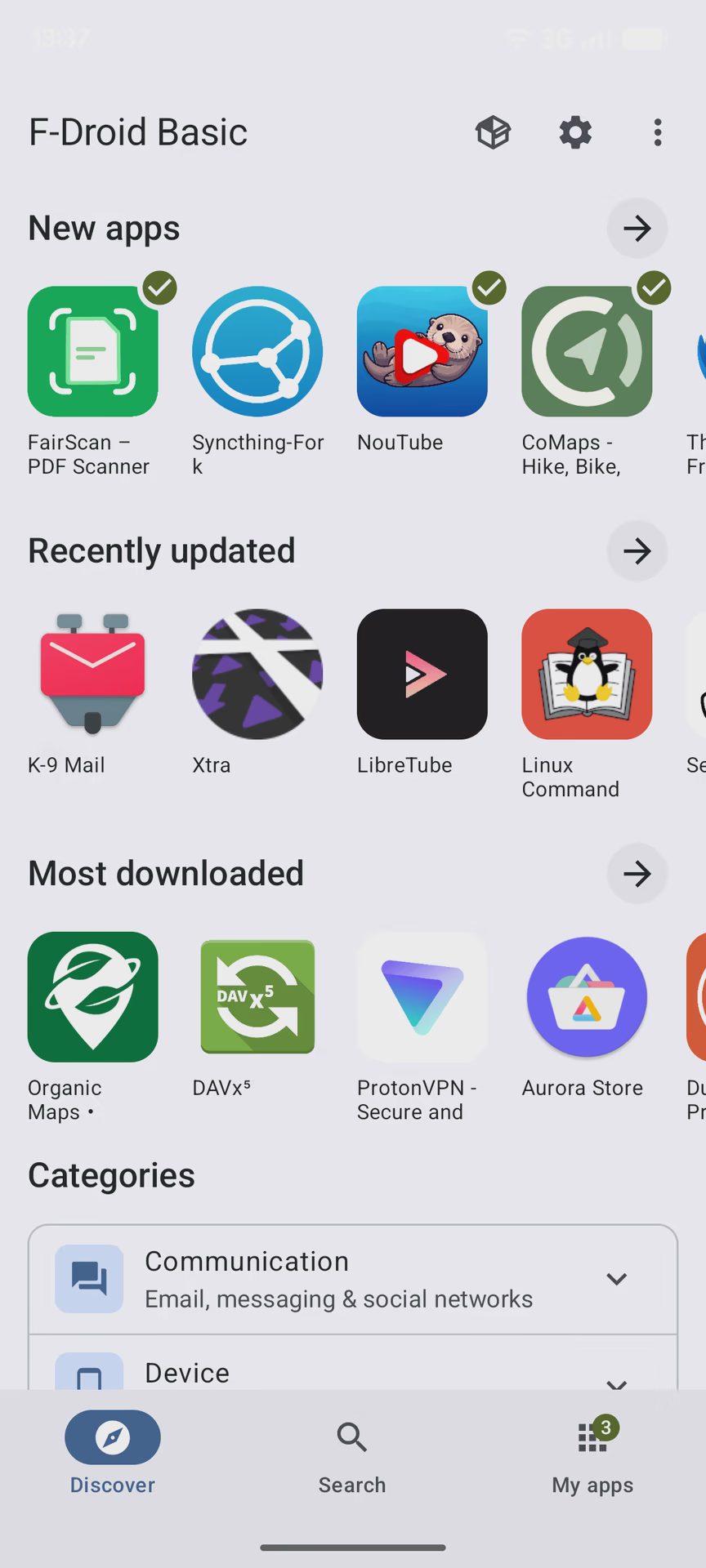
One of our main goals for F-Droid 2.0 was to make it easier to discover, install, and maintain the apps you rely on. We simplified the main navigation into three core areas: Discover, Search and My Apps. Categories are now integrated into Discover, making it easier to browse and explore, while My Apps provides a central place to manage installed apps, updates, and potential issues. Settings and Nearby Swap are still only a tap away from the top bar, but no longer compete for space in the main navigation.
[… Continues at f-droid.org/…/f-droid-2.0-a-new-chapter-for-andro…]
Replying to @return2ozma@lemmy.world
I’ve been on neo store for a couple of years for the apps that have no APIs ready in git repos (for those, Obtainium is just the greatest). I tried the new F-Droid app, and it is way smoother and the UI improvement is amazing. They still show you apps that haven’t been maintained for over a year up front, but that’s not a deal killer.

Replying to @return2ozma@lemmy.world
I’ve just tried it. The UX is great and the downloads are faster than ever. It’s soo much better noww!

Replying to @Fermenade@feddit.org
UX is much better. I wouldn’t say it’s great. At all.
But I’m really happy to see big improvements! And I’m finding things I had no idea were on the “store” before at all. Which ultimately is the goal.
Replying to @ripcord@lemmy.world
what things you don’t like?

Replying to @Fermenade@feddit.org
WTF, why is the download on the Fdroid front page still giving me 1.3.2?
Replying to @hansolo@lemmy.today
yea I can’t figure out how to update either.
Replying to @Hadriscus@jlai.lu
I use droid-ify. It didn’t pop any updates for F-droid, but I updated it manually, since the 2.0 version is there.
Replying to @nuko147@lemmy.world
I downloaded the apk directly from the website and it still installs 1.3.2 or whatnot, what am I doing wrong ?
Replying to @Hadriscus@jlai.lu
try to browse it in the repo.
Replying to @nuko147@lemmy.world
I got it ! thank you
Replying to @Hadriscus@jlai.lu
open the app’s page and expand versions. the last one was just not marked recommended yet, in case there are serious bugs
Replying to @WhyJiffie@sh.itjust.works
Found it !
f-droid.org/packages/org.fdroid.fdroid/
I had to go through the Gitlab, browse to “client” (gitlab.com/fdroid/fdroidclient ), and scroll down to the readme section to find the link.
 f-droid.orgF-Droid | F-Droid - Free and Open Source Android App RepositoryThe app store that respects freedom and privacy
Replying to @Hadriscus@jlai.lu
I think you can get to it also by searching “f-droid” inside f-droid
Replying to @WhyJiffie@sh.itjust.works
oh wow I can install f-droid from f-droid ? nooice
Replying to @Hadriscus@jlai.lu
install update
Replying to @hansolo@lemmy.today
Could be a gradual rollout.
Edit: saw it’s actually still a beta (and probably this is why it doesn’t show), here’s a link for the APK: f-droid.org/repo/org.fdroid.fdroid_2000050.apk
Replying to @kamen@lemmy.world
From the website apk download link?
Replying to @hansolo@lemmy.today
I don’t know, could be. I just tried downloading and I’m getting the 1.x version too.
Replying to @kamen@lemmy.world
Yeah me too.
Edit: just like WhyJiffie@sh.itjust.works said you’ll find it by searching f-droid on f-droid.org, scroll down to version 2.0 and download the apk.
Replying to @Igris@feddit.org
Ah, right. It’s still tagged as beta, maybe that’s why it doesn’t appear in other places (like in the news article on their site).
Thanks for the tip.
Replying to @hansolo@lemmy.today
Enable beta.
Replying to @roundabout@feddit.org
Ah, for me it was labeled “unstable updates.”
Replying to @return2ozma@lemmy.world
It has indeed gotten better more pleasing to look at.

Replying to @return2ozma@lemmy.world
I’m using F-droid and it’s still the same, I haven’t noticed any difference :P
Furthermore, there’s that annoying Google law that blocks Android apps from being installed, and downloading apps like f-droid is quite complicated after that.
Replying to @gatitaQwQ@lemmy.world
You can opt out of it by putting your phone in “developer mode” or by using something like LineageOS
Replying to @freespirits@lemmy.world
I was thinking about rooting my phone to install LineageOS, but unfortunately, that plan won’t be possible because I don’t really understand how to do it, and I don’t have a computer or another phone to help me.
The only thing I’ve done so far is disable Google Play services, and I’m using a few microG apps instead. :/
Replying to @gatitaQwQ@lemmy.world
LineageOS is great I am using it right now, however do keep in mind that you do not need to root your phone in order to install LineageOS.
Replying to @utrinity@lemmy.world
What:0
But you don’t need to unlock the bootloader to install LineageOS.
Half of the videos I watched on YouTube said that it was necessary to format the phone or do several other things to unlock it. I was already getting confused with so much information.
Replying to @gatitaQwQ@lemmy.world
You don’t need to root your phone, just unlock the bootloader. But yes you will need to hook it to a PC or maybe another phone to make it work. I did mine off a PC.
Replying to @freespirits@lemmy.world
That’s why I gave up, I don’t understand any of this stuff. Furthermore, the bootloader seems like something very complicated to do. (。•́︿•̀。)
Replying to @return2ozma@lemmy.world
Looks quite good. I am not a fan of M3E in general, but the app is well-made.
Replying to @return2ozma@lemmy.world
The new ui is excellent, much more approachable in my opinion
Replying to @return2ozma@lemmy.world
Now it will take them another decade to update apk on their website to the newest version.
Replying to @return2ozma@lemmy.world
Still not as good as Neo Store or droid-ify.
Replying to @return2ozma@lemmy.world
I had alpha updates on and got this early. I then mistook this for malware.
Because it fucking sucks. This is the only time I had to wait for fucking F-Droid to load.
All because they are still sucking Google’s dick and abiding by their orders of “meh use this 320GiB framew*rk so that this button can be this much rounded”. They have been bitten quite a few times and they still haven’t learned anything.
AND the alpha didn’t have offline sharing. I figured they would add it later. They did not. It’s gone. In some places, one rarely ever goes online. The app auto-updates once and the feature is gone. Reduced to atoms. Cannot share anything.
Also, they used corpo speak to justify it.
I repeat, this so called “collection of nerds” used corporate speak to justify something.
EDIT: I guess they added it, but the corpo speak was so bad that the blog post makes it read like it was not added.
My conclusion is fuck Android, fuck smartphones, that platform is dead, go back to Thinkpads. Older ones. And not E series. And not L series. These Thinkpads. Normalize sharing .c files via an Ethernet cable.
Thanks for coming to my ted talk.

Replying to @diaphragmwp@discuss.tchncs.de
Cant tell if sarcasm/copypasta. If not, can’t you just reinstall the latest suggested 1x.x version?
Replying to @maniacalmanicmania@aussie.zone
APIs can’t be compatible forever.
Replying to @diaphragmwp@discuss.tchncs.de
What is offline sharing? Is that not the same as nearby?
Replying to @maniacalmanicmania@aussie.zone
That’s what I referred to, yes.
Replying to @diaphragmwp@discuss.tchncs.de
I’m confused. I have it in version 2.0.0. Discover tab > top right menu > Nearby.
Replying to @maniacalmanicmania@aussie.zone
Okay, corrected.
Replying to @diaphragmwp@discuss.tchncs.de
It’s exactly as quick to start as it always has been on my device. You seem to be very angry over basically nothing. I’d rather have a flourishing ecosystem of mobile Linux apps, but until we have that, I’m very grateful for all the hard work of the f-droid team. You do know you can use one of many different clients if you don’t like the main one?
Replying to @uniquethrowagay@feddit.org
on my device
Then let’s ship your device to the whole planet.
you can use one of many different clients
Yes, but I am talking about F-Droid’s F-Droid.
Replying to @diaphragmwp@discuss.tchncs.de
It’s an open source project, fork the old version yourself if you hate the new one so much
Replying to @SpatchyIsOnline@lemmy.world
Just one more fork broooo, it will be good this time trust

Replying to @diaphragmwp@discuss.tchncs.de
Imagine ranting on the internet about how flawed the alpha release of a piece of software was.
Replying to @roofuskit@lemmy.world
My bad, I should be using pigeon mail for this.

Replying to @return2ozma@lemmy.world
Wow. I was not expecting that big of a UI change upon updating F-Droid. It looks modern, I like it a lot!
Replying to @return2ozma@lemmy.world
Hopefully now updates will go much smoother. I like the new design!
Replying to @return2ozma@lemmy.world
Do I need to delete F-Droid from my mobile and then install it again to get the latest F-Droid update ?
Replying to @Purplegengar25@lemmy.cafe
Probably just need to wait. They didn’t roll out the new version through update channels yet, likely to have more users test it first.
Replying to @Purplegengar25@lemmy.cafe
Go to the app page in F-Droid, scroll down to the bottom and expand versions. Clock 2.0 and install
Replying to @return2ozma@lemmy.world
Saw the post after I had an update on my e/OS and wanted ti check out the new look.
Sadly not one APP showed up. Empty shell. FDroid blank.
24 hours? Will check it tomorrow. Edit: solved itself, see next comment.
Replying to @Alex_anders@lemmy.world
Solved itself. After the packages got updated (which somehow suddenly did by itself after several hours).