
Replying to @irmadlad@lemmy.world
:)
Replying to @irmadlad@lemmy.world
:)
Replying to @superglue@lemmy.dbzer0.com
Yes of course. I will look into and hopefully release in the very near future.
Replying to @Estebiu@lemmy.dbzer0.com
Thank you. Alot of time was put into this locally, prior to releasing anything on github… and happy to look into your request! To help me track it, would you mind submitting a feature request on the GitHub repo? I appreciate your input!
posted in Selfhosted
[AIP] Fathom v0.11.0: now on Android and Android TV (experimental), plus many more updates!
Fathom is an all-in-one client for Jellyfin, on Linux, Windows, and now Android. It brings movies, shows, music, and Live TV into one window, with most of Jellyfin’s server-side management built in, plus optional Seerr requests and a full YouTube client. Everything plays through mpv (via media_kit), so you get direct play, hardware decoding, and real subtitle and audio track control. Free and open source (AGPL-3.0).
Feedback is very welcome. Bug reports and feature requests both belong on GitHub Issues, and questions are fine in Discussions. Fair warning: the new Android TV build is still rough around the edges, so testers and reports there especially would help a lot.
This is my first update post since the 0.9.0 launch, so here’s everything added since then.
Platforms: Linux and Windows (self-contained downloads) and Android (APK; Android TV experimental). macOS and iOS need Mac hardware I don’t have yet.
Per Rule 7 / [AIP] disclosure requirements AI was used during development as a coding assistant. Level per category:
 GitHubRelease v0.11.0 · Fathom-Media/fathomFathom 0.11.0 brings the app to Android and Android TV, adds a YouTube Shorts viewer, Android Auto, and an Up Next prompt, and lets you manage and delete items in place.
Note: Android TV support i...
GitHubRelease v0.11.0 · Fathom-Media/fathomFathom 0.11.0 brings the app to Android and Android TV, adds a YouTube Shorts viewer, Android Auto, and an Up Next prompt, and lets you manage and delete items in place.
Note: Android TV support i...Replying to @irmadlad@lemmy.world
One thing I wish ai would teach vibe coders is how to use semantic versioning.
Trying to infer state of project from versions in ai-assisted software is an exercise in confusion.
Thank you. Hoping to continue to improve the products in meaningful ways. Always appreciate your continued support!
posted in Selfhosted
[AIP] CookTrace v1.1.1: In-App Updates, Full i18n Sweep, Android App-ID Fix
CookTrace is a self-hosted recipe, pantry, and cook-diary app. Single Docker container, PWA + native Android app, no accounts on external services, no telemetry. Third app in the Trace family alongside NutriTrace and LiftTrace.
v1.1.1 rolls up everything since v1.0.3 (a couple months of work, went straight from 1.0.3 to 1.1.0 to 1.1.1).
src/i18n/en.json and reads via svelte-i18n. ~460 new keys, Weblate-ready. Covers Settings, Pantry, Recipes, Cook Diary, Shopping, Trace AI, and every shared widget. Chicago-style title case for labels/buttons/headings, sentence case for body prose. Column-aligned values and paired <key>_desc sibling keys so translators get inline context.<meta name=“theme-color”>. Running CookTrace alongside NutriTrace / LiftTrace? Distinct accent per install makes tabs visually distinguishable at a glance.ghcr.io/traceapps/cooktrace (primary) and traceapps/cooktrace on Docker Hub. Identical multi-arch tag set on both registries.https://localhost/, so autofill entries saved as “localhost” and were indistinguishable from any other localhost app. Now identifies as app.cooktrace.local, which reads clearly in autofill dialogs and saved-credentials lists. One-time upgrade cost: the origin change orphans locally cached web-only state, so on first launch after upgrading you’ll re-enter your server URL + log in again (server-connected users) or lose theme / accent / display prefs (standalone users). Recipe, pantry, and shopping data is unaffected (that lives in a separate local SQLite DB).countries_tags_en=<slug>), so selecting Norway or any non-World option silently had no effect. Fixed by using search-a-licious’s native inline Lucene syntax. While in there: alphabetized the picker and added Argentina, Austria, Belgium, Chile, Denmark, Finland, Ireland, Netherlands, New Zealand, Norway, Poland, Portugal, Singapore, South Africa, South Korea, Sweden, Switzerland.top:0, which on Android slid it up over the status bar / clock. Now floats as a rounded card below the status bar and the compact header.Docker Compose:
services:
  cooktrace:
    image: ghcr.io/traceapps/cooktrace:latest  # or traceapps/cooktrace:latest on Docker Hub
    container_name: cooktrace
    ports:
      - "3003:3001"
    volumes:
      - ./data/db:/data/db
      - ./data/uploads:/data/uploads
    environment:
      JWT_SECRET: change-me-to-a-long-random-string
      DB_PATH: /data/db/cooktrace.db
      UPLOADS_PATH: /data/uploads
    restart: unless-stopped
Then docker compose up -d and open http://localhost:3003/.
AGPL-3.0. No accounts, no telemetry, no external cloud unless you opt in (Open Food Facts, USDA, or an AI provider you supply the key for).
Per Rule 7 / [AIP] disclosure requirements AI was used during development as a coding assistant. Level per category:
 GitHubRelease v1.1.1 · TraceApps/cooktracePatch release. Server-connection banner no longer covers the phone's status bar on Android.
Fixed
Server-connection banner no longer covers the phone's notification bar. The red "server unreachabl...
GitHubRelease v1.1.1 · TraceApps/cooktracePatch release. Server-connection banner no longer covers the phone's status bar on Android.
Fixed
Server-connection banner no longer covers the phone's notification bar. The red "server unreachabl...Replying to @Axolotl_cpp@feddit.it
yes both are included as an available option to enable/disable!
Thanks, that narrows it down a lot. Fathom renders through libmpv and currently leans on its default frame timing, where a well-tuned client instead syncs frames to the display refresh.
Two questions would let me pin it down:
Which official client are you comparing against: the web client in a browser, or the Jellyfin Media Player desktop app? It matters because a browser hands video to a hardware overlay that is tear-free by design, while Jellyfin Media Player runs the same engine Fathom does, just configured differently.
What OS are you on, and what is your monitor’s refresh rate (60, 120, 144Hz)? On Linux, which desktop or compositor?
On the fix side, the next dev build adds a “Smooth Motion (Display Sync)” option under Settings > Playback > Advanced that paces frames to your monitor’s refresh. That is the usual cure for this kind of judder, so please try it when you have a moment.
The same build also adds a Diagnostics screen under Settings > About. Open it, turn on Diagnostic Logging, start the video again, let the stutter happen for a few seconds, then use “Copy Diagnostics” and paste the result here. That shows me the exact decode path and frame timing instead of me guessing. It strips out anything sensitive before copying.
 GitHubRelease v0.9.1-dev.3 · Fathom-Media/fathomA modern desktop client for Jellyfin, with an optional built-in YouTube player and Seerr requests. - Release v0.9.1-dev.3 · Fathom-Media/fathom
Glad 10.11.11 fixed the login. Since it’s the same with hardware acceleration on or off, decoding isn’t the bottleneck, it’s likely delivery or frame timing. Two quick checks: in your Jellyfin dashboard, is that session Direct Play or Transcode? And does the same file play smoothly in plain mpv/VLC (Fathom uses libmpv underneath)? That’ll tell us if it’s server/network vs. something on the Fathom side.
Replying to @potustheplant@feddit.nl
Yeah, unfortunately that’s a Google account/billing thing, not a playback thing. Fathom only fetches the video stream on your machine; it doesn’t touch your account or Premium. That “verify your country” check is much stricter than playback and wants a residential IP in the country, so datacenter VPN ranges like Proton’s can get “flagged”. Nothing i think a media client alone can get around.
Sorry about that. That message is a network timeout, so the Quick Connect request isn’t getting a response back within the window. Since you had to enter the server address to reach that screen, plain reachability and your cert are should be fine, so it’s something specific to the Quick Connect path.
Two things would help me narrow it down:
Does normal username/password sign-in work against the same server, or does that time out too? If password works and only Quick Connect hangs, that isolates it to the Quick Connect endpoints.
Is Jellyfin behind a reverse proxy (nginx/Caddy/Traefik), and which Jellyfin version?
Replying to @CAVOK@lemmy.world
Interesting idea, but that’s out of scope for this app, Fathom is just a Jellyfin/YouTube/Seerr client, with no torrent or P2P layer, so there’s nothing for I2P to integrate with.
Replying to @Jjoiq@lemmy.world
Unfortunately, it’s Jellyfin-only. Emby and Jellyfin came from the same codebase originally, but their APIs and auth have drifted apart enough that Fathom’s Jellyfin-specific calls won’t work against Emby. No Emby support planned, the focus is Jellyfin, alongside the Seerr and YouTube pieces.
Sign-in goes through Jellyfin’s normal username/password endpoint (AuthenticateByName) plus Quick Connect, which is the same path the LDAP plugin hooks into, so LDAP logins generally work with a standard client like this, it shouldn’t be the blocker by itself. A few things worth trying: if your server has Quick Connect enabled, try that (it sidesteps the password path entirely and is a good way to isolate the problem); double-check the server URL has the scheme and port (e.g. host:8096); and a self-signed HTTPS cert can also cause a failure. If you can paste the exact error you’re seeing, I’ll dig in, and a GitHub issue is welcome.
Replying to @potustheplant@feddit.nl
Yes, the YouTube side is fully client-side, the app resolves and fetches the stream directly, the Jellyfin server isn’t involved at all. So YouTube sees the connection of whatever machine is running Fathom, using that machine’s IP and location. Fathom doesn’t spoof anything itself, but because it’s client-side, running it at home or behind a VPN is what should decide the location YouTube sees.
Replying to @warmaster@lemmy.world
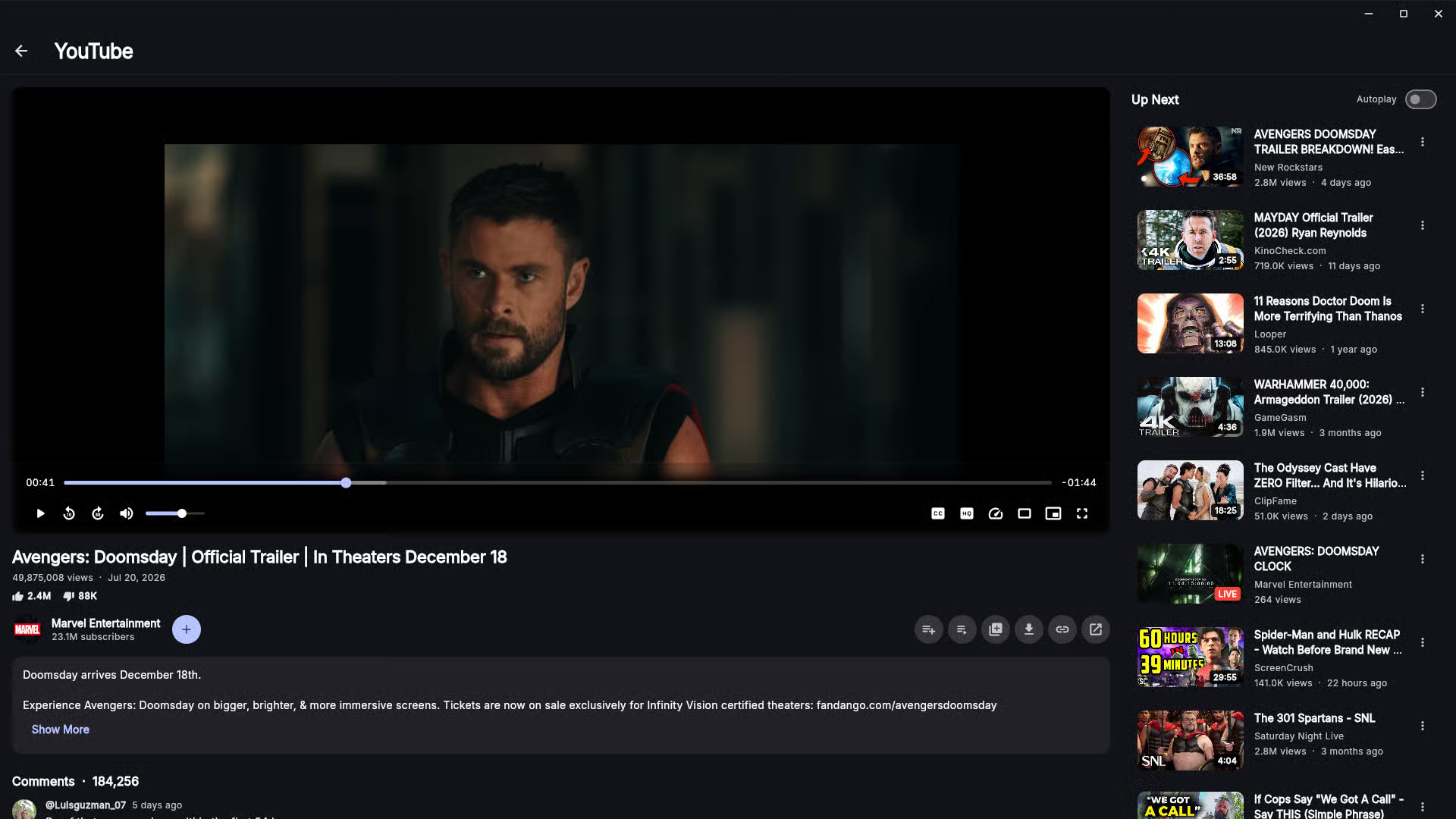
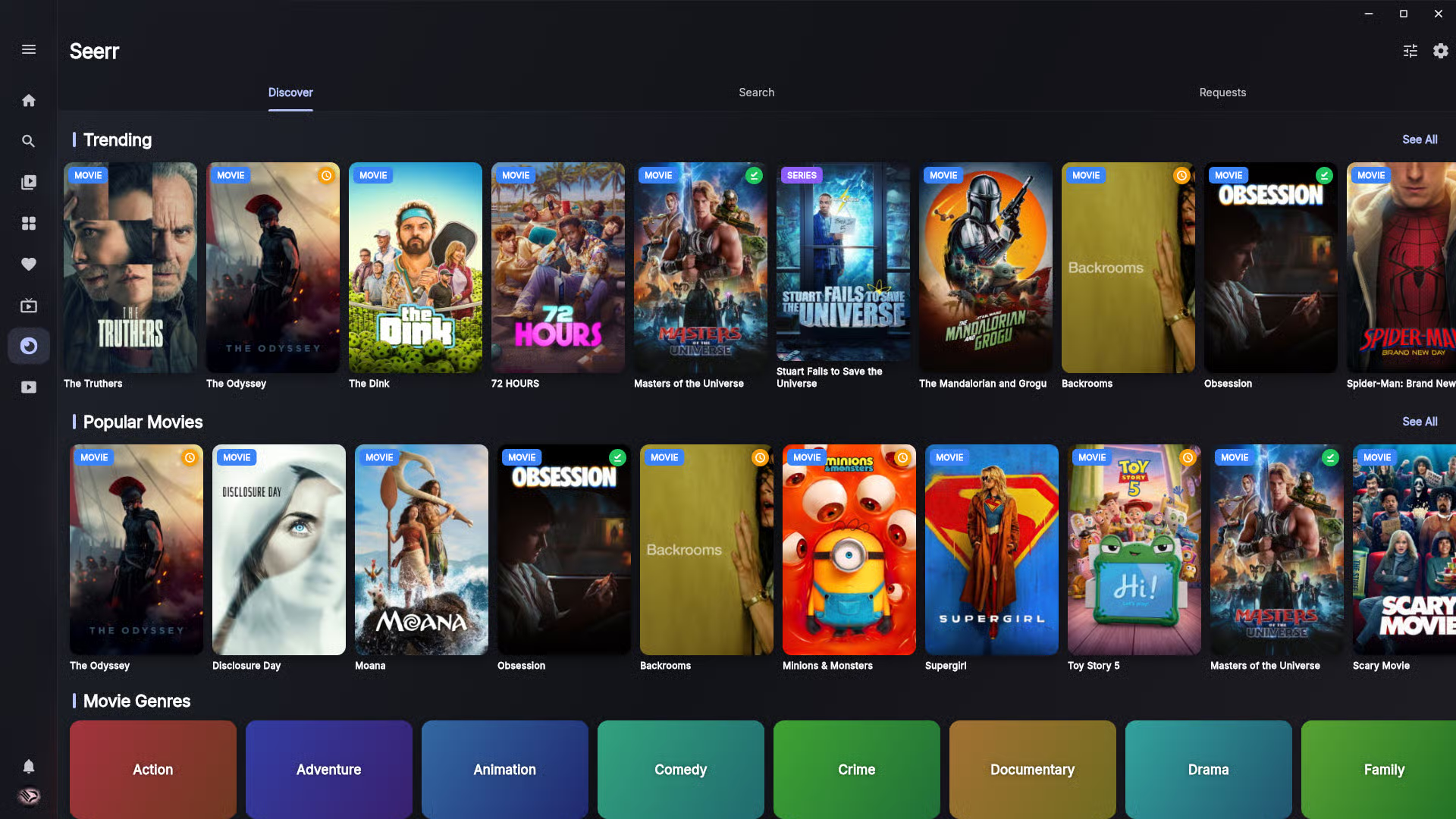
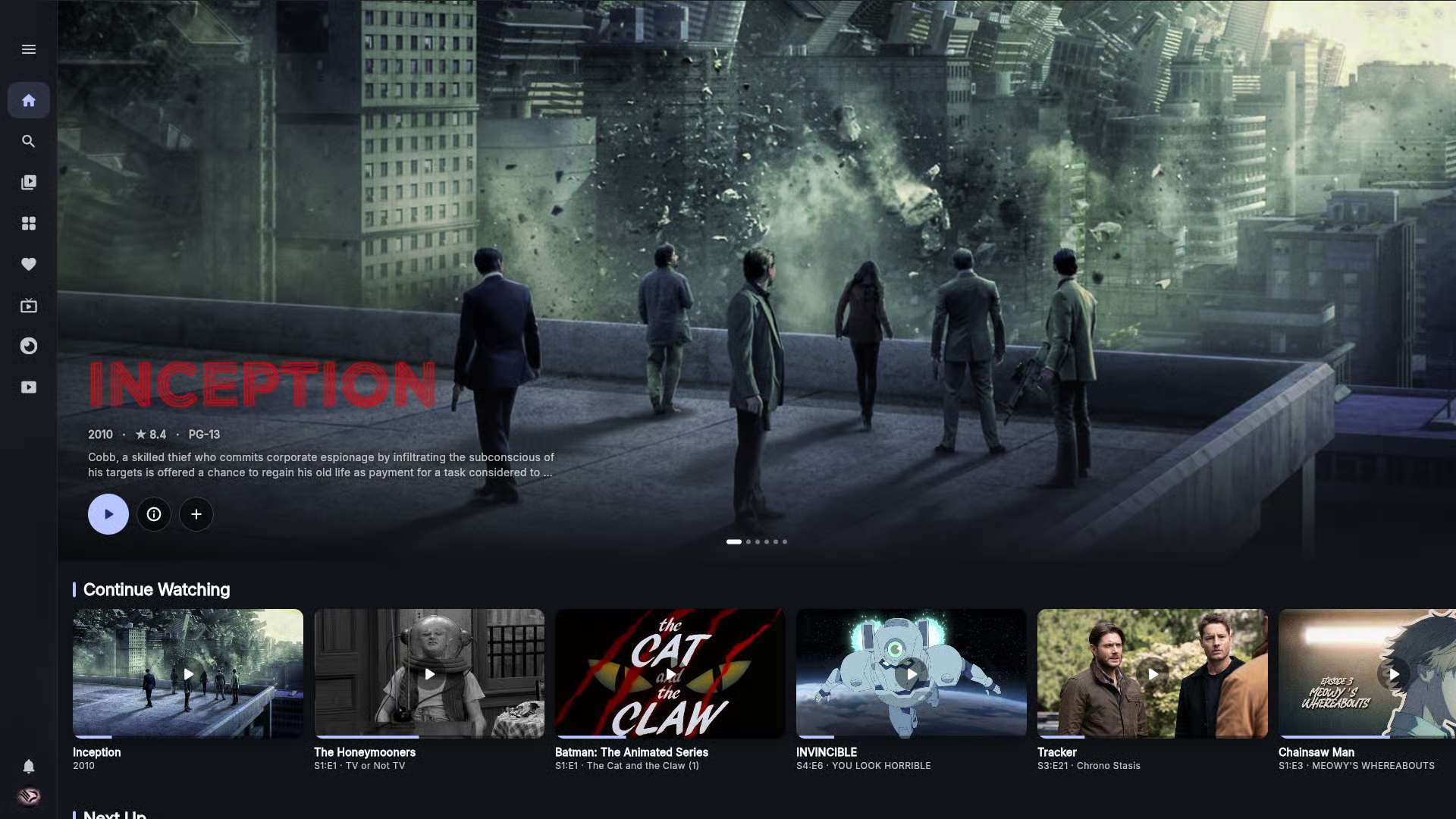
yes here are a few of different areas:
posted in Selfhosted
[AIP] Fathom v0.9.0: a new desktop Jellyfin client with built-in server management, Seerr, and YouTube
I’ve been building Fathom, a desktop Jellyfin client, for quite some time and just put out the first public release (0.9.0) for Linux and Windows.
The real draw is having everything in one place. Your Jellyfin movies, shows, music, and Live TV; most of Jellyfin’s important server-side management (users, libraries, scheduled tasks, transcoding, Live TV and DVR, and more); and optional Seerr requests plus a full YouTube client, all without leaving the app. No bouncing between the web dashboard, a requests page, and a browser tab. One window does the lot.
What’s in it:
It’s Linux-first (built and tested on Arch/KDE) with a self-contained AppImage, plus a portable Windows build. Android and more features are on the roadmap.
Download + source: github.com/Fathom-Media/fathom/releases/…/v0.9.0 Repo (AGPL-3.0): github.com/Fathom-Media/fathom
This is the first public release, so expect a few rough edges. All feedback is genuinely wanted: bug reports, feature requests, and ideas. The goal is to grow Fathom into one of the best Jellyfin clients out there, so open an issue or start a discussion and it’ll get read.
Per Rule 7 / [AIP] disclosure requirements AI was used during development as a coding assistant. Level per category:
 GitHubRelease v0.9.0 · Fathom-Media/fathomFathom 0.9.0
The first public release of Fathom, a desktop client for Jellyfin, for Linux and Windows.
Fathom puts your Jellyfin movies, shows, music, and Live TV in one fast, good-looking app, and...
GitHubRelease v0.9.0 · Fathom-Media/fathomFathom 0.9.0
The first public release of Fathom, a desktop client for Jellyfin, for Linux and Windows.
Fathom puts your Jellyfin movies, shows, music, and Live TV in one fast, good-looking app, and...