A place to share alternatives to popular online services that can be self-hosted without giving up privacy or locking you into a service you don’t control.
Don’t duplicate the full text of your blog or readme if you’re providing a link.
Submission headline should match the article title.
No trolling.
Promotion posts require active participation, with an account that is at least 30 days old. F/LOSS without a paywall has exceptions, with requirements. See the rules link for details. Tags [CBH] or [AIP] are required, see the links in Rule 8 for details.
For me: after setting up all the integrations and fall overs using the arr stack and Jellyfin (inc Sabnzdb etc)… I keep circling back to Nova video player.
It’s arguably not even self hosting…but there something undeniably cool about sticking a USB stick into a router, installing a single app on your TV and boom, done. EDIT: of course, it can consume the *arr stack, integrate with Ombi etc
IOW, I really like stuff that simple to set up and punches above its weight class.
Looking for a recommendation on an LLM that can guide a user on how to manually set up a home server that runs Jellyfin, Arr Stack, etc. Have a couple of friends interested and I have some spare old NUCs I was going to give them, so I was going to download the software for them and then walk them through it.
But it’ll be difficult to align our schedules for the next month or so (school starting and different time zones) so then I thought maybe I could just run an LLM they could use on my main PC for when they have time.
Why not just use one of the existing services? Those cost extra money and none of us want to financially support those companies.
[AIP] Will Be Done v0.10 released: offline-first self-hosted task manager with weekly timeline. Now with checklist!
New version of Will Be Done is released! Will Be Done is offline-first, self-hosted task manager with visual weekly timeline.
The main idea is simple: collect tasks, put them on week timeline. I find that week timeline helps me stay more organised and fits naturally into my workflow. I can see what tasks done in which day, and what tasks planned previously in which day. Then, also, I missed other things, like open-source, offline-first, API, vim keybinds support.
It works offline-first, so tasks are stored locally in browser/desktop app(like Linear). You can open app and use it even when your server or homelab is down or no internet connection. When server is back, sync will sync changes between devices and server.
Main features right now:
Offline-first task management. It will be still available and working if no internet connection
Visual weekly planner
Projects with columns
Vim-style keyboard navigation
Self-hosted server with SQLite as primary DB
Fast sync between devices
Recurring tasks
Desktop app for macOS, Windows and Linux
Mobile PWA
Todoist and TickTick import
And here is what changed since my last post:
Added task checklists.
Added Stash feature. You can store tasks that don’t have exact date yet, but you still want to keep them in focus.
Added task action menu.
Added mobile card details page.
Added IndexedDB support for faster and more reliable local persistence. New installs use IndexedDB by default. Existing users can turn it on in settings page.
Design - architecture, system design: no AI involved. I’ve been working on local-first apps for ~5y and have been a software engineer for ~10y. I even built HyperDB, a database for local-first apps, because existing solutions such as Dexie and RxDB didn’t meet my needs.
Implementation - Pair. From the start of project it was Hint, but now it’s Pair.
Testing - Generated.
Documentation - Pair.
Review - Pair. I have coderabbit AI + greptile, but also do manual review.
Looking for selfhosted alternative to "Find my phone"
Hi,
I’m looking for an alternative to Google’s Find my phone that can be self hosted. Most important feature would be to see the last known location of a mobile phone without disclosing the location to any third party system. It would be nice to have features like making the phone ring or wiping the phone remotely.
Happy to hear any ideas what you people are using.
If you have any questions please feel free to ask. This is a project I have been working on for about 5 months over time. With suggestions from a few matrix community members it has reached this point.
I used AI as a tool to write the syntax, I was the one who managed the design and came up with the solution myself.
Human suggested solution, AI did the task.
Implementation - production code
Testing - writing tests, test plans, and QA.
Documentation - Docs, comments, README, change logs
Review - Code review and pull request feedback
Deployment - CI/CD configuration.
The gitlab link shows everythinge lse
Multiple CalDAV calendars synced to email aliases for a single email account?
Has anyone managed to get multiple CalDAV calendars (e.g. personal and work) to send out event invite emails using corresponding email aliases from the same email account?
I have multiple domains and aliases set up with a single email account through an email provider, but I'm just now trying to figure out how to separate the calendar into personal and work.
EDIT: I managed to get it set up and working with nextcloud! So yes, this is possible
[CBH] yoself: Podman monitoring & public status page
Made a status page tool, almost no configuration (a few environment variables), ready to drop in compose.yaml. If you run Podman but don’t receive status alerts yet, try setting Yoself up, it should be relatively easy.
To monitor Podman, add volume /run/podman/podman.sock:/var/run/docker.sock. To check if an external website is up, add SERVER_EXAMPLE=https://example.org.
To send alerts, set EMAIL_STATUS=admin@example.org and SMTP_{HOST,PORT,USER,PASSWORD}.
To generate a static page, set STATIC_HTML=/home/user/public_html/yoself.html. To only monitor containers and/or servers, but not host, set MONITOR_HOST=false.
Intended usage: One instance on each server whose containers you want to monitor. Another one (static page) on the server that checks if your main servers are up.
I work with a few servers with Podman containers. Some containers have health checks defined in their Containerfile or my compose.yaml. Some don’t include binaries neccessary to implement health checks; but to see if they work, it can be enough to query their HTTP API.
A server may experience load spikes and is sometimes close to running out of disk. Finally, a server may periodically become inaccessible because of network issues.
My goal is to get emails about server health events, with very little configuration per server. And to have an overview of what stands out, without deep insights (for detailed information, I’ll ssh anyway). Ideally with one tool for it all.
The static page is needed because I only work part-time and don’t have money to rent an extra VPS. For monitoring my main VPS, I use a shared system that lets users run apps in background and publish HTML pages.
Non-goals, their features that Yoself doesn’t have:
Settings UI: Beszel, cState, Simon, Statping-ng, Uptime Kuma. (I want compose.yaml and/or .env to be the entire config, possible to keep in Git with version history.)
Split monitoring and overview services: Beszel, cState + monitorbot.
Large, detailed charts: Beszel, Simon. (Yoself is just two screens.)
Private dashboard: Beszel, Simon. (Yoself is userless.)
Key auth between servers: Beszel.
Multi-user management: Beszel.
Description of current incident. (If needed, I can make Yoself show recent RSS from Mastodon.)
TCP, DNS, ping: cState + monitorbot, Uptime Kuma.
Years of history: cState. (Yoself logs expire after 31 days.)
Live metrics: Beszel, Simon. (Yoself periodically refreshes, but not every second.)
Reading container journal on the web: Simon.
File management: Simon.
Telegram, Slack, Discord etc: Beszel, Simon, Uptime Kuma. (Plain text e-mail is enough for me.)
Lightweight, written in compiled language: Beszel, cState, Simon, Statping-ng.
Custom styling: Statping-ng.
Regex matching of website responses: Statping-ng. (Yoself supports JMESPath.)
Frontend using React or Vue: Beszel, Simon, Statping-ng, Uptime Kuma. (I use Preact with my SSR/ORM library EviKit, about which I wrote recently.)
Would be nice, but wasn’t a strong need to implement yet:
Weblate for continuous translation: Beszel, Uptime Kuma. (For Yoself, I edit Ukrainian .po using Poedit.)
Upd: re-read the rules and added [CBH] to title as per Rule 8. I didn’t use LLMs when coding this project, as evidenced by my commit history on Codeberg. Developers of dependencies do use LLMs, though.
[AIP] Fathom v0.9.0: a new desktop Jellyfin client with built-in server management, Seerr, and YouTube
I’ve been building Fathom, a desktop Jellyfin client, for quite some time and just put out the first public release (0.9.0) for Linux and Windows.
The real draw is having everything in one place. Your Jellyfin movies, shows, music, and Live TV; most of Jellyfin’s important server-side management (users, libraries, scheduled tasks, transcoding, Live TV and DVR, and more); and optional Seerr requests plus a full YouTube client, all without leaving the app. No bouncing between the web dashboard, a requests page, and a browser tab. One window does the lot.
What’s in it:
Server management, built in. Handle users, libraries, scheduled tasks, transcoding, active sessions, Live TV and DVR, and more, without opening the Jellyfin web dashboard.
Optional Seerr requests right from the detail page, with Jellyfin, Seerr, or API-key sign-in.
Optional YouTube client. SponsorBlock, DeArrow, dislike counts, downloads, no ads and no account, off unless you turn it on.
One shared player. Jellyfin and YouTube use the same controls, seek bar, and shortcuts. Picture-in-picture, or pop a video out to a floating, always-on-top window on your desktop.
Plus: SyncPlay watch-together (works with other Jellyfin clients too), ratings (Rotten Tomatoes, IMDb, and more), in-app updates with a stable or beta channel, light/dark/AMOLED themes, and searchable settings. Everything plays through mpv, so you get direct play, hardware decoding, and proper subtitle and audio track control.
It’s Linux-first (built and tested on Arch/KDE) with a self-contained AppImage, plus a portable Windows build. Android and more features are on the roadmap.
This is the first public release, so expect a few rough edges. All feedback is genuinely wanted: bug reports, feature requests, and ideas. The goal is to grow Fathom into one of the best Jellyfin clients out there, so open an issue or start a discussion and it’ll get read.
AI Disclosure
Per Rule 7 / [AIP] disclosure requirements AI was used during development as a coding assistant. Level per category:
Design (architecture, system design): Hint — I make the architectural calls; AI suggests trade-offs and edge cases I might have missed.
Implementation (production code): Pair — roughly 50/50. AI drafts, I review, adjust, test on real hardware, and only commit what I’ve verified. Every commit is manually reviewed before it goes to my dev repo.
Testing (writing tests, test plans, QA): Assisted — real-device testing is manual (I test on my own PC before every release). AI helps draft test plans and think through edge cases.
Documentation (docs, comments, README, CHANGELOG): Pair — release notes and changelog entries are drafted with AI then edited for tone; comments and code docs are mostly Pair as well.
Review (code review, PR feedback): Assisted — I’m the reviewer; AI helps with security sweeps, audit passes on complex changes, and consistency checks.
Deployment (CI/CD config): Hint — GitHub Actions/release pipeline is largely conventional; AI-suggested improvements only.
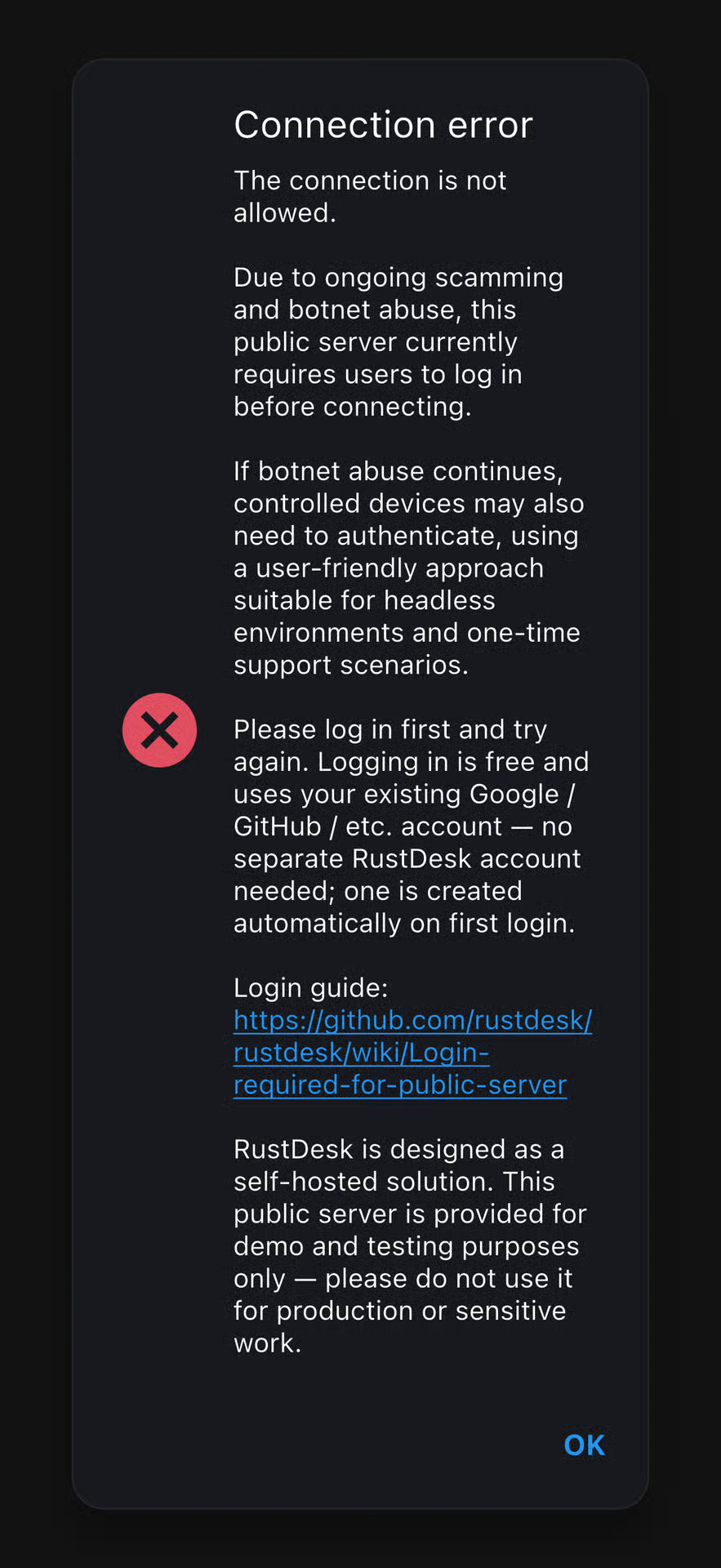
Been using self hosted rust desk option for a while now. Great program and it’s very easy to use, honestly much more smooth than team viewer which kept logging me out.
Speaking of logging in, it’s now asking me to do that. While I could, I thought since it’s self hosted it wouldn’t need this step and am not thrilled that it would make me rely on big tech still.
I’m self hosting the relay server but it just uses an ip without any certificate, wondering if that’s the reason.
Has anyone hit this issue? Any known fixes besides logging in? Can anyone confirm whether it would be solved if the relay server used a proper domain with https?
Here is the link from the screenshot and as always, thanks in advance. Love this community!
It’s a tough spot, Codeberg has found themselves in and I wish them luck. But beyond that, this is (yet) another reminder that in 2026, if you don’t self host it, the cloud is just someone else computer
Did you know you can use Conversations (xmpp chat app) as a Push Notification Provider?
Couple of days ago I lost the connection to ntfy.sh, so we started talking on the #selfhosted matrix.org chat about notifications and ntfy, I started selfhosting ntfy and then stratself pointed out one can also use Conversations as a provider.
Long story short, I tried it and it works. This is the config for someone hosting xmpp with prosody and using apache reverse proxy. The original post of stratself gives the config with ejabberd and Caddy, it’s linked in the beginning.
I was having some issues with Invidious the other day, which I resolved. However, I came across this tidbit of info that I’d never seen before when I first deployed it:
Post-install configuration:

Highly recommended

Because of various issues, Invidious must be restarted often, at least once a day, ideally every hour.
I have an family immich instance self-hosted. All pics from my kids devices are auto-uploaded on our instance. This is nice, but also updates a lot of photos and videos of they kidding and joking, ando lot of repeated stuff. Immich only allows that I exclude my own stuff, and it’s really boring have to login with each account to exclude my kids stuff. Is there anyway that I can manage and exclude photos and videos of other users?
Has anyone tried to use kdrive form infomaniak as clone of directory where immich stores photos? Does it make any sense? I think it is one of the cheapest options right now for backup.
[Solved] Any idea why those two drives are dramatically slower than the rest?
I have eight identical drives connected to an LSI 9207-8i ASRock X470 Taichi Ultimate mainboard.
They’re currently all running badblocks -b 8192 -c 2048 -p 0 -s -t 0 -v -w /dev/disk/by-id/ata-WDC_WUH722424ALE6L4_[XXXXXXXX] each.
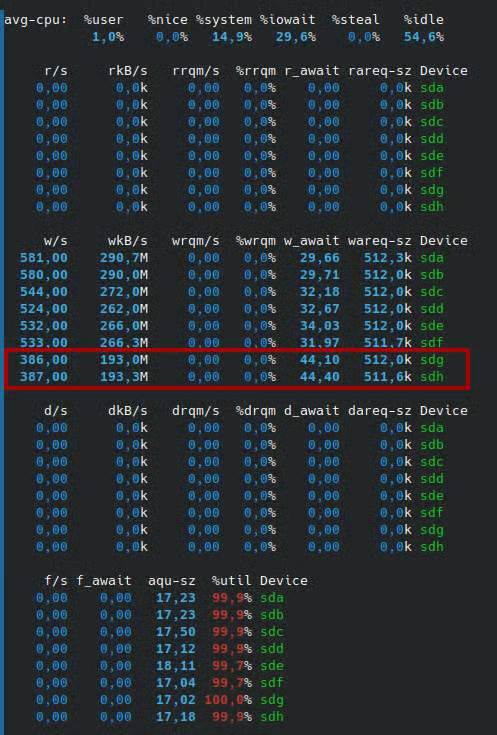
While sda and sdb achieve almost 300MB/s, sdg and sdh struggle to even get to 200MB/s. That’s a 50% difference!
All of my drives are recognized as SATA3, confirmed by smartctl -a /dev/sd[a-h] | grep SATA showing SATA Version is: SATA 3.5, 6.0 Gb/s (current: 6.0 Gb/s)
There’s no CPU bottleneck either AFAICT:
Any idea what could be the issue of that? Is such a dramatic speed difference to be expected of Ultrastar drives?
Are these drives just bad?
Edit: Mainboard configuration:
Edit2:
Okay, apparently the ASM1061 which provides the two extra SATA3 ports is connected to the CPU via a single PCIe 2.0 x1 lane, which provides only 4gbps (=500MB/s) of raw throughput.
I think I have found the culprit and the problem should disappear once I connect the drives to my LSI 9207-8i HBA card.


 GitHubReleases · nova-video-player/aos-AVPNOVA opeN sOurce Video plAyer: main repository to build them all - nova-video-player/aos-AVP