posted in Asklemmy

I'm using Lemmy in a browser right now, are there any apps I can use for Lemmy on my phone and PC?
I have a GrapheneOS phone and Linux Mint on my personal computer.
posted in Asklemmy
I'm using Lemmy in a browser right now, are there any apps I can use for Lemmy on my phone and PC?
I have a GrapheneOS phone and Linux Mint on my personal computer.
Replying to @psycholocomotor@lemmy.world
I enjoy Voyager for mobile.
Replying to @psycholocomotor@lemmy.world
Been using thunder for a few years. Havent had any issues. Its has lots of options if you wanna customize your UI and swipe gestures.
Replying to @psycholocomotor@lemmy.world
I use Summit. I used to use Sync, but I think it’s been abandoned. At least that was the sentiment when I last used it about a year and a half ago.
Replying to @Zahille7@lemmy.world
Second summit, excellent app

Replying to @Zahille7@lemmy.world
You can also try boost.
Replying to @Zahille7@lemmy.world
Just tried it. It feels so much snappier than voyager.
I’m using the famous Lemmy phone client called Fennec
Replying to @psycholocomotor@lemmy.world
In this thread: everyone suggesting a phone app and not answering the question.
Replying to @Feidry@sh.itjust.works
Ah I totally missed that detail in the original question! Is there an app that does both desktop and mobile?
Replying to @velma@sh.itjust.works
I think that’s the question OP is asking too. You could do some convoluted shit to get an emulator running and just use whatever phone app on both I guess.

Replying to @velma@sh.itjust.works
You can technically use Voyager on desktop and mobile. You can access the web client here: vger.app
Replying to @Foxfire@pawb.social
You might as well just continue using whatever web browser and access your home instance directly at that rate.
Replying to @Feidry@sh.itjust.works
It’s also a standalone app as a flatpak, if that makes a difference: flathub.org/en/apps/app.vger.voyager
Replying to @Foxfire@pawb.social
Oh hey! That’s cool to know!

Voyager is designed to work on basically any kind of device. It is available as a web app or on most of the major app stores, including Flathub for Linux use on desktop if you want.
https://github.com/aeharding/voyager
While Thunder is primarily designed to be a mobile app (and only Android/iOS builds are officially distributed), I have certainly built it from source to run on my Linux desktop just to try it. It’s just a Flutter app. The Flutter documentation outlines how to build a Flutter project for Linux.
https://github.com/thunder-app/thunder
But you really have to ask why you want a native Lemmy app instead of just using the website on desktop. There some convenience factors for mobile apps, but I can’t really think of why someone would not just want to use the website when using the platform in desktop. Perhaps they just really want the same exact UI across every device or something.
Replying to @Feidry@sh.itjust.works
Two different ones would also work

Replying to @psycholocomotor@lemmy.world
I recommend this site to compare all the apps across various platforms
I think Interstellar and Voyager are available on both android and Linux
Personally I would suggest picking different apps on each, since it’s all the same backend data. A mobile focused app may not behave as nicely on desktop.
You can likely also run some of the alternative UIs as PWAs or full apps, but I haven’t explored that yet
Replying to @psycholocomotor@lemmy.world
 lemmy.worldLemmy Apps - Lemmy.WorldA home for discussion of Lemmy apps and tools for all platforms. RULES: - No
spamming - Be nice and have fun - Follow the general lemmy.world rules Any
project posted here requires an AI disclosure if any ML/LLM technology was used
in any way in the development: - Please include [AI] or [AI Assisted] as a tag
at the end of your post title when sharing or discussing the project. - In the
post body, please include in what way AI was used, e.g.: AI disclosure: design:
none implementation: assist testing: copilot documentation: auto review: pair
deployment: hint Please consult ai-declaration.md [https://ai-declaration.md/]
for details how to apply about these categories. If you are posting about an
app, but are not the developer, you should include the most complete information
available, e.g.: " This repository lists Copilot as a contributor." or " This
app shows signs of AI development such as…" — An extensive list of Lemmy apps is
available here: LemmyApps.com [https://www.lemmyapps.com
lemmy.worldLemmy Apps - Lemmy.WorldA home for discussion of Lemmy apps and tools for all platforms. RULES: - No
spamming - Be nice and have fun - Follow the general lemmy.world rules Any
project posted here requires an AI disclosure if any ML/LLM technology was used
in any way in the development: - Please include [AI] or [AI Assisted] as a tag
at the end of your post title when sharing or discussing the project. - In the
post body, please include in what way AI was used, e.g.: AI disclosure: design:
none implementation: assist testing: copilot documentation: auto review: pair
deployment: hint Please consult ai-declaration.md [https://ai-declaration.md/]
for details how to apply about these categories. If you are posting about an
app, but are not the developer, you should include the most complete information
available, e.g.: " This repository lists Copilot as a contributor." or " This
app shows signs of AI development such as…" — An extensive list of Lemmy apps is
available here: LemmyApps.com [https://www.lemmyapps.comReplying to @psycholocomotor@lemmy.world
I would advise against using Voyager since it tries to track link shares by first directing you to their website first. It made me uncomfortable so I switched to Summit. I had tried interstellar but wasn’t a fan of the layout or how they didn’t have the ability to handle going into cross-posted links on android at least. Also, had to use obtainium to install it. Summit on F-Droid supports the full fediverse. I had tried a fourth but can’t remember its name, I dropped it because it lacked support for piefeed.
Replying to @begrudgedcarfolk@sh.itjust.works
Can you explain what you mean about the sharing? I don’t notice any redirection when sharing in Voyager
Replying to @crandall@lemmy.today
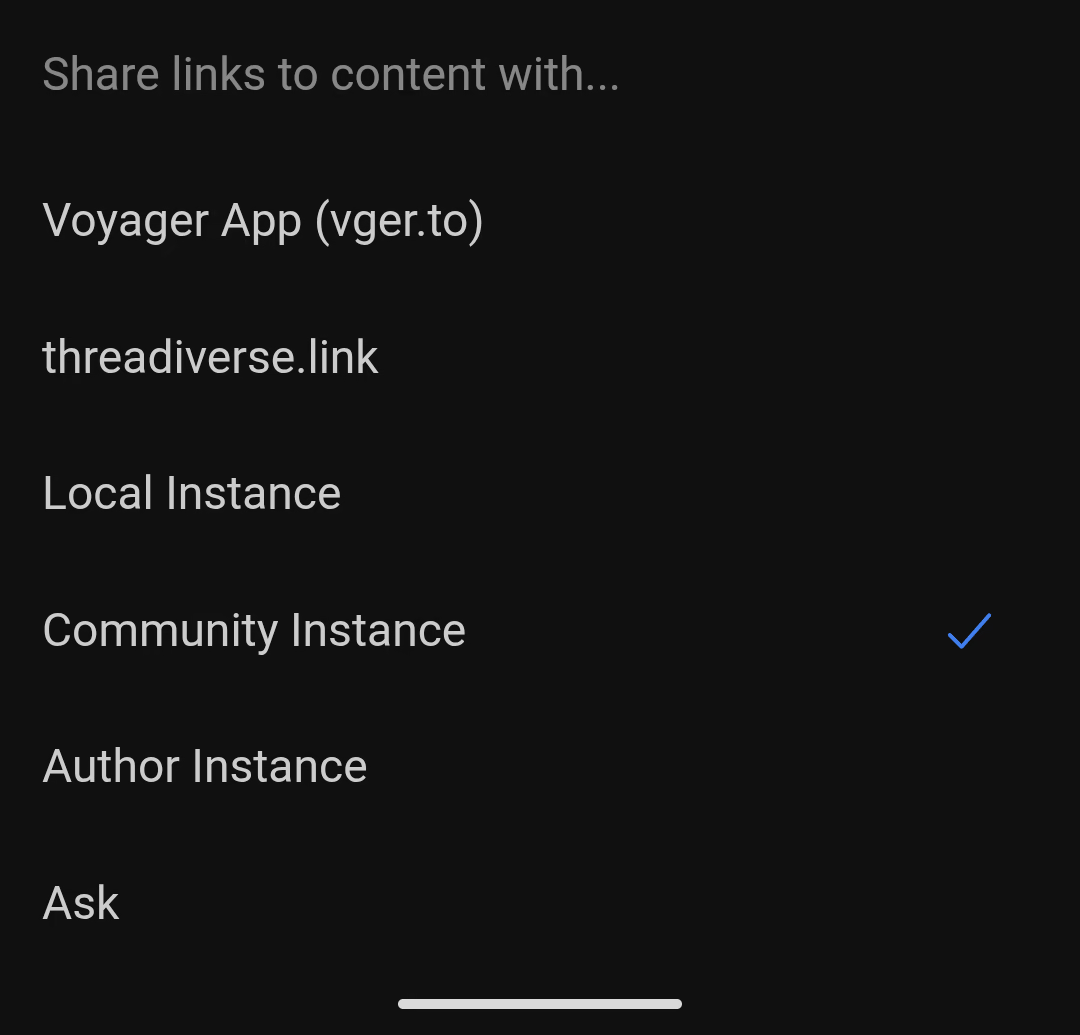
When sharing a link to a post from Voyager it sends you to a URL on their server.
As an example, sharing this post from Summit will go to sh.itjust.works/post/68040352, but sharing this post from Voyager will go to vger.to/sh.itjust.works/post/68040352, which is a private server where we don’t know what this person is doing with the data collected.
Replying to @begrudgedcarfolk@sh.itjust.works
Oh, I see! Turns out this is a user setting in the app:
Replying to @crandall@lemmy.today
And you don’t see a problem where the default is that tracking behavior? I shouldn’t have to hunt through settings meticulously just to maintain some semblance of privacy.
Replying to @begrudgedcarfolk@sh.itjust.works
Hey buddy, instances can already track you anyway. The voyager link is better for voyager users sharing things to eachother because it opens in the recipient’s preferred instance in their voyager app instead of being taken to the web UI of some random instance you don’t even have an account on. You don’t have to use it if you don’t want it.
Replying to @boonhet@lemmy.zip
TBH while I’m a fan of the app, they have a point that it’s annoying when full privacy requires pouring through every setting you don’t even know exists. I’d love for apps to be fully private by default. I don’t prefer to blindly trust passing data through third-parties. In this case though, you can see the link that will be shared before you do so, so I don’t feel the Voyager dev(s) are doing anything too shady.
Replying to @begrudgedcarfolk@sh.itjust.works
Eh… I have it enabled because it’s an easy way to open links in the app. Like, if my friend sends me a link to lemmy.world/whatever, voyager won’t be able to open it by default, but using Voyager links allows the app to open it.
Are other apps able to open links without using this work around? It’s a pretty important feature-not-bug for me.
Replying to @overcast5348@lemmy.world
I’m on grapheneos, when someone seems me a link, I long press until a context moment l menu pops up, then I share to summit. I don’t allow apps to auto-open other apps as its a privacy concern. App developers will use what apps you have available for handling links as a way to build a unique profile of their users.
Replying to @begrudgedcarfolk@sh.itjust.works
I care about privacy and all, but I care about bringing my friends over to the fediverse more. I’m happy sending them voyager links and not starting a blog post of “buy a pixel and install graphene” to get them to open a meme thread. 🤷♂️
Replying to @begrudgedcarfolk@sh.itjust.works
What do the apps give you that Lemmy’s default UI doesn’t?
Replying to @eldavi@lemmy.ml
Recently learned that keyword filtering doesn’t exist in normal Lemmy, something I use a lot to filter out nonsense.

Replying to @psycholocomotor@lemmy.world
Since you use Mint I think it should be pointed out that it has the Web Apps manager
The Linux Mint Web Apps manager can be used to add any website you want to your system and make it appear as a separate app. It works by opening the website in a new separate window using your selected browser of choice without adding it to the rest of your tabs.
Replying to @SmokeInFog@midwest.social
oh that is cool. I think I’ll try that.
Replying to @psycholocomotor@lemmy.world
Since noone else said it so far I want to kindly push back and ask why you would want to use an app in the first place. We have gotten too used to just download an app for every single thing and granting it all the permissions in the world. Sure the Lemmy apps are going to be open-source but still, I feel like we need to push the habit to just use a browser instead of an app more.
Replying to @yxc999@lemmy.ml
I have actually decided to set it up as a browser on my phone since I tried everything and didn’t really like them, and I’ve set it up as a web app on my PC.
Replying to @psycholocomotor@lemmy.world
On iOS I use Voyager, but it is buggy as fuck.
Replying to @psycholocomotor@lemmy.world
My personal pick is Thunder. Probably has less bells and whistles than some other choices, but it still has everything I need and then some. Looks pretty nice as well and follows the revised Material aesthetic so it should fit in nicely with the rest of the Graphene UI.
And as a cherry on top it’s both libre and gratis!
Replying to @psycholocomotor@lemmy.world
There are a bunch. I tried Jerboa and then Voyager on android. Jerboa is the official one, I found Voyager to be a bit nicer, but in the end I find it better to use a browser including on my phone. I sometimes think of writing my own client to reorganize the UI to be more like a usenet client, or maybe even just write a Lemmy to NNTP gateway. I don’t understand why it wasn’t done that way in the first place.
Interstellar is pretty nice
Replying to @psycholocomotor@lemmy.world
Connect has been awesome on Android

I really like Blorp. Couldn’t really say why, it’s just nice
Replying to @psycholocomotor@lemmy.world
I use Eternity because it’s most familiar to me coming from Infinity

Replying to @psycholocomotor@lemmy.world
Voyager works on PC. Grapheme has access to many apps. I would suggest Summit from F-droid.

Replying to @psycholocomotor@lemmy.world
Summit on my phone (Fdroid) , browser on my computer (LMDE)
Replying to @psycholocomotor@lemmy.world
I like Connect