posted in Selfhosted

[AIP] 🎉 Dreeve v5.0.0 released (formerly Statistics for Strava). No more Strava or any 3rd party dependencies.

It has taken a while, but v5.0.0 is finally here. This is the biggest release since the project began as Statistics for Strava.

A few months ago, Strava announced changes to their API program that affected a lot of developers.

In hindsight I’m really happy that Strava did what they did, Dreeve is now 100% self-hosted and no longer depends on Strava.

For anyone who never heard about Dreeve (or Statistics for Strava):

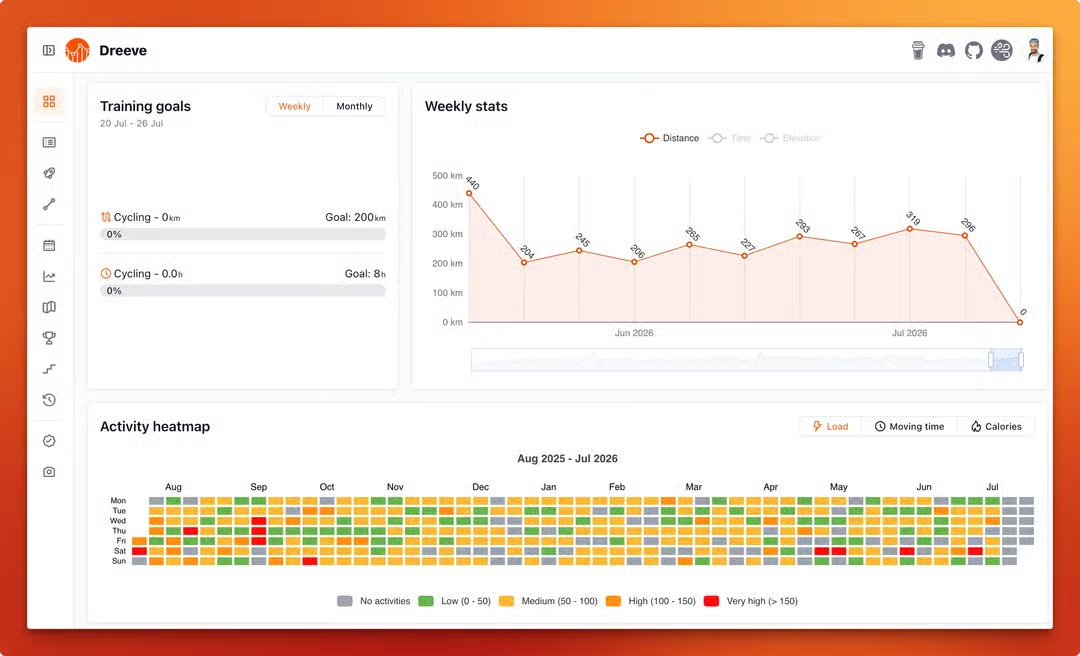
Dreeve is a self-hosted, open-source dashboard for your sports and fitness data

The biggest changes that v5.0.0 includes:

  • Full rebrand, moving away from Strava branding
  • Uploading raw FIT, TCX and GPX files (importing your activities from Strava is still fully supported)
  • A proper admin panel, moving away from YAML based config files

If you are upgrading from v4, be sure to check the migration guide: docs.dreeve.app/#/getting-started/migrating-from-…

As always, thanks for your feedback and I’m looking forward to more feature requests! Stay fit, stay healthy 💪

Edited ⁨⁨Jul⁩ ⁨24⁩, ⁨2026⁩, ⁨08:11⁩⁩enPage

Replying to @⁨statisticsforstrava@lemmy.world⁩

lemmy.worldAI & Promotional Post Expanded Rules - Lemmy.WorldComments are disabled, to start a discussion with the community about this post or the rules in general, please make a meta post. Please stick to one specific item to address as your post to keep discussions on topic. Due to the large number of AI-involved projects, posts oriented towards AI use on a self-hosted system, and the widely varied sentiment around AI usage, an additional rule has been created to manage them. If your post is about AI or is a project promotion post, please read here first. If you are not posting about AI or making a project promotion post, you don’t need to read further. If a post has tagged with an AI tag, low effort comments regarding their use will be removed. ### Post Tagging There are three types of tags for project promotional / AI posts. - [CBH] - Code By Human - A project promotional post with a project that did not use AI in any capacity. No disclosure necessary. - [AIP] - AI Project - A project promotional post with a project that used AI in developm

Replying to @⁨vermaterc@lemmy.ml⁩

Didn’t downvote you but, even as someone who dabbles in AI, and who does not outright reject AI assisted opensource projects, I do really care about the content, the inner workings of said app. If for nothing other than I don’t want to mop up an attack because I deployed something unsafe on my network. So, while I am quite open to AI assisted projects, prudence is the operative word.

Replying to @⁨Shimitar@downonthestreet.eu⁩

  • We moved away from 3rd party vendor lock-ins. For the time being you need to manually upload your activity files. We are going to release separate containers to setup integrations though, for example dreeve-garmin-connector
  • Endurain aims to be a self-hosted alternative for Strava, Dreeve is just a “simple” stat-driven app that chews numbers and shows you some fancy charts :)

Replying to @⁨statisticsforstrava@lemmy.world⁩

I’ve just started using GarminDB to fetch .fit and .json files from my Garmin account.

Can I simply tell Dreeve to watch the directory where GarminDB dumps the files and it will pick them up?

Does Dreeve do something with the Garmin .json files too? Sleep data for example is in those kind of files, but since Dreeve has a Strava background I suspect it only deals with sports activities?

Download and parse data from Garmin Connect or a Garmin watch, FitBit CSV, and MS Health CSV files into and analyze data in Sqlite serverless databases with Jupyter notebooks. - tcgoetz/GarminDBGitHubGitHub - tcgoetz/GarminDB: Download and parse data from Garmin Connect or a Garmin watch, FitBit CSV, and MS Health CSV files into and analyze data in Sqlite serverless databases with Jupyter notebooks.Download and parse data from Garmin Connect or a Garmin watch, FitBit CSV, and MS Health CSV files into and analyze data in Sqlite serverless databases with Jupyter notebooks. - tcgoetz/GarminDB

Replying to @⁨Shimitar@downonthestreet.eu⁩

I’ve just stumbled across this post and it’s serendipitous because I just finished setting up GarminDB in a Docker container. It’s a Python CLI app you can use to download your Garmin stuff locally (which happens to be a bunch of FIT and JSON files).

You don’t have to use Docker ofc, you can also use a venv/pip to set it up somewhere and automate the backup command in any way you want.

It’s a happy coincidence because I was now wondering how to visualize the files. GarminDB also has some –import and –analyze options that parse the data into SQLite but they’re a bit buggy. Then you can use Jupyter notebook templates to produce something you can look at, but Dreeve might also be interesting (especially if it can monitor the folder where GarminDB dumps the files in read-only mode).

Download and parse data from Garmin Connect or a Garmin watch, FitBit CSV, and MS Health CSV files into and analyze data in Sqlite serverless databases with Jupyter notebooks. - tcgoetz/GarminDBGitHubGitHub - tcgoetz/GarminDB: Download and parse data from Garmin Connect or a Garmin watch, FitBit CSV, and MS Health CSV files into and analyze data in Sqlite serverless databases with Jupyter notebooks.Download and parse data from Garmin Connect or a Garmin watch, FitBit CSV, and MS Health CSV files into and analyze data in Sqlite serverless databases with Jupyter notebooks. - tcgoetz/GarminDB