Selfhosted

Group

!selfhosted@lemmy.world · Created ⁨Jun⁩ ⁨2023⁩

A place to share alternatives to popular online services that can be self-hosted without giving up privacy or locking you into a service you don’t control.

Rules:

Detailed Rules Post

  1. Be civil.

  2. No spam.

  3. Posts are to be related to self-hosting.

  4. Don’t duplicate the full text of your blog or readme if you’re providing a link.

  5. Submission headline should match the article title.

  6. No trolling.

  7. Promotion posts require active participation, with an account that is at least 30 days old. F/LOSS without a paywall has exceptions, with requirements. See the rules link for details. Tags [CBH] or [AIP] are required, see the links in Rule 8 for details.

  8. AI-related discussions and AI-involved promotional posts have additional requirements for tagging, as noted in Rule 7 and the AI & Promotional Post Expanded Rules post, and find example disclosures here.

Resources:

Any issues on the community? Report it using the report flag.

Questions? DM the mods!

posted in Selfhosted

Do you participate in this hobby without a formal IT education or a career in a similar field?

Does anyone else here participate in the selfhosting hobby without a formal IT related education or a career in a similar field? I’ve only had one or two programming courses as part of my university education, but it was only very basic Python and C. I’ve never formally learned how to use containers, version control or anything else. Sometimes I regret not pursuing an education in IT/programming because there are so many things I’d like to accomplish but can’t (for example if there’s a feature missing in some project, or to feel safe in my abilities to harden my servers and my network in order to expose services to the open internet).

posted in Selfhosted

Putting a Bunny.net CDN in Front of My Static Blog

My blog is now an international success. I get like 3 hits from Google a day. That’s what they call Seomaxxing. Or not. Depends who you ask.

Nevertheless, I noticed my audience comes mostly from outside Europe. My server sits in Frankfurt, so the only reasonable choice was to put a global CDN in front of my static Astro blog.

Easy, I thought.

I jumped straight in without reading anything first. What could go wrong. A lot, actually, and I can now confirm that the error pages from Bunny.net look really nice.

Got it working anyway. Full writeup on said blog, blazing fast no matter where you are:

hmmr.online/posts/bunny-cdn-for-a-static-blog/

hmmr.online/posts/bunny-cdn-for-a-static-blog/

posted in Selfhosted

Circlus messenger?

Right - ran a search and got no results, so am asking directly

This thing any good? Anyone run it?

circlus.org

Use case: want to give my kid a SEVERELY locked down Moto E (2nd gen) as a Youtube music player device and a “message Daddy” app - strictly wifi / in house only.

The first thing is simple enough. The second thing is…interesting.

I had my local AI do some research and it spat out the above. I don’t think it’s quite right but It looks interesting. Any one use it / can comment? Failing that, can anyone recommend a simple WLAN messaging app that will run on Android 6 / lineageOS? I’m sure I can dig one up but if someone has one running, I’m all ears.

PS: I’m not looking at using a VPS for this…but the above did catch my attention as fairly normie friendly. Might be worth self hosting something like that…

circlus.orgCirclus — Your Private MessengerCirclus is a private messenger for trusted circles, with self-hosted servers, end-to-end encrypted chats, calls, and transparent server ownership.

posted in Selfhosted

Good resources for setting up a domain name to a local Caddy instance

I’ve been using Linux for decades, I’ve worked as a software engineer/architect/sre for around a decade, but networking has always been my biggest gap in knowledge.

I have a local server, I have caddy spun up, a glinet router running their version of openwrt, and I have a domain name purchased through porkbun.

I am looking to setup “local.domain.com” to point to my local server, ideally without exposing it publicly, and enable devices on my home network to be able to access it from that url. Id also like to be able to access containers running on that server by something like “searxng.local.domain.com” or “local.domain.com/searxng” aka without using the port suffix. Id also like to enable https.

I have read so many guides that have fragments of what I need, but nothing that ties enough together to get it working. And with all the options around different domain registers, let’s encrypt, reverse proxies, etc, im struggling just a bit.

Are their any guides (prefer text over YouTube, but beggars cant be choosers) that people recommend that encompass the whole process, instead of just pieces? Id like to understand it instead of just fumble through it.

posted in Selfhosted

3 days ago I said I needed a new hobby...

So I asked if I was an idiot for coming up with the bright idea to start my own lemmy instance. Well I can proudly state that yes, I am an idiot, but I’m an idiot with his own lemmy instance: MopLemmy.fyi. Barebones and barely federated, but by God it’s mine.

A brief summary of the issues I ran into: Lemmy Easy Deploy was absolutely the right way to go, thanks ᛒᛚᚢᛖᛇᚦᛖᚱ@no.lastname.nz for that suggestion. I’ve very new to several aspects of this so just understanding containers and when to use LED commands and not standard container commands ended up being the biggest hurdle to deploying the instance.

Email. Everything about getting the SMTP setup was basically terrible. Brevo won’t let you make an account using an email address with a “.” in it, so I ended up needing to make an email account so I could make an email account. Then I was troubleshooting a typo error for too long, and then I was troubleshooting a bad bit of info I got from the internet which had me using my account email address instead of the Brevo created one for the SMTP, so those were human error and by far the single most time consuming issue.

Second to that, a script to check if my external IP address changed. This ended up being the single most annoying thing, partly because of my newbity. I was using Remote Desktop Connection into my Linux box and copy and pasting stuff. Copy and paste was screwing up the data and kept breaking things. Once I realized that and switched to SSH things went smoother. I know, rookie mistake.

Setting up backups to my RAID that I could then access from my Samba share ended up being another issue. First it was saving to the wrong folder, then I thought I had broken my Samba share and couldn’t access it from the network… and the problem ended up being UFW because I forgot to allow Samba through the frickin’ firewall. Oh and then the same thing happened when I was trying to look at my Netdata but at least that time I figured it out much quicker.

Those were the major annoyances, the rest was more about the learning experiences of finding out certain things were a lot more complicated than I thought they would be. I did not expect to have to put so many different DNS records. I didn’t expect to have to spend so much time deciding on white list vs black list federation, or host images local or not, or image retention, etc. But it’s up and stable and working and I am very slowly federating to more communities and deciding what all I want to be able to see. Thanks to everyone on the original post with advice and suggestions, even the people who suggested things I ended up not doing, heh.

posted in Selfhosted

How can i teach myself to contribute to these projects?

I use open source self hosted software everyday. I love the community and I would love to be able to contribute to some of these projects.

As far as code goes, I basically no nothing about how it works. I see the development section of the repos I use and again, I’ve go no idea how it works.

How can I teach myself how to offer small improvements to the projects I use?

posted in Selfhosted

My Firewall was not putting out last night. So I could not get any pihole action.

So last night my firewall decided to say F you Reann and stopped working for no apparent reason. I called my ISP to see if it was anything on their end but it was a big nope. It was rather late at night and I do not have computers with monitors at my place so I thought I was SOL. I was frustrated that I could not do anything because I had the bright idea of deleting one of my two static IPs out of the router and than reboot it. I thought to calm my frustrations I would play some games on my ipad, and holly poop am I ever not used to all the ads in mobile games. Luckily my youtube ad blocking does not require anything else on my LAN so I put on some videos and went to bed. In the morning I remembered I had a ethernet to USB adapter and a USB A to c adapter so I would be able to fix it that way. Don’t know how many times I needed to fix the firewall because I broke the internet trying to fix my boo boos and a few times the firewall just said F you Reann I am not putting out. But it is now fixed and I can enjoy my moble games and web browsing mostly ad free!

So I had no pihole action on my LAN.

Like seriously how do people hand how many ads are shoved at you when you are using your devices?

I was on DuckDuckGo this morning trying to fix things and wow the ads, really made me miss searXNG.

Luckily I do not get spam, I spin up a new address for everything so I did not get those ads at least.

posted in Selfhosted

Restarting the Internet router

Once upon a time an admin told their family that the ISP’s router needed a restart. A teenager, watching a movie while playing World of Warcraft and talking to Llama, asked if it could wait until they weren’t using the Internet. The admin nodded and restarted the router. They lived happily ever after, until the local DNS failed of course.

posted in Selfhosted

Sometimes, when I am all alone i like to fantasize...

that hard drive prices return to normal and think about all the things i can build.

silliness aside, i honestly sit there and plan it out. i wish i pulled the trigger and started earlier. i actually bought two mini pcs before this mess and have one setup running proxmox. o have this beautiful jellyfin -> jellyseer -> radarr/sonarr -> sazbd -> gluetun -> newsreader setup on proxmox and i founf 1 8tb wd red plus on sale that i put in a ugreen nas running truenas and its filling up quickly.

i wont move to nextcloud until i get a second drive for mirroring. i still have to find a place to backup those future files as well.

there is not really a point tp this post except i know people here feel my pain. how i dream of buy a few 12 tb drives.

for now i find stuff and put price alerts on them. o have tried ebay but i dont always get what i pay for. like buying wlanlisting that says wd red plus cmr and getting a wd red (non plus) smr.

i fantasize about the cool rack setup i could build. right now everything, jellyfin stack, home assistant, glance dashboard, pteradactyl, netbird , anf any vm i want to play with all on one proxmox mini pc. next comes books

sorry for the rant but maybe you can relate

posted in Selfhosted

I need a new hobby, I'm going to set up my own Lemmy instance. Am I an idiot?

Of the many useful things I could do with my spare time instead I’m setting up a Lemmy instance because why not. The scope of this is definitely greater than any self-hosting I’ve ever attempted, so please feel free to tell me just how much trouble I’m in. I’m just giving the broad strokes to see if I’ve made any crucial errors (other than deciding to do this at all).

And if this is a completely wrong place for a post like this or I’m missing data I’m supposed to include I apologize, I probably need a sanity check, in more ways than one.

First limitation, I’ll be hosting it on an existing Linux Mint box acting as a file share mostly and occasional gaming PC/movie streaming box. Its hardware is overkill for this, I do not anticipate issues when it is in use. It receives regular updates and weekly reboots, instance will be set to automatically restart. NVMe with loads of space for local storage, RAID SSDs for data offload/backup.

Second limitation, I hate Cloudfare and Oracle. I do not want to use either of them.

Third limitation, money. Cheaper is better. I have a URL picked out and a registrar which will give me the cheapest long term option, in case I actually keep this thing going.

Last limitation, I’m already in over my head so I’ll be relying on a lot of googling and probably some chat bots to figure things out as I go through the actual deployment process. What could go wrong?

So, Lemmy hosted on Linux Mint box using Docker containers. ISP is a good one for this I’m told, no CGNAT, largely stable public IP but I’ll have a script running in case it does change. Confirmed ports 80/443 are open. Using Caddy for the HTTPS. Closed registration to start, if by some miracle I make it to actually wanting to allow additional users it will not be fully open, and I’ll use Brevo for the email SMTP. Security wise I know I’m making it harder for myself by exposing my IP, I’m going to have UFW running and Crowdsec to help keep incoming bad traffic out.

Down the line I’ll get Lemmy updates, backups, retention rules in place/automated, and make decisions on federation, etc. Thoughts?


🥧1

posted in Selfhosted

Sourcing replacement rack ears for UPS?

I’ve got an HPE R1500 G3 UPS that I was given and refurbed to be useable. Now that it’s in the rack and running, I want to fix things up a bit more.

Unfortunately the ears were not given with the UPS and I’d like to replace them. However everything I’m finding is listed as intended for switches/routers. Can anyone point me in a good direction, other than just watching eBay, where I might be able to get some replacement ears?

TIA

Edit: The ears WONT be bearing any weight, it’s just to keep it in place so it stays in until I want it out. I know it’s too heavy for ears alone.

posted in Selfhosted

Anyone know a good Selfhosted yt-dlp manager?

I’m looking for a server I can host in my home that has a simple ui where I can put in URLs for download and have them all show up on my Jellyfin. Bonus if there is VPN support.

Update: Thanks to everyone for the suggestions! Several projects to check out: youtube-dl, pinchflat, ytptube, metube, tubearchivist, yt-dlp-webui, ytzero, igloo, youtarr

Automated yt-dlp Docker image. Contribute to Jeeaaasus/youtube-dl development by creating an account on GitHub.GitHubGitHub - Jeeaaasus/youtube-dl: Automated yt-dlp Docker imageAutomated yt-dlp Docker image. Contribute to Jeeaaasus/youtube-dl development by creating an account on GitHub.

posted in Selfhosted

[AIT] Birdnet-go: Self-hosted realtime soundscape analyser for birds, bats and other wildlife

Birdnet-go is a real-time sound analyzer that detects bird species. It can take in audio from microphones. I set mine up to stream audio from my security cameras that I already had installed. There’s even a Home Assistant App, if you’re using it.

I live in a more suburban/semi-urban environment, but was really surprised to so many different bird species.

github.com/tphakala/birdnet-go/
Self-hosted realtime soundscape analyser for birds, bats and other wildlife. Multi-model local AI inference, runs 24/7 on a Raspberry Pi. - tphakala/birdnet-goGitHubGitHub - tphakala/birdnet-go: Self-hosted realtime soundscape analyser for birds, bats and other wildlife. Multi-model local AI inference, runs 24/7 on a Raspberry Pi.Self-hosted realtime soundscape analyser for birds, bats and other wildlife. Multi-model local AI inference, runs 24/7 on a Raspberry Pi. - tphakala/birdnet-go

posted in Selfhosted

Rayfish is working on my phone!

A few weeks ago Rayfish was released and only worked on PCs. But today I checked and noticed V2 was out. I updated my V1 on my PC and then installed it on my phone.

I had to restart the network on my PC to refresh the VPN networks I had already created. I setup a searcXNG on my PC just to try some sort of server. Next I created a firewall rule for that port on the rayfish network and another rule for the network on my Linux firewall. On rayfish I created a network and an invite code for my phone. On the phone I entered the invite code and was immediately connected. I could then ping from my phone to my PC and viseversa.

Finally I searched for the PCs rayfish IP and just connected to it on my browser on the phone. That worked and I was happy. But then I turned off my WiFi on my phone and clicked refresh… A few seconds later the phone re-connected and I got to my searcXNG!

My outside IP is not fixed and I rely on Cloudflare. But none of my services are actually public and are not planned to be public. So now with rayfish I get a permanent IP for free regardless of what my actual IP is. The possibilities are endless… Big big!

This is very cool! Yeah it’s AI developed, but this is AI for us. It’s clear and well defined for me, AI working for us is small potatoes vs AI the evil resource sucker spy tool. So let’s take advantage. Specifically this project is great and solves my privacy issues with Cloudflare.

Bug Maybe I’m putting it too simply. Any thoughts on this?

posted in Selfhosted

Self-hosted analytics and the infrastructure cost of privacy

My blog has been up and running for a few months now and I wanted to have a better idea of what sort of visitor numbers I was getting but as it is a blog about FOSS, self-hosting and privacy I wasn’t just about to hand data to Google.

I managed to set up a self hosted instance of Rybbit but it was a bit heavier resource wise than other options I have looked at so I had to have a major overhaul in my Proxmox node layout!

unknownuniverse.uk/home-lab/privacy-analytics/
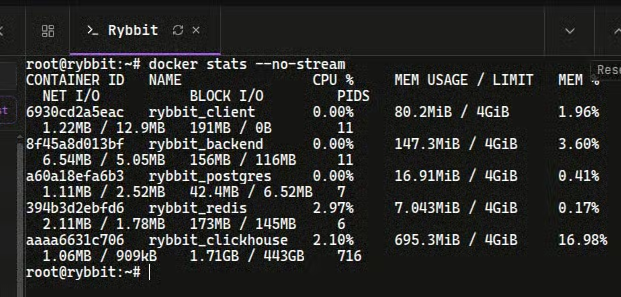
Terminal output from 'docker stats' showing CPU and memory usage for the Rybbit analytics container stack including ClickHouse, Postgres, and Redis.The Unknown UniverseI Added Analytics to the Blog!I’ve spent years preaching privacy, yet here I am installing a tracker. No, this isn’t a sellout, I just self-hosted Rybbit. Here is the transparent breakdown.

posted in Selfhosted

OPNsense on top of Proxmox - Part 2

Hello beautiful people of this community!

I asked for your help a month back about setting up OPNsense on Proxmox. I went through all the comments in the post.

I got a bit distracted by IRL commitments but I sat down with it properly last week. After a lot of studying, and a bit of trial and error, I have done it!

My Journey

This was my first time with Proxmox, so I spent a few weeks with Proxmox initially before undertaking OPNsense. OPNsense took me a week to install and deploy. I did a staggered deployment over multiple days, i.e., installed the VM first, check connectivity, check DHCP, and then make it part of my homelab.

Architecture

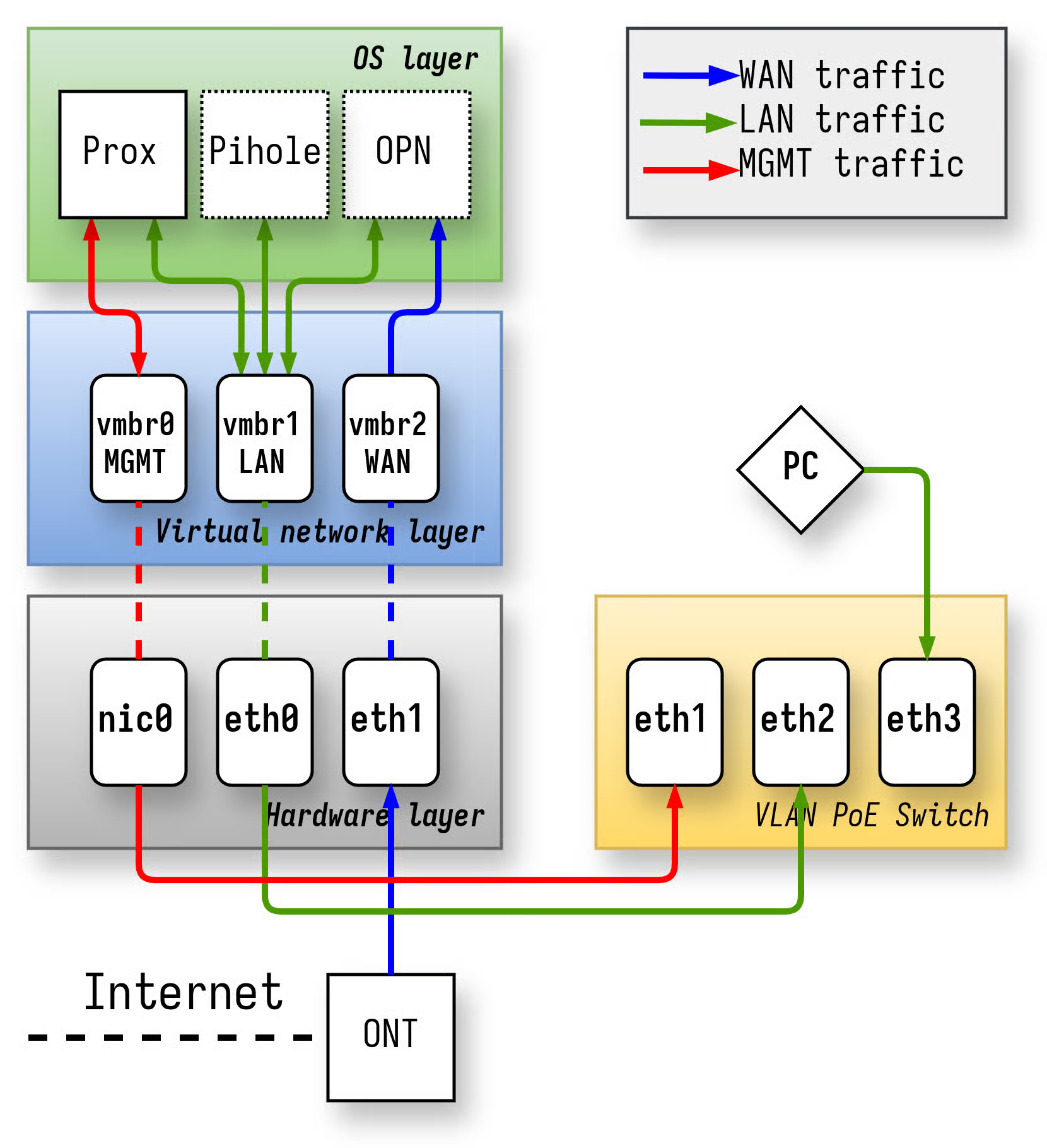
The diagram might look complicated, but it’s simple.

  • My host has 3 interfaces, onboard NIC and a dual NIC card.
  • I made a LAN and WAN interface out of the dual NIC card, and made the onboard NIC as a management interface.
  • I connected all of the interfaces to dedicated Linux bridges and the underlying OS/VMs only use the Linux bridges.
  • The onboard NIC was converted into a management interface and is only used to configure Proxmox in case something catastrophic happens.
  • The other VMs can communicate with the OPNsense VM via the virtual LAN interface.

I initially was thinking of going through the pass-through option, but after some research, I saw the upsides were very low and you lose a bit of flexibility.

Challenges

  1. KEEP TRACK OF YOUR NIC TO LINUX BRIDGE MAPPING - This caused me a lot of stress and trails. I thought I was trying to ping the LAN interface, was connected to the WAN bridge.
  2. The Chicken & Egg Problem - During boot, Proxmox needs an IP but the DHCP service inside OPNsense is not up yet. Without that IP, I cannot log into Proxmox. I solved it using a hard-coded IP for Proxmox.
  3. Options galore - Coming from standard routers, OPNsense is a different beast; it has so many options that it becomes a crazy labyrinth. Had to read again and again to understand what the options meant.
  4. Where is dark mode? - The first change that I wanted to do was set dark mode and I don’t know why but it an ungodly amount of time for something so simple. It’s present in such a weird location (System -> Settings -> General -> Theme)
  5. This ain’t Kansas anymore - This is FreeBSD, not Linux. So the same commands won’t work. There is drill, no dig.
  6. PLEASE CLICK APPLY - Many times I just forgot to click Apply after making a change and I got super confused.
  7. DNS, YOU DEVIL - This was the setting which made me question my own sanity. I have a simple but non-standard setup for DNS. I am running Pihole (Ad-blocking + Local domains) + Adguard DNS Proxy (Supports encrypted DNS). I wanted to tell OPNsense “Hey, use this IP to resolve all internal and external DNS queries”. OPNsense was just not having it. It took me two days of experimentation to finally figure out the right approach (Disable WAN populated DNS, turn off Unbound, and use DHCP options).

Thanks to these people

Their comments really helped me out (Technical and encouragement)

  • @chief@lemmy.zip
  • @dbtng@eviltoast.org
  • @zarathustrad@lemmy.world
  • @possiblylinux127@lemmy.zip

Closing remarks

I am still documenting the entire process. I will publish the entire process of how I got a bare Lenovo M720Q working as a virtualized OPNsense router. Remember, if I can do it, anyone else can do it.

Edit: FreeBSD, not OpenBSD

posted in Selfhosted

OPNSense Reverse Proxies and Giving Internal Services Domain Names?

Heya, I just wanted to post here before doing something that puts my stuff out on the internet for anyone to see 😅

So I have a basic, still in-configuration homelab network going on. It’s Modem --> OPNsense router --> Ubiquiti switch --> Openwrt AP. DNS and DHCP (via Dnsmasq) are working right now, each VLAN (Home Devices, IoT, and Guest) can access the internet. But I’m still tinkering and doing firewall stuff, so sometimes I reactivate the ISP router and switch back to that until I have everything perfect enough to not bother my family

I have a Proxmox homelab that I’ve been running services like Jellyfin and Immich in a Docker Debian VM for a few months now, but I was getting tired of typing out IPs and remembering port nums, especially after bouncing between my router and the original ISP router whenever I’m having network issues. So I wanted to finally map those IPs to human-friendly domains. So like, 192.168.10.247:8096 --> jellyfin.example.com, 192.168.10.247:2283 --> immich.example.com, etc.

I quickly learned that DNS services like Unbound and Dnsmasq do what they say on the tin, DNS only, so I can’t do a override to map ports to a domain, as they can only do IPs. My research led me to reverse proxies, and people said Caddy was simple on OPNsense, so I installed that and followed the official guide/documentation. But then I ran into the issue of needing the domain to be externally resolveable. Which then led me to realizing I need to use some sort of CA.

I know Let’s Encrypt does it for free, plus the guide mentions them as a default so why not? Except I still need an actual external domain so… Cloudflare? DuckDNS? Someone else? I’m so lost…

The biggest concern of mine right now is, if I set up a reverse proxy, does that mean my services are externally accessible? I was using Tailscale so I could avoid that, especially since I know services like Jellyfin have had serious vulnerabilities, and everyone says it’s a good rule of thumb to just not expose services. But how do I map ip + port #s to a domain on OPNsense?

docs.opnsense.orgCaddy: Reverse Proxy — OPNsense documentation