Selfhosters what is the power draw of your entire setup? And have you done anything special to manage it you’d like to share?
Including all network equipment I use around 110kWh of good ol’ 120V 60Hz USA juice per month. Averaging about 215 watts of power draw for my systems. Nothing amazing, but I like to think that it’s a conservative setup for everything I accomplish with it. I’m paying around $25 a month for my setup. None of that includes my work PC or personal PC, just hosting infrastructure.
Other than trying to make sure all power states are available on my server I haven’t done a lot of power conservation.
NAS sits at 24w idle. Security cams are drawing 19w of poe power, but I suspect there is a bit more being used in total. I have another NUC using probably around 24w max.
I’ll slap some power meters on the switches and main nuc and try get some more accurate numbers.
two Lenovo tiny proxmox nodes, each with nvme + SATA SSD + second NIC
two switches (5/8 port)
PCengine APU running OpnSense
Raspi4 with Zigbee antenna
Mini PC + JBOD (4 SSD in total)
Small OpenDTU device
Keeping power consumption low was my design goal, but I eventually added the secondary NICs and additional switch for Proxmox replication and management traffic.
Yeah they’re amazing value, got them for 150 each with 32GB RAM right before the AI craze. It’s sixth gen i7 processors and they’re perfectly fine for everything I’m throwing at them.
Currently, 2 servers and 2 3d printers, I’m running just over 200w at idle. Depending on what my printers and servers are doing at any given moment, it could go up to 2000w, total, but I haven’t seen that high a power draw since I stopped contributing to Boinc projects about a year ago. I remember finding it mildly amusing that my graphics cards had a higher power draw then my printers.
If I recall right off hand it’s 92 cores, 64+8+8+12 between them. Been looking to merge a couple of the smaller ones into the others but it’s not a small task.
My nas takes about 40 Wh. And my network machine (proxmox + openwrt) about 20 Wh. When I upgraded my nas a year ago it was actually drawing twice as much, I have since then switched to more efficient processor (amd from normal to E) and I took out graphic card that I didn’t use.
I could have in theory merge those two, but I wanted to separate networking from nas+apps.
I don’t know how much my smart devices take but I don’t have many so it can be up to 50 Wh total maybe. But that is more smart home than self hosting 😀
NAS running ~15 docker (frigate, nextcloud, immich, plex etc), two windows VMs one is managing my NAS backups to cloud.
Couple RPIs one does Home assistant, one does pihole and weewx.
All my Network gear, and poe for APs and a few of my cameras,
2 x 12 channel whole house amps fed by 11 Chromecast audios (that’s going to be a disaster one day)
That “idles” just under 300w but can obviously jump all over.
Rest of my security cameras are poe from another location (since I couldn’t get the network drops back to the server room for the majority of the cameras, uses another 65w , but that’s a bit misleading as it is picking up other things since it’s not as isolated.
i3-4160 running Proxmox (OPNSense VM and a couple of containers) with 3 spinny drives and no GPU, TP-Link 8x GbE switch, ASUS AX1800 as a Wifi AP, ISP’s own manky cable modem, plus a UPS eats about 66-72 watts at the wall socket. If I install a passively cooled GT-710 for transcoding, it adds 10-15 watts at idle.
My network and server setup eat about 200 W, split right down the middle. I have plans to cut the network consumption by replacing the PoE switch, so that I can use the savings to add another server.
90w here, so 65kwh/mo. Tinyminimicro server. Three pi (5, 4, 3B), fiber gateway, Mikrotik router, switch and two APs. Plus power gear (managed PDU and UPS).
Around 150W for UPS, Mikrotik router, Pi 4, Proxmox/TrueNAS server with 8x SAS drives. Without the SAS drives I’d be closer to 50W, but how else am I going to heat up my cupboard? I got the SAS drives at a bargain price thankfully… I estimate about AUD300/year in electricity.
If btop is to be believed my server pulls a tiny 1.5W on idle. Given everyone else’s numbers I’m wondering if that’s true of btop is confused. It’s an old optiplex 3050.
Regardless my main rig which is regularly running expensive simulations is often ~200W so my server and home labbing is a rounding error
Unlikely, as it isn’t being measured from the outlet. That being said, an idle server technically could be that low, but literally every part would have to be the most efficient version of what it is, and almost nothing happening on the server.
There are USB chargers that use more than that sitting at idle.
Hardware Haven did a video about chromeboxes running linux and their idle power draw was pretty impressive (being x86 they were sitting at 2-3w i believe)
My UPS says 116 watts right now, but it’s probably not particularly accurate. That’s running my pfSense box, NAS, switch, 2 access points, Starlink and a mini PC. That’s with minimal disk and internet activity. My CCTV cameras and DVR use another 30 W in the day and 50 W at night.
All these people saying 500, 600, 700+ watts - it’s almost hard to believe. My “gaming” computer, with two monitors, peaks around 400W on graphics-heavy games, and the monitors are like 120 of that. I suppose, though, if you’re running a server-class CPU, a half dozen HDDs, and a GPU for continuous transcoding or mining, the it wouldn’t be too hard to get there.
I run a dozen containers on an N100 with a couple of HDDs, VOIP device, router & cable modem on 63W, and I’ve considered that a pretty fair deal for a home lab. Of course, that only serves the household - nothing really offered to the public.
My rack server uses 150W idle. Granted that’s 2 processors and 48 cores, 256GB ram, and 8 case fans that you can’t cycle less than 35% even though they don’t need to be anywhere near that high.
Around 700W on low load, almost idle. Haven’t had the chance to test it at full load yet.
It sits in my basement, so the waste heat is actually useful this time of year. Even more so when my basement would otherwise be freezing.
I plan on implementing scheduling where the two most power hungry servers are powered down and up as needed. The other two take almost nothing.
Also, the UPS supports a green mode that is a lot more efficient but with a downside of output side dropping out a few ms during switchover. This removes any conversion loss. I haven’t tested whether my hardware can tolerate it yet, so for now I’m living with the conversion loss.
My house is powered by cheap hydroelectric supply, generated in a mountain roughly 5km from my house, so I’m not worried.
My various servers, firewall and nas are relatively power optimized. Everything including switches (most with some 10g ports) and access points is 160 W or so combined. I can’t give you monthly usage, as I’ve got solar+battery so it’s frequently just 0 kWh for some days. It’s also rather hard to separate from the other power usage in the house when solar doesn’t fit cover it.
Acronyms, initialisms, abbreviations, contractions, and other phrases which expand to something larger, that I’ve seen in this thread:
Fewer Letters
More Letters
AP
WiFi Access Point
ISP
Internet Service Provider
NAS
Network-Attached Storage
NUC
Next Unit of Computing brand of Intel small computers
NVR
Network Video Recorder (generally for CCTV)
Plex
Brand of media server package
PoE
Power over Ethernet
RAID
Redundant Array of Independent Disks for mass storage
RPi
Raspberry Pi brand of SBC
SATA
Serial AT Attachment interface for mass storage
SBC
Single-Board Computer
SSD
Solid State Drive mass storage
ZFS
Solaris/Linux filesystem focusing on data integrity
Zigbee
Wireless mesh network for low-power devices
nginx
Popular HTTP server
~500W continuous, ~625W peak. To reduce this further I’d really need to start consolidating hardware. I do have one system that could be replaced with something more modern and would probably drop 20-30W. And my fileserver is a bit overkill as well so there could be improvements there.
About 300-400 watts. I should put it on a smart plug to track it over time. I have a NAS with 16 HDDs, an outdated super overkill switch that I should replace to save some power, and a few old laptops.
It also might use some more power while transcoding for my PeerTube Instance or Jellyfin, and I have my desktop set up as a remote runner for the PeerTube Instance, so that uses some additional power.
I am, and it does, that’s how I got the 300-400w estimate. It is connected to the NAS and shuts it down gracefully when power goes out. Wonder if the NAS can also read the power usage over that cable. Might just be easier to use a $15 zigbee plug though to get the data directly into Home Assistant.
I use Home Assistant, and prefer Z Wave or Zigbee, as those are gaurenteed to not call home and not rely on a third party server. Third Reality makes some pretty good stuff. And yeah, it’d go between the wall and my server rack.
About 100w on average for a nuc, 4 bay nas (only 3 in use), 4 poe cameras, AP, 2 switches, IP kvm, and the ups. Pretty happy with how little that seems to be for the amount there.
I’m drawing 4.474kWh per day on average, and drew 139 kWh over the last month.
I have EcoFlow batteries on both A and B PDUs.
Stuff that can be powered off (mining, redundant power supplies) gets the wall outlet feeding ups b and pdu B turned off at 4pm and turned back on at 9pm to align with my time of use rate plan.
Rack mount synology bad, tplink Omada switch, wireless access point, rack fans, and a rack mount nutanix server repurposed as proxmox, but it’s only drawing on the IPMI as I’ve powered it down and moved any services over to containers on the NAS.
I can trip the measly 15 amp breaker by drawing 1.5kW on two servers + turning on an amplifier that is somehow on the same circuit despite being in a different room quite far from where my servers are lol.
On average though I only draw like 350W. The huge spike only happens if I run a miner/llm on both of my servers or the during the startup spike.
The 1kW chunk comes from some RTX Quadro 6000s which each eat 250W each when maxxed out.
EDIT: Want to mention that most machines report their power draw (from mobo) without IPMI, so you can use your favorite stats collector use it to form a rough estimate of kWh total in case you don’t have a proper meter that records usage.
I’m in the same boat and i rent the place. Both bedrooms are on the same breaker and I’m upgrading my GPU (215W to 415W) and might get a Mi50 as a second card in my desktop for local LLMs.
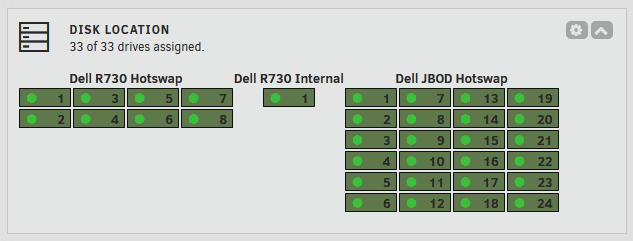
At full power on both machines i’m already close to tripping the breaker. Witj these new card(s) i don’t think it’ll fly. My server uses around 700W at max, 450W idle if it’s nice and cool in the spare room. Mostly due to loooots of spinning rust. I’m a datahoarder and have a full 18 disk 3.5" JBOD, and 24/25 drives in my 2.5" JBOD.
When nothing (no a/c, washer, work PCs off, etc) is running my house power draw is about 500-800w. So my battery keeps things going until the next day.
Edit: just checked and whole house is 350W this evening.
Kinda pointless to conpare power draw without saying what hw you’re running. There’s a big difference between a system with 1 ssd and another one with 12 hdds.
Normally my power sensor connected to my server rack hovers around 150 watts.
I’ve got mini hp pc, 2 HDD bay UGREEN NAS, ubiquity cloud Max router, home assistant green, 2 switches with Poe (2 WiFi AP, raspberry pi, and a mesh radio), and a dell r340.
I also have a dell t310 I’m using as a proxmox backup server that powers on every day around 2am to do backups. The power shoots up to 360 watts when that happens 😅
On average it’s about 4kwh per day. I’m effectively off grid most of the time so the cost of electricity is irrelevant unless I go way overboard during a week of rain or something and I have to draw from the grid.
I am about to move from an 18ru rack to 45… So… Might be some expansion in the future.
My servers (3U) in the DC pull ~400w but my provider doesn’t do power/traffic billing just a flat fee ~230€
For my homelab if I power up my backup server pull a backup and then write it to tape and my gf is gaming it’s 900w
Idle is like 150w
Something like 25W at idle for the single server I operate. I’m not counting networking because I’m using the equipment that I already have and need just to distribute internet at home.
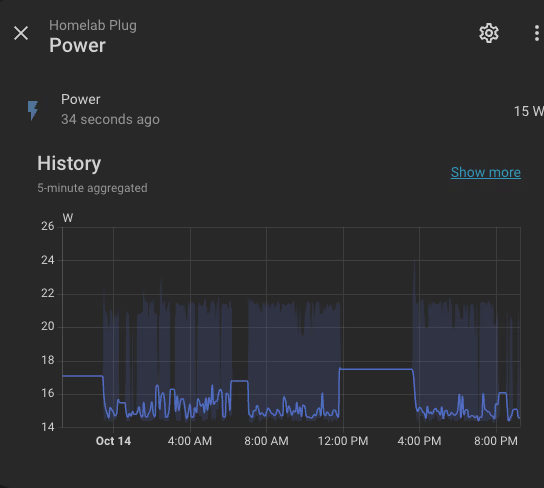
7 or 8w idle for the server. Comes to about 10eur per year. I couldn’t justify using more without feeling like a hypocrite who also advocates for energy conservation.
I worked good out a whole ago, so here’s a copy and paste:
I have a power monitoring plug on this setup, so I can tell you exactly how much!
CPU: 2 x Intel® Xeon® CPU E5-2680 v4 @ 2.40GHz
RAM: 512 GiB DDR4 Multi-bit ECC
My disk layout is like so:
This draws a fairly consistent 650W, including a POE router (15.6kwh per day). My current electricity price is 39.38c/kwh… HOWEVER I have a cheap rate of 8c/kwh between midnight and 6:00am, and free power between 11:00am and 2:00pm. I also have solar which tends to cover ~10:00am to ~2:00pm, but its dependant on sunlight so I’ll ignore it for now.
Total = $4.15AUD per 24 hours, or $1,514.75AUD per year
My Merross plug is showing that I’m currently averaging a daily consumpion of 15.021kwh, and I’m not accounting for the hours of solar offset so the actual dollar value will be a little lower. But still. Fair few bucks.
Nextcloud (around 500GB or so of shared work photos/documents, then another ~2TB or so of auto uploads user from mobile)
Plex/Jellyfin/Emby all sharing from the same ~100TB library.
Navidrome for just music, though I actually prefer Plex Music now.
Paperless with the usual tika/gotenberg for OCR (around 50,000 documents, lots of technical manuals which means search is very handy to find codes/part numbers quickly). Also imports from my work email so any purchase orders or invoices get saved, and anything the office scanner scans gets automatically imported too.
Archivebox for archiving websites (pretty crap now tbh)
Bentopdf for editing PDF files (super handy!)
Chhoto for my own short URL service (super handy!)
Convertx for file conversions from anything to anything pretty much
MeTube for downloading clips from FB/YT/etc
Nginx for an image hosting website I made many many years ago (kinda like Imgur but 15 years ago) with a few hundred GB that still get referenced in forum links on occasion (I see links to files from 2011 still active in the logs)
Pingvin for sharing large files
SearXNG for when I get sick of Google bubbling me
–
Non-public facing:
Kopia to back up my home server to my work server, and vice versa
Crashplan for a(nother) remote backup on someone elses hardware
Syncthing as a way to keep photo directories on laptops and what not backed up to the server
The classic *arr stack (sonarr, radarr, lidarr) with qbit/sab behind gluetun
An assortment of scripts to do things that are useful.
For example I record my VOIP calls to WAV files which get emailed at the end of a call. There’s a script that logs in to my email account and downloads any recorded files, transcribes it with Gemini, then posts it to Discord with a summary of the call at the top, a transcription of the call, and then stats at the bottom (source number, time and date of call, duration).
Another one is a webhook via the VOIP provider - when someone rings, the webhook calls a script that downloads my shared phone book (or falls back to the last downloaded copy if it times out after 2 seconds), matches the incoming number to the phone book, and adds a Discord notification for the person who’s ringing. The Discord notification saying who is ringing and where they are from (and any other notes) pops up basically at the same time as the first ring is received.
Also for whatever reason I set up an Arduino for the entry buzzer on our workshop and it sends Discord notifications when the buzzer is turned on/off via timer or by the manual override. I did have it set up to record entry/exits but turns out that got real spammy, real fast.
What’s using all this power? I have PhotoPrism, *arr stack, MeTube, nginx, Jellyfin, Syncthing, Vaulvarden, mongoDB and couple of smaller things and it’s all running on a single laptop with a tiny RAID. It is all this data storage? I have <10TB so this looks like the biggest difference.
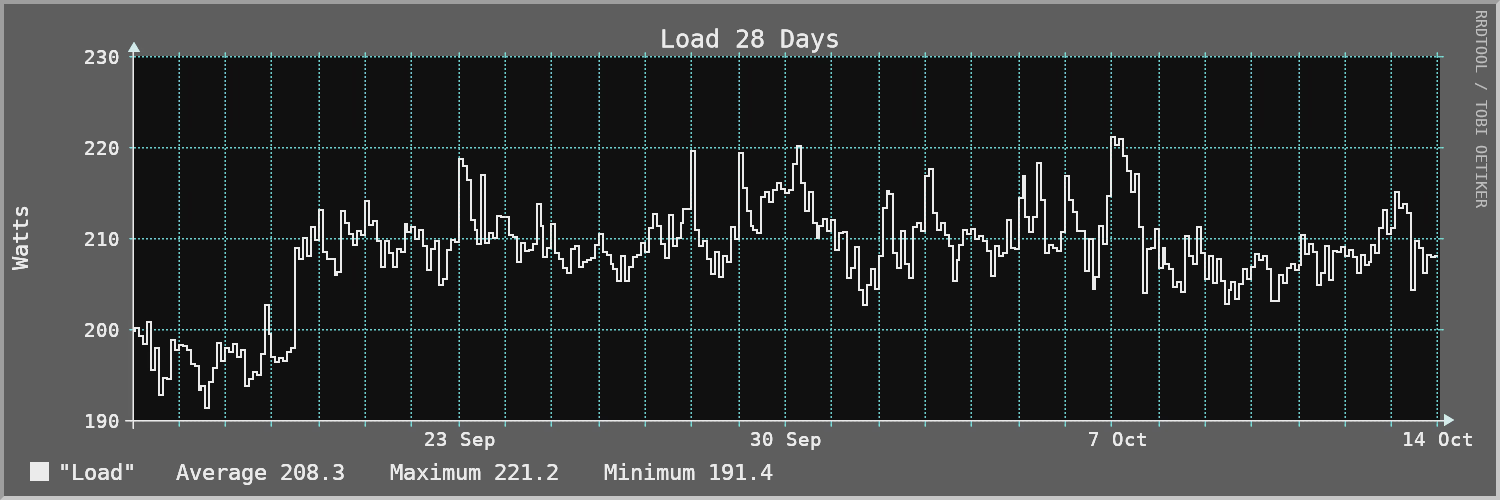
Used to be 200watts bang on but the latest round of updates bumped it up to 210Watts. Everything is on a UPS and I pull measurements from that into an RRD DB (because I like to make my own stuff). It’s kinda cool to see how heavy disk use or CPU intense tasks will increase power draw by up to 50W, or some times or when the power drops off sharply I know my NVR container is not working because 6 ffmpeg tasks all stopped at the same time.
Most of my stuff lives on a cheap hetzner vps so that power is someone else’s problem lol. at home it’s a raspberry pi that’s always on (a few watts) and a bitaxe miner doing about 19W, that’s around 14 kWh a month, like 3 euros here. the gaming pc is the only hungry thing and it stays off, the pi wakes it with wake-on-lan when I actually need it. took me a while to get the bios settings right (erp off, power on by pci-e) but it was worth it.
money wise no, not even close. it’s a bitaxe gamma doing around 1 TH/s solo, so it’s basically a lottery ticket, the odds of hitting a block are tiny. it costs me like 3 euros a month in power so I treat it as a toy, I like checking the best difficulty it found and it’s a nice way to learn how mining works
I am using a Raspbery Pi 5 8GB as my NAS & homeserver. It is quick and performant enough while having an idle power draw which is not really noticeable on your electricity bill. Very happy with it.
My NAS/home server takes about 180 kWH/year, or 20W on average (costs me about 5 Euro/month). This feels like a lot to me and makes up a good chunk of my total energy usage.
What I did to optimize it is mostly select a “low-power” x86 platform, and limit the number of disks. I also decided not to use TrueNAS because it couldn’t let the disks from going to sleep.
The machine hosts 10 TB of usable storage (+RAID 1), syncthing, immich, file server, Influx DB, Grafana, and a few other services.
Yeah I use Unraid for multiple reasons but being able to spin down disks when not in use was a big factor. I have 6 mechanical drives totalling 56TB of usuable storage so it was important to me they don’t all need to be on at the same time. TrueNAS also comes with some other headaches, I like being able to drop in whatever disk I need to for expansion or replacement.
I like being able to drop in whatever disk I need to for expansion or replacement.
I didn’t move that far away (to Debian + ZFS), so that limitation still remains. Although the addition of Raid-Z expansion should alleviate things quite a bit.
That’s the one thing I don’t like about Truenas. It technically can spin down disks, but there’s no way to force them. You can set the idle timer to 5 minutes, but then it constantly spins them back up again. Now I just power the entire system down with home assistant outside of the usage hours and I can power it up again with home assistant using wake on Lan.
Mine draws around 15-20 watts. I’m mostly using low-power hardware: a Rock 5b as my main server, a 2tb nvme ssd, a 2tb hdd and a Glinet travel router (fine since i live in an apartment).
late but i think i lose the thread. The entire house runs at slightly over 1.5kW, and self hosted equipment accounts around 1.2kW of that. The daily cost is only about £2 though due to solarand batteries.
I’m actually up at 1am because the two servers I brought online pushed my usage to around 1200W and it was too much for my UPS plus solar battery setup to keep up with. Also I just discovered that my power cable was too high a gauge and it melted to the extension cord, so I had to pry it apart with a screwdriver. Oops.
At full tilt I pull around 2500 watts, but I haven’t been fully up and running in months because I haven’t had enough available circuits in my panel. Just upgraded my home service to 400a so I should be able to run some new outlets this weekend.
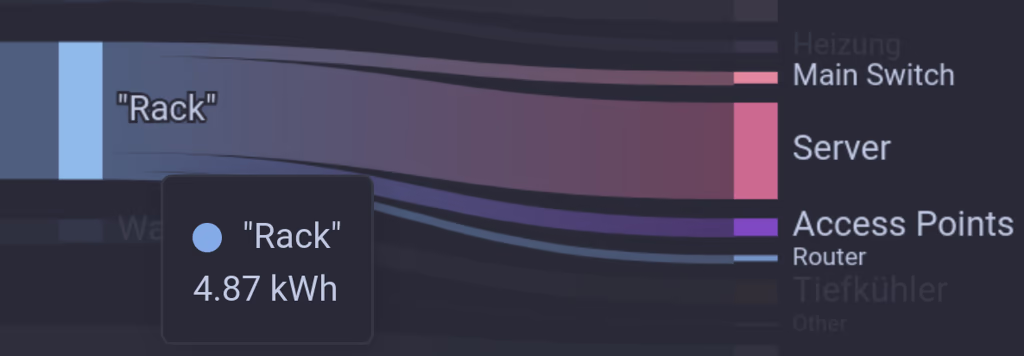
Around 5kWh/day.
My Biggest Power drain is my homeserver/hypervisor/nas/whatever (5600G, 64gb ram, 9xHDD) which uses around 3.5kWh.
Wifi is provided by 2x Extreme Networks WS-AP3825i and 2x Ubiquiti UniFi 6 Plus which total to around 660W/h.
My Router is a small dual-nic shuttle pc with a Pentium G4560 drawing like 310W/h
Switching is done by an Aruba 2930F-24G-4SFP+ Switch that consumes 490W/h
I could probably squeeze out a few more watts if I replace the HDD’s with higher density ones and virtualise my router but I really dont feel like doing that right now…