Fabio Manganiello

View original page

@fabio@manganiello.blog · Joined ⁨Sep⁩ ⁨2026⁩

Fabio's Blog
Powered by Madblog
https://git.fabiomanganiello.com/madblog verified

Replying to @⁨fabio@manganiello.blog⁩

Support for live stream capture

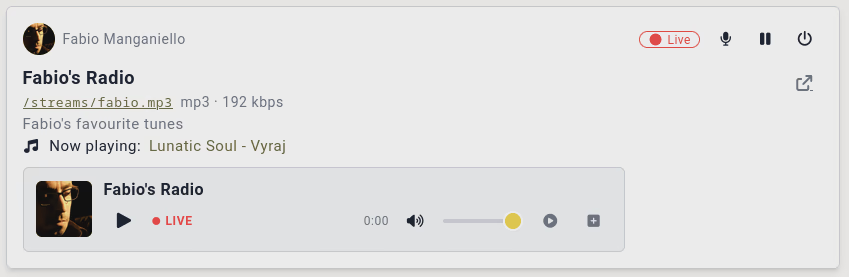
Support for live stream capture has now been added to #songhive.

[Screenshot of a live stream card, with the microphone for live recording shown at the top]

You can stream live recordings from your sound devices directly to an HTTP mount point, or to Icecast.

Simply click the microphone icon on top of the stream card, and you're ready to recover directly from your computer and stream to the Web.

Perfect for:

  • Live music shows. Share a link that anyone can join, plug your instruments and play.
  • Live podcasts.
  • Live radio. Play your favourite songs to the stream, and talk to your listeners between tracks.

You can find my streams (and those of @nemo@mas.to) on manganiello.music/streams.

Screenshot of a live stream card, with the microphone for live recording shown at the top — Open image attachment ⁨1⁩ of ⁨1⁩
Screenshot of a live stream card, with the microphone for live recording shown at the top

Madblog: A Markdown Folder That Federates Everywhere

Madblog: A Markdown Folder That Federates Everywhere

A lightweight blogging engine based on text files, with native Fediverse and IndieWeb support

I started working on Madblog a few years ago.

I wanted a simple blogging platform that I could run from my own Markdown files. No intermediaries. No bloated UI. No JavaScript. No databases and migration scripts. No insecure plugins. Just a git folder, an Obsidian vault or a synchronized SyncThing directory, and the ability to create and modify content by simply writing text files, wherever I am.

Drop a Markdown file in the directory, and it's live. Edit it, and the changes propagate. Delete it, and it's gone.

It's been running my personal blog and the Platypush blog for a while now.

With the new release, #madblog now gets a new superpower: it supports federation, interactions and comments both through:

Webmentions allow your site to mention and be mentioned by other sites that also implement them - like any WordPress blog with the Webmention plugin, or link aggregators like Lemmy or HackerNews. Interactions with any of your pages will be visible under them.

#activitypub support allows Madblog to fully federate with Mastodon, Pleroma, Misskey, Friendica or any other #fediverse instance. It turns your blog into a federated handle that can be followed by anyone on the Fediverse. It gives you the ability to mention people on the Fediverse directly from your text files, and get replies to your articles directly from Mastodon, get your articles boosted, shared and quoted like any other Mastodon post.

Demos

These blogs are powered by Madblog:

You can follow them from Mastodon (or any other Fediverse client), reply to articles directly from your instance, boost them, or quote them. You can also interact via Webmentions: link to an article from your own site, and if your site supports Webmentions, the mention will show up as a response on the original post. These blogs also have a Guestbook — mention the blog's Fediverse handle or send a Webmention to the home page, and your message appears on a public guest registry.

How Does It Compare?

If you've looked into federated blogging before, you've likely come across a few options:

  • WriteFreely is probably the closest alternative — a minimalist, Go-based platform with ActivityPub support. It's well-designed, but it uses a database (SQLite or MySQL), has its own (very minimal) editor, and doesn't support Webmentions. Additionally, it lacks many features that are deal-breakers for me.

    • No export of all the content to Markdown, nor ability to run my blog from my Nextcloud Notes folder or Obsidian vault.
    • No support for LaTeX or Mermaid diagrams.
    • No support for federated interactions - any interaction with your articles on the Fediverse is simply lost.
    • The UI is minimalist and not necessarily bad, but not even sufficiently curated for something like a blog (narrow width, Serif fonts not optimized for legibility, the settings and admin panels are a mess...).
    • No support for moderation / content blocking.
    • No support for federated hashtags.
  • WordPress with ActivityPub and Webmention plugins can technically do what Madblog does, but it's a full CMS with a database, a theme engine, a plugin ecosystem, and a much larger attack surface. If all you need is a blog, it's overkill.

  • Plume and Friendica offer blogging with federation, but they're full social platforms, not lightweight publishing tools.

Madblog sits in a different niche: it's closer to a static-site generator that happens to speak federation protocols. It implements a workflow like "write Markdown, push to server, syndicate everywhere".

Getting Started

Docker Quickstart

mkdir -p ~/madblog/markdown
cat <<EOF > ~/madblog/markdown/hello-world.md
# Hello, Fediverse!

This is my first post on [Madblog](https://git.fabiomanganiello.com/madblog)!
EOF

docker run -it \
  -p 8000:8000 \
  -v "$HOME/madblog:/data" \
  quay.io/blacklight/madblog

Open http://localhost:8000. That's it — you have a blog.

The default Docker image (quay.io/blacklight/madblog) is a minimal build (< 100 MB) that includes everything except LaTeX and Mermaid rendering. If you need those, build the full image from source:

git clone https://git.fabiomanganiello.com/madblog
cd madblog
docker build -f docker/full.Dockerfile -t madblog .

See the full Docker documentation for details on mounting config files and ActivityPub keys.

Markdown structure

Since there's no database or extra state files involved, the metadata of your articles is also stored in Markdown.

Some things (like title, description) can be inferred from the file name, headers of your files etc., creation date defaults to the creation timestamp of the file and author and language are inherited from your config.yaml.

A full customized header would look like this:

 [//]: # (title: Title of the article)
 [//]: # (description: Short description of the content)
 [//]: # (image: /img/some-header-image.png)
 [//]: # (author: Author Name <https://author.me>)
 [//]: # (author_photo: https://author.me/avatar.png)
 [//]: # (language: en-US)
 [//]: # (published: 2022-01-01)

...your Markdown content...

Key Configuration

Madblog reads configuration from a config.yaml in your content directory. Every option is also available as an environment variable with a MADBLOG_ prefix — handy for Docker or CI setups.

A minimal config to get started:

title: My Blog
description: Thoughts on tech and life
link: https://myblog.example.com
author: Your Name

Or purely via environment variables:

docker run -it \
  -p 8000:8000 \
  -e MADBLOG_TITLE="My Blog" \
  -e MADBLOG_LINK="https://myblog.example.com" \
  -e MADBLOG_AUTHOR="Your Name" \
  -v "$HOME/madblog:/data" \
  quay.io/blacklight/madblog

See config.example.yaml for the full reference.

It is advised to keep all of your Markdown content under <data-dir>/markdown, especially if you enable federation, in order to keep the Markdown folder tidy from all the auxiliary files generated by Madblog.

Webmentions

Webmentions are the IndieWeb's answer to trackbacks and pingbacks — a W3C standard that lets websites notify each other when they link to one another. Madblog supports them natively, both inbound and outbound.

When someone links to one of your articles from a Webmention-capable site, your blog receives a notification and renders the mention as a response on the article page. Going the other way, when you link to an external URL in your Markdown and save the file, Madblog automatically discovers the target's Webmention endpoint and sends a notification — no manual step required. All mentions are stored as Markdown files under your content directory (mentions/incoming/<post-slug>/), so they're version-controllable and easy to inspect.

You can enable pending-mode for moderation (webmentions_default_status: pending), or use the blocklist/allowlist system to filter sources by domain, URL, or regex. Webmentions are enabled by default — if you're running Madblog locally for testing, set enable_webmentions: false to avoid sending real notifications to external sites.

ActivityPub Federation

ActivityPub is the protocol that powers the Fediverse — Mastodon, Pleroma, Misskey, and hundreds of other platforms. Madblog implements it as a first-class feature: enable it, and your blog becomes a Fediverse actor that people can follow, reply to, boost, and quote.

Enable it in your config:

enable_activitypub: true
activitypub_username: blog
activitypub_private_key_path: /path/to/private_key.pem

Madblog will generate an RSA keypair on first start if you don't provide one. Once enabled, your blog gets a Fediverse handle (@blog@yourdomain.com), a WebFinger endpoint for discovery, and a full ActivityPub actor profile. New and updated articles are automatically delivered to all followers' timelines.

Here's what federation looks like in practice:

  • Receiving mentions: when someone mentions your blog's Fediverse handle in a public post (not as a reply to a specific article), the mention shows up on your Guestbook page.
  • Receiving replies, likes, boosts, and quotes: interactions targeting a specific article are rendered below that article — replies as threaded comments, likes/boosts/quotes as counters and cards. All stored as JSON files on disk.
  • Sending mentions: just write the fully-qualified handle in your Markdown (@alice@mastodon.social) and save the file. Madblog resolves the actor via WebFinger and delivers a proper ActivityPub Mention tag — the mentioned user gets a notification on their instance.
  • Federated hashtags: hashtags in your articles (#Python, #Fediverse) are included as ActivityPub Hashtag tags in the published object. Followers who track those hashtags on their instance will see your posts in their filtered feeds.
  • Custom profile fields: configure additional profile metadata (verified links, donation pages, git repos) that show up on your actor's profile as seen from Mastodon and other Fediverse clients:

    yaml activitypub_profile_fields: Git repository: <https://git.example.com/myblog> Donate: <https://liberapay.com/myprofile>

The federation layer also exposes a read-only subset of the Mastodon API, so Mastodon-compatible clients and crawlers can discover the instance, look up the actor, list published statuses, and search for content — with no extra configuration.

Madblog also supports advanced ActivityPub features like split-domain setups (e.g. your blog at blog.example.com but your Fediverse handle at @blog@example.com), configurable object types (Note for inline rendering on Mastodon vs. Article for link-card previews), and quote policies (FEP-044f, so Mastodon users can quote your articles too).

LaTeX and Mermaid

Madblog supports server-side rendering of LaTeX equations and Mermaid diagrams directly in your Markdown files — no client-side JavaScript required.

LaTeX uses latex + dvipng under the hood. Inline expressions use conventional LaTeX markers:

The Pythagorean theorem states that \(c^2 = a^2 + b^2\).

$$
E = mc^2
$$

Mermaid diagrams use standard fenced code blocks. Both light and dark theme variants are rendered at build time and switch automatically based on the reader's color scheme:

 ```mermaid
 graph LR
     A[Write Markdown] --> B[Madblog renders it]
     B --> C[Fediverse sees it]
 ```

Install Mermaid support with pip install "madblog[mermaid]" or use the full Docker image. Rendered output is cached, so only the first render of each block is slow.

Tags and Categories

Tag your articles with hashtags — either in the metadata header or directly in the body text:

# My Article

This post is about #Python and the #Fediverse.

Madblog builds a tag index at /tags, with per-tag pages at /tags/<tag>. Hashtags from incoming Webmentions are also indexed. Folders in your content directory act as categories — if you organize files into subdirectories, the home page groups articles by folder.

Feed Syndication

Madblog generates both RSS and Atom feeds at /feed.rss and /feed.atom. You can control whether feeds include full article content or just descriptions (short_feed: true), and limit the number of entries (max_entries_per_feed: 10). limit and offset parameters are also supported for pagination.

Aggregator Mode

Madblog can also pull in external RSS/Atom feeds and render them alongside your own posts on the home page — useful for affiliated blogs, or even as a self-hosted feed reader:

external_feeds:
  - https://friendsblog.example.com/feed.atom
  - https://colleaguesblog.example.com/feed.atom

Guestbook

The guestbook (/guestbook) is a dedicated page that aggregates public interactions — Webmentions targeting the home page and Fediverse mentions of your blog actor that aren't replies to specific articles. Think of it as a public guest registry, or a lo-fi comment section for your blog as a whole. Visitors can leave a message by mentioning your Fediverse handle or sending a Webmention. It can be disabled via enable_guestbook=0.

View Modes

The home page supports three layouts:

  • cards (default) — a responsive grid of article cards with images
  • list — a compact list with titles and dates
  • full — a scrollable, WordPress-like view with full article content inline

Set it in your config (view_mode: cards) or override at runtime with ?view=list.

Moderation

Madblog ships with a flexible moderation system that applies to both Webmentions and ActivityPub interactions. You can run in blocklist mode (reject specific actors) or allowlist mode (accept only specific actors), with pattern matching by domain, URL, ActivityPub handle, or regex:

blocked_actors:
  - spammer.example.com
  - "@troll@evil.social"
  - /spam-ring\.example\..*/

Moderation rules also apply retroactively — interactions already stored are filtered at render time. Blocked ActivityPub followers are excluded from fan-out delivery and hidden from the public follower count, but their records are preserved so they can be automatically reinstated if you change your rules.

Email Notifications

Configure SMTP settings and Madblog will notify you by email whenever a new Webmention or ActivityPub interaction arrives — likes, boosts, replies, mentions, and quotes:

author_email: you@example.com
smtp_server: smtp.example.com
smtp_username: you@example.com
smtp_password: your-password

Progressive Web App

Madblog is installable as a PWA, with offline access and a native-like experience on supported devices. A service worker handles stale-while-revalidate caching with background sync for retries.

Raw Markdown Access

Append .md to any article URL to get the raw Markdown source:

https://myblog.example.com/article/my-post.md

Useful for readers who prefer plain text, or for tools that consume Markdown directly.

Reusable Libraries

Two key subsystems of Madblog have been extracted into standalone, reusable Python libraries. If you're building a Python web application and want to add decentralized federation support, you can use them directly — no need to adopt Madblog itself.

Webmentions

Webmentions is a general-purpose Python library for sending and receiving Webmentions. It comes with framework adapters for FastAPI, Flask, and Tornado, pluggable storage backends (SQLAlchemy or custom), filesystem monitoring for auto-sending mentions when files change, full microformats2 parsing, and built-in HTML rendering for displaying mentions on your pages.

Adding Webmentions to a FastAPI app:

from fastapi import FastAPI
from webmentions import WebmentionsHandler
from webmentions.storage.adapters.db import init_db_storage
from webmentions.server.adapters.fastapi import bind_webmentions

app = FastAPI()
storage = init_db_storage(engine="sqlite:////tmp/webmentions.db")
handler = WebmentionsHandler(storage=storage, base_url="https://example.com")
bind_webmentions(app, handler)

That's it — your app now has a /webmentions endpoint for receiving mentions, a Link header advertising it on every response, and a storage layer for persisting them. See the full documentation for details on sending mentions, custom storage, moderation, and rendering.

Pubby

Pubby is a general-purpose Python library for adding ActivityPub federation to any web application. It handles inbox processing, outbox delivery with concurrent fan-out, HTTP Signatures, WebFinger/NodeInfo discovery, interaction storage, a Mastodon-compatible API, and framework adapters for FastAPI, Flask, and Tornado.

Adding ActivityPub to a FastAPI app:

from fastapi import FastAPI
from pubby import ActivityPubHandler, Object
from pubby.crypto import generate_rsa_keypair
from pubby.storage.adapters.db import init_db_storage
from pubby.server.adapters.fastapi import bind_activitypub

app = FastAPI()
storage = init_db_storage("sqlite:////tmp/pubby.db")
private_key, _ = generate_rsa_keypair()

handler = ActivityPubHandler(
    storage=storage,
    actor_config={
        "base_url": "https://example.com",
        "username": "blog",
        "name": "My Blog",
        "summary": "A blog with ActivityPub support",
    },
    private_key=private_key,
)

bind_activitypub(app, handler)

# Publish a post to all followers
handler.publish_object(Object(
    id="https://example.com/posts/hello",
    type="Note",
    content="<p>Hello from the Fediverse!</p>",
    url="https://example.com/posts/hello",
    attributed_to="https://example.com/ap/actor",
))

Optionally, you can also expose a Mastodon-compatible API so that Mastodon clients and crawlers can discover your instance and browse statuses:

from pubby.server.adapters.fastapi_mastodon import bind_mastodon_api

bind_mastodon_api(
    app,
    handler,
    title="My Blog",
    description="A blog with ActivityPub support",
)

Both libraries follow the same design philosophy: provide the protocol plumbing so you can wire it into your existing application with minimal ceremony. Storage is pluggable (SQLAlchemy, file-based, or bring-your-own), framework binding is a single function call, and the core logic is framework-agnostic. See the full documentation for Pubby and Webmentions.

Links

Madblog is open-source under the AGPL-3.0-only license. The source code, issue tracker, and full documentation are available at git.fabiomanganiello.com/madblog.

Songhive — A fully self-hosted and federated music platform

Songhive — A fully self-hosted and federated music platform

What if your music server had a social network attached, and your social network could play music?

The problem

If you've ever tried to self-host your music, you've probably noticed that every tool solves exactly one half of the problem.

Media servers (Jellyfin, Navidrome, plain Subsonic) are great at the library half: point them at your FLAC collection, get streaming, transcoding, mobile apps. But they're single-player islands. Nobody else can discover your music, there's no social layer, and sharing a track means copy-pasting a file or a link that probably doesn't resolve outside your LAN, or creating accounts on your server for every person you want to share content with.

Social music platforms (Funkwhale being the closest thing) add the federation half, but the social experience is mostly library-oriented: you follow someone's library and sync their files. It's a distribution network, not a place where people talk about music. Moreover, most of those open platforms were never thought with revenue models in mind. Payments were never integrated. They're mostly places for artists to freely share their creations, not for them to monetize them.

Streaming services (Spotify, Apple Music, TIDAL) are widespread, but they usually don't come with true built-in social features besides following someone else's playlists, or the "Share to Facebook/Instagram/TikTok" button. And consumers don't own anything: the catalog can shrink overnight, and shared URLs can often be viewed only by people who already have an account on the platform. Music creators don't have much of a say either. They get fractions of a cent, they don't fully control distribution (and often they need an intermediary just to distribute their music, which takes a share of the revenue too), and they often have to release to multiple music platforms just because those platforms don't talk with one another. Most importantly, your listening history is the product.

Bandcamp tries to fix some of the issues, namely by putting content creators at the center and letting them own their own sales and monetization process (including sales of things like vinyls, CDs and merchandise). But it's still a centralized service whose ownership changed hands several times. Users and artists are just one round of layoffs away from seeing the platform they invested in rot and/or enshittify, with no direct compatible alternatives. The social media aspect is also not something Bandcamp particularly invested in as well. The focus has increasingly shifted to sales, social interactions are basically limited to a "community" tab on artist pages, where artists can post updates and people can reply to. Any social interactions stay strictly confined to a tab on a centralized platform.

Perhaps the old incarnation of Google Music helped filled an important gap on user-generated content (it allowed users to upload up to 50,000 tracks to the cloud for free, making music collection sitting on old hard drives available on-the-go), but it didn't last long, and it didn't cover any social media and sharing needs.

And MySpace — the thing everyone actually remembers fondly — was never really any of these. It was a place where a band had a page, you could play their song right there, leave a comment, and add them as a friend. Nobody has successfully rebuilt that.

Songhive is an attempt to meet all these needs in one package: a self-hosted music streaming server where tracks, albums, playlists and posts are first-class ActivityPub objects. Think Funkwhale meets Mastodon — your music library lives on your hardware, or in any cloud storage you want to plug to it, but your music (and your posts about music) can travel across the fediverse, be followed from Mastodon, replied to, boosted, and quoted.

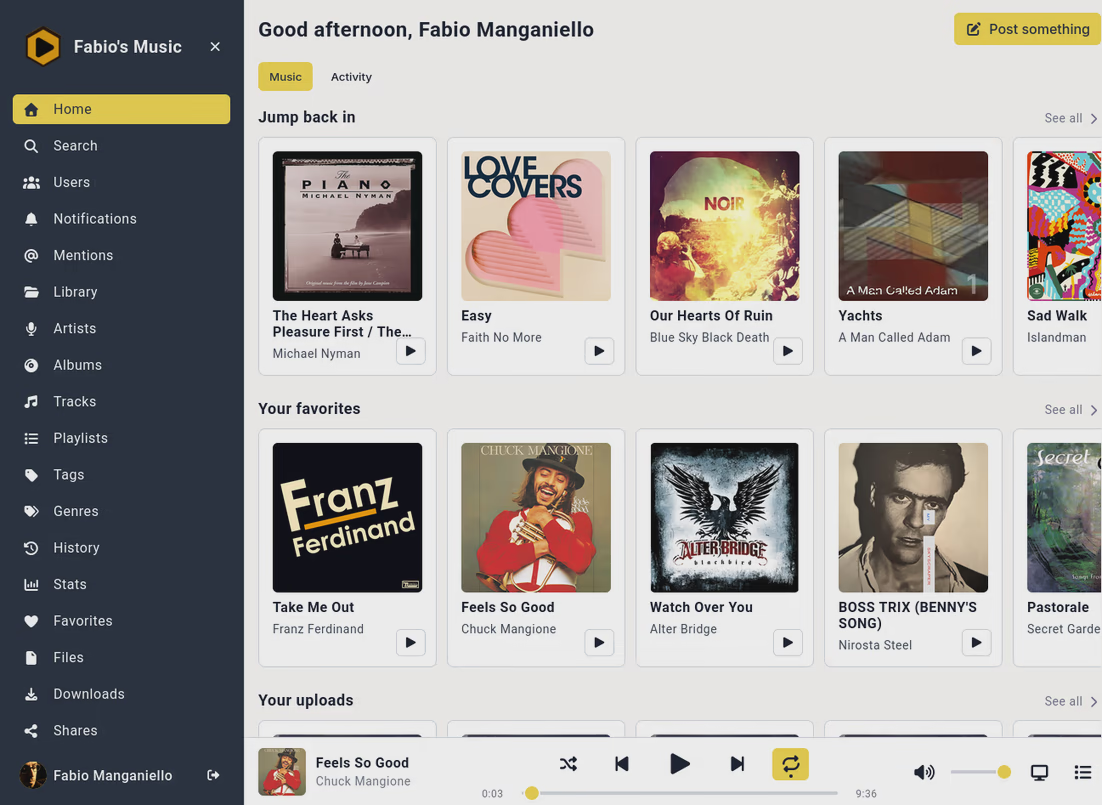
[Screenshot of an instance's home page on desktop]

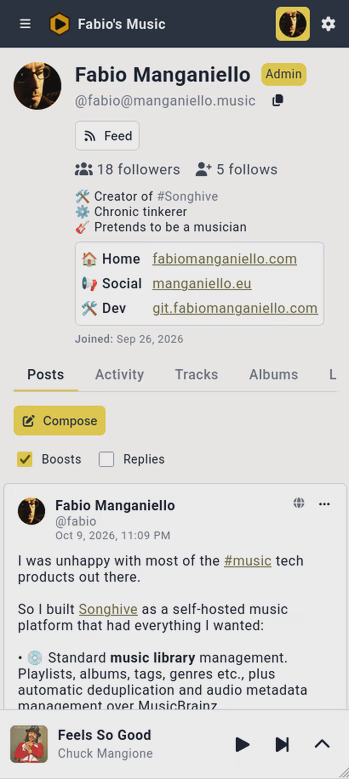
[Screenshot of an instance's home page on mobile]

Who is this for

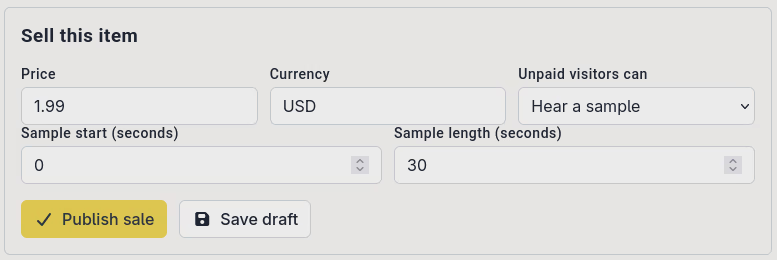
  • Artists: publish tracks with a "Publish on the Fediverse" checkbox and they appear as playable Audio objects in Mastodon timelines. People can reply, boost and quote them from their existing fediverse account — no new signup required on your side. Your artist page, releases and playlists all expose RSS/Atom feeds, and blogs that support Webmentions will send you a notification when they link to your song. Native integration with Stripe also makes it easier for you to connect a payout account and put some of your tracks or albums for sale. You can choose how much of a paid song you want to share for streaming (only a sample, the full song or nothing), and how much users should pay for it. No shares of your revenue are taken besides the share taken by Stripe to process the transaction.
  • Bands who need an easy and flexible way to share their recordings, rehearsals, playlists of covers etc. Those who have played in a band know this issue quite well. Spotify playlists for covers to play are only good as long as everyone in the band has a premium Spotify account. YouTube playlists often result in precious rehearsal time wasted waiting for ads to end. Not to mention those rehearsal.mp3 files shared between WhatsApp chats, emails and Dropbox or Google Drive folders, with no easy way of bringing them all together under the same roof - especially when you're looking for those recordings during a rehearsal. Songhive makes it easier to share whole tracks, albums or playlists with full control over the level of visibility. It makes it easier to integrate 3rd-party music streaming services so you can sync your playlist of covers and easily share it from a proxy platform without everyone having to have a Spotify or TIDAL premium account. It makes it easy to just plug that Google Drive folder where you carelessly dropped all the recordings of your band's rehearsal and sort them, tag them and share them as consistent collections with a single URL.
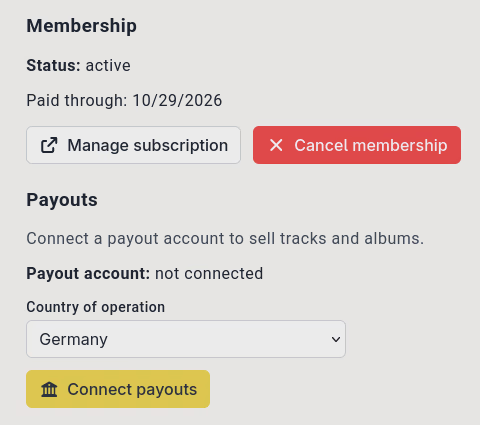
  • Self-hosters / library curators: point Songhive at your local folders, an S3 bucket, a WebDAV/SFTP share, Dropbox, Google Drive — or even import your collections from Jellyfin or TIDAL — and get a full streaming stack with transcoding, Subsonic mobile apps, Last.fm scrobbling, listening stats and automatic MusicBrainz/cover-art enrichment. Fine-grained visibility (private / local / public) means your 4,000-track hoard stays private while the three songs you actually wrote are public. Not only, but Songhive also taps into an issue that open projects like these often fail to address: how to provide incentives to sysadmins and self-hosters to run their servers. Especially when it comes to things like a music streaming server which, in terms of CPU, storage and bandwidth usage, is not free - and often not even cheap. Songhive provides the option for sysadmins to have a Paid registration mode. The admin can decide how much they want to charge users to use their instance and upload music to it, and how often they want to charge them. Subscriptions are handled transparently by Stripe and can be cancelled at any time. And admins can also set user quotas to keep things sane and prevent abuse.
  • People who want a MySpace-style music social network: run an instance for your scene, your label, your collective. Users get profiles, statuses with mentions and hashtags, threaded replies, quotes, notifications, and moderation tools (mute/block, reports, instance-level defederation). Your instance federates with Mastodon, so it's not a walled garden unless you want it to be.
  • Musicians with a multi-room house or a community radio streak: server-side outputs let playback keep running on the server after you close the tab — cast to Snapcast multi-room speakers, relay to an Icecast station, or host your own HTTP radio mountpoint with fan-out to unlimited listeners.

What you get

The streaming stack

The core is a serious music library and streaming server:

  • Library management with artists, albums, tracks, playlists and dynamic radio stations. Uploads get automatic tag extraction, duplicate detection, and metadata enrichment from MusicBrainz and the Cover Art Archive — including cover art and artist images fetched for you.
  • Streaming with on-the-fly transcoding (MP3, OGG, FLAC, AAC, Opus), HTTP range requests, and a transcode cache, with per-user/per-role bitrate caps (handy if your uplink or mobile data is precious).
  • Subsonic API compatibility, enabled by default. This is the sleeper feature: every Subsonic-compatible mobile/desktop client — Substreamer, Symfonium, Ultrasonic, Supersonic, Tempus and friends — works against your instance out of the box. You get a decade's worth of mature third-party players for free, and API tokens keep your real password out of them.
  • Mopidy integration via the mopidy-songhive extension if that's your jam. - Listening history, favorites and scrobbling to Last.fm and Libre.fm out of the box, plus a personal listening-stats dashboard (top artists, calendar and hour-of-day heatmaps, release-year breakdowns) rendered with ECharts.

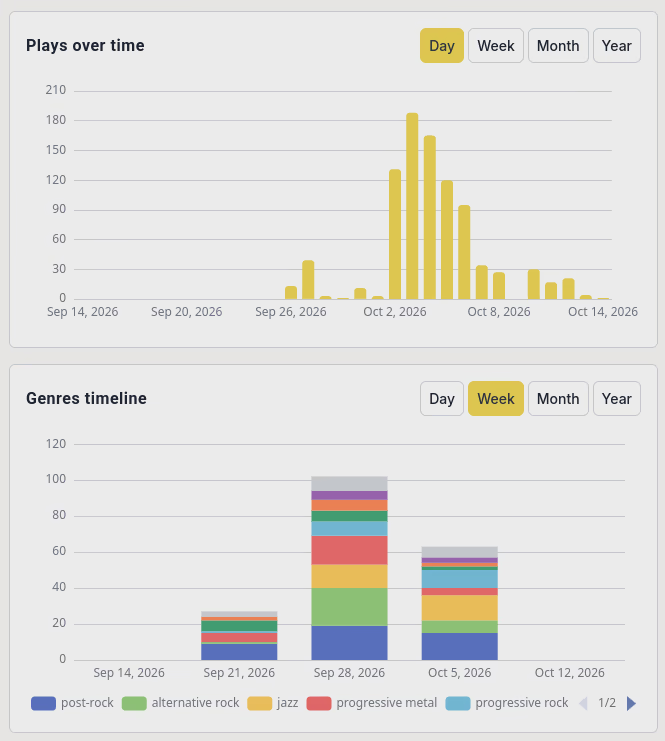
[A screenshot of the listening stats page, showing top listened artists and albums over a given time period]

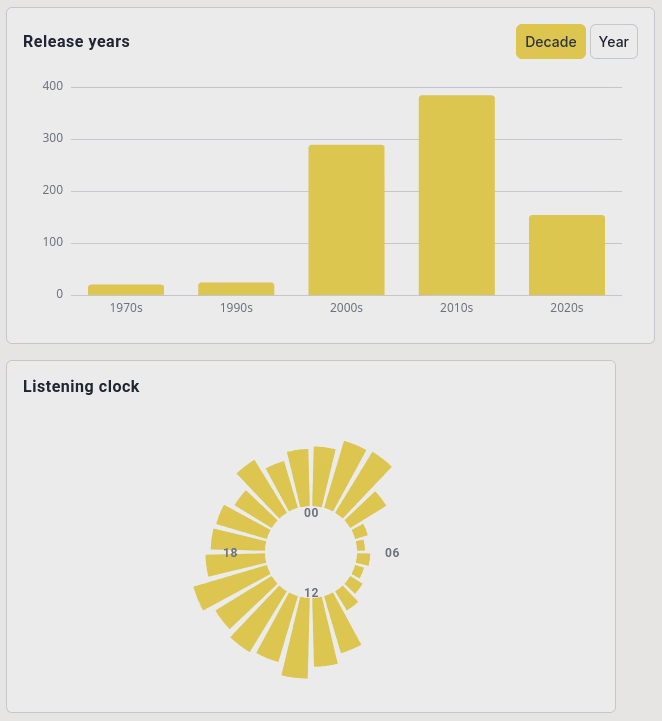
[A screenshot of the listening stats page, showing listened tracks grouped by release years and listening hours]

  • Bulk downloads: select tracks/collections and get an async-built ZIP archive.
  • Server-side outputs — Spotify-Connect-style. The browser is just a remote control; audio is rendered by the server via a dedicated stream worker. Three providers: an Icecast relay (with live ICY metadata updates), a Snapcast provider for whole-home audio, and native HTTP mountpoints (/streams/<mount>) served directly by Songhive with per-listener cursors over Redis Streams — no external radio server required. Playback keeps playing after you close the tab, and multiple tabs/devices stay in sync.
  • Payments support out of the box — set up a Stripe account and connect it to the instance, and configure it as a marketplace account if you also want to allow musicians to wire their payout accounts and sell music through your platform.

[A screenshot of a track uploaded by a musician, showing the options to set up payments for it]

[A screenshot of the membership page on an instance with paid subscriptions]

The social layer

This is where Songhive diverges from every other self-hosted media server. Federation is full ActivityPub (via the pubby library), and music entities are social objects:

  • Every user is an ActivityPub actor, reachable at @user@instance via WebFinger, with Mastodon-style alias URLs. Mastodon users can follow, mention and interact with you from their own client.
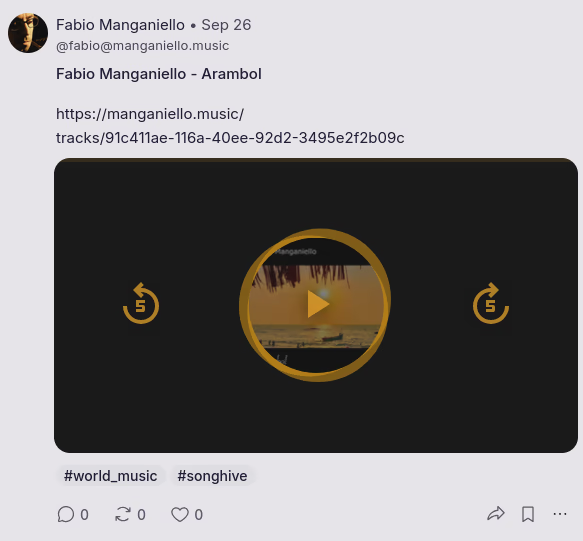
  • Tracks are Audio objects. Publishing is explicit and opt-in per upload — your private library never leaks to the Fediverse by accident. Published tracks render as playable audio in Mastodon and Akkoma timelines, with descriptions, hashtags and link-backs to the track page.
  • Mastodon-style statuses with Markdown, mentions, hashtags, threaded replies, quotes and link preview cards. Reply to a track, boost an album drop, quote-post a playlist, or simply post some words to Mastodon and use it like a normal Mastodon account.
  • Funkwhale-compatible music federation: full bidirectional music federation with Funkwhale and other Songhive instances — remote libraries, albums, artists and tracks resolve as browsable resources you can follow and add to your collection.
  • Remote discovery: paste a Fediverse handle or URL into the search box and it's dereferenced, cached and browsable — SSRF-guarded and domain-moderated.
  • Real notifications over WebSocket (in-app, real-time), with per-type email and daily-digest preferences, plus optional OS-native push via VAPID WebPush.
  • Mastodon-grade moderation: users mute/block local and remote actors; admins limit/suspend actors, defederate or restrict instances, and review reports — optionally forwarding them to the reported actor's home instance via ActivityPub Flag.
  • RSS/Atom everywhere: every profile, artist, playlist, library, tag and genre has RSS 2.0 and Atom feeds with <link rel="alternate"> discovery, so even non-fediverse readers can subscribe.

[A Songhive post with a published song viewed from Mastodon]

Sharing and privacy

  • Three-level visibility on tracks, albums, playlists and libraries: private, local (instance-only), or public.
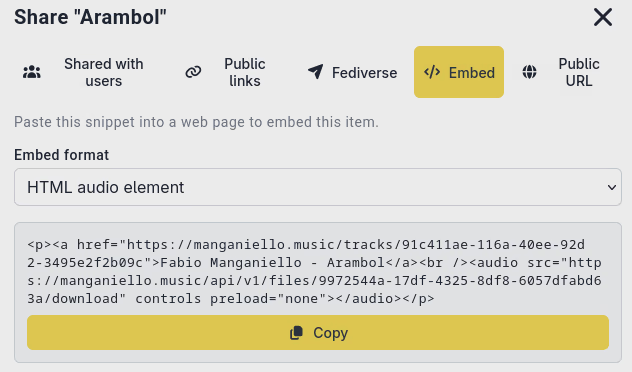
  • Share grants (give a specific user access) and revocable share links — a short URL that renders a preview page with an audio player for anyone, content-negotiated so API clients get JSON and crawlers get OpenGraph metadata.
  • Embeddables: public tracks and collections embed on any web page via <audio> tags, Markdown links, a <script> widget or a no-JS iframe. Media endpoints send Access-Control-Allow-Origin, so fediverse clients can embed your audio too.
  • Webmentions: bidirectional link-backs for public content. A blog that links to your song sends you a notification; content you share or comment on sends a Webmention back to the source. All outbound/inbound fetches on this path are SSRF-guarded.

[Screenshot of the "Share Track" modal]

The platform bits

  • Multi-user with open, invite-only, approval-required or closed registration; per-user profile visibility.
  • OAuth2 provider for third-party apps, plus API tokens for scripts and Subsonic clients.
  • Flexible storage: local filesystem, S3-compatible object storage.
  • External libraries — the feature that sells it to people with existing collections. Attach external music storage to a Songhive library: local folders (with a filesystem watchdog that picks up changes automatically), S3, SFTP, WebDAV, Dropbox, Google Drive, or plain HTTP. Entity-backed providers go further: Jellyfin and TIDAL import tracks, albums, artists and playlists as first-class library entries with lazily-fetched contents — audio bytes stay remote and are proxied at play time, so provider credentials never reach the client. Metadata can be written back to the provider, and Dropbox/TIDAL connect via OAuth straight from the settings form.
  • Metadata write-back: enriched tags are written into the audio files themselves, using audio-only content hashing — so re-tagging or swapping cover art never changes the stored path or invalidates the content hash. Since it support metadata write-back to the original file, you can also wire your existing music library on an old hard drive and use Songhive to fix broken audio metadata tags.

How it compares

Songhive Funkwhale Jellyfin/Navidrome Mastodon Spotify Bandcamp Self-hosted ✅ ✅ ✅ ✅ ❌ ❌ Streaming + transcoding ✅ ✅ ✅ ❌ ✅ ✅ Subsonic API (mobile apps) ✅ ✅ ✅ ❌ ❌ ❌ Scrobbling + listening stats ✅ partial partial ❌ ✅ ❌ ActivityPub social (posts, replies, boosts) ✅ ❌ ❌ ✅ ❌ ❌ Federated music objects playable in Mastodon ✅ partial (library-oriented) ❌ ❌ ❌ ❌ Fine-grained sharing (grants, links, embeds) ✅ partial ❌ ❌ ❌ partial Server-side outputs (Icecast/Snapcast) ✅ ❌ ❌ ❌ (Spotify Connect, proprietary) ❌ External library import (S3, WebDAV, Jellyfin, TIDAL…) ✅ partial ❌ ❌ ❌ ❌ Support for payments to artists ✅ ❌ ❌ ❌ ✅ ✅ Support for subscriptions to fund platform maintainers ✅ ❌ ❌ ❌ ✅ ✅ You own the catalog ✅ ✅ ✅ ✅ ❌ you can download the content you pay for

Quickstart

The fastest path is the Docker bootstrap script, which drops a docker-compose.yml, an nginx config, and starter config.toml/.env files into the current directory:

curl -fsSL https://git.fabiomanganiello.com/songhive/raw/branch/main/docker/bootstrap.sh | sh

Set your user's UID/GID in .env (so the bind-mounted volumes stay yours), fill in the few required values in config.toml:

[auth]
secret_key = "..."  # python -c "import secrets; print(secrets.token_urlsafe(64))"

[storage]
local_path = "./data/media"

[federation]
enabled = false
# instance_domain = "music.example.com"  # uncomment to join the fediverse

then:

docker compose up
# Or, if you want to enable local HTTP stream mount points too
docker compose up --profile streams

Create the admin user:

docker compose exec songhive songhive admin create-user \
    --username admin --email admin@example.com --password secret --admin

Open http://localhost:8000/ and start uploading. The web UI, Swagger UI (/swagger-ui/) and OpenAPI spec (/openapi.json) are all served by the same process. There's also a pip install songhive path (the PyPI package ships the built web UI), systemd units under config/systemd/, and an install.sh that wires the whole thing up — see the README for those.

Everything else — federation, Webmentions, RSS feeds, scrobbling keys, registration mode, bitrate caps — is a config knob, and most of it is enabled by default. All config.toml entries can also be overridden with SONGHIVE_* environment variables.

Under the hood

  • Backend: FastAPI (REST) mounted inside Tornado via a2wsgi — Tornado natively handles WebSockets, audio streaming with range requests, and HTTP stream mountpoints, while FastAPI handles everything else. (There's a non-obvious reason for the explicit thread pool in the WSGI bridge: without it, a federated fetch that resolves back to your own instance deadlocks the event loop. The architecture doc tells the whole war story.)
  • Data: PostgreSQL (SQLite works for small setups) + SQLAlchemy 2 async, Pydantic v2 everywhere, Alembic migrations.
  • Async work: Celery + Redis with three queues — celery for interactive work, scrobbles for latency-sensitive submissions, and bulk for the per-item fan-out jobs (a fresh external library sync can enqueue tens of thousands of enrichment tasks; without the split they'd starve scrobbles and federation delivery for hours).
  • Storage: content-addressable files (SHA-256) with audio-only hashing, so tag/cover-art rewrites don't move files or invalidate hashes.
  • Frontend: Vue 3 + TypeScript + Pinia, fully i18n'd with RTL support.
  • Security posture: JWT + opaque rotating refresh tokens, double-submit CSRF, Redis sliding-window rate limiting, SSRF-guarded federation and Webmention fetches with redirect revalidation, Fernet-encrypted provider secrets, RFC 7807 error handling.
  • License: AGPL-3.0.

Caveats, honestly

  • It's a real stack: Postgres, Redis, a Celery worker, ffmpeg. The Docker compose file makes this a non-issue, but it's not a single static binary. It can run on a RaspberryPi 4 or 5 with decent storage if you want to run it for yourself and your family, but if you want to have more tracks and more users you may need a beefier machine.
  • Federation with the big platforms is only as good as ActivityPub support for audio — Mastodon renders playable audio attachments, but it treats Audio as a converted type, so Songhive also emits Note variants when you share a track as a post. The interop details with Akkoma, Funkwhale and friends are handled, but the fediverse music landscape is still young.
  • TIDAL imports federate metadata-only (a browse link, not hosted audio) — for obvious reasons the audio bytes stay with the provider.

Links

Screenshot of an instance's home page on desktop — Open image attachment ⁨1⁩ of ⁨4⁩
Screenshot of an instance's home page on desktop
Screenshot of an instance's home page on mobile — Open image attachment ⁨2⁩ of ⁨4⁩
Screenshot of an instance's home page on mobile
A screenshot of the listening stats page, showing top listened artists and albums over a given time period — Open image attachment ⁨3⁩ of ⁨4⁩
A screenshot of the listening stats page, showing top listened artists and albums over a given time period
A screenshot of the listening stats page, showing listened tracks grouped by release years and listening hours — Open image attachment ⁨4⁩ of ⁨4⁩
A screenshot of the listening stats page, showing listened tracks grouped by release years and listening hours
A screenshot of a track uploaded by a musician, showing the options to set up payments for it — Open image attachment ⁨5⁩ of ⁨4⁩
A screenshot of a track uploaded by a musician, showing the options to set up payments for it
A screenshot of the membership page on an instance with paid subscriptions — Open image attachment ⁨6⁩ of ⁨4⁩
A screenshot of the membership page on an instance with paid subscriptions
A Songhive post with a published song viewed from Mastodon — Open image attachment ⁨7⁩ of ⁨4⁩
A Songhive post with a published song viewed from Mastodon
Screenshot of the &quot;Share Track&quot; modal — Open image attachment ⁨8⁩ of ⁨4⁩
Screenshot of the &quot;Share Track&quot; modal