posted in Technology

A 2GB Raspberry Pi 4 now costs 50% more than it did at launch
www.omgubuntu.co.uk/2026/10/raspberry-pi-2gb-costs-how-much-nowposted in Technology
A 2GB Raspberry Pi 4 now costs 50% more than it did at launch
www.omgubuntu.co.uk/2026/10/raspberry-pi-2gb-costs-how-much-nowAnd that is…?
Edit: apparently, the cost had jumped from $55-$78. Still, at least $100 less than what it cost in 2016 when I was in school for an RPi 2. I’m having a huge amount of trouble finding scaler comparisons between RPi and standard server set up.
Genuinely asking: for the Rpi fans out there, what’s it actually capable of nowadays? Can I run a Plex server off of a single RPi?
I am looking to replace a 2011 iMac (i7-2600) as my Plex server,, I’d like to know if a modern RPi could handle the load.
Advice, please?
If you don’t need an rpi specifically (i.e. for the built in CEC) you’re better off with something else.

Replying to @eurodyne@piefed.world
Get a usff thinkcentre, like the m910 tiny. Insanely simple, upgradeable (nvme + 2.5", 2 sodimm slots), lots of usb and other connectics, supports 3 screens if you need that, low power, super small and can be found for cheap.
Yeah, I saw an eighth generation i5 OptiPlex SFF that I thought was kind of tasty. Refurbished for under $500. I was just wondering if a modern RPi could actually handle the load. I used a few in school about 10 years ago, but I’ve heard they’ve become really far in that time.
BTW, I put in a request for quote on a refurbished ThinkCentre. I’ll let you know what they tell me. Here’s the link to the machine.
https://www.pcliquidations.com/p27443-lenovo-thinkcentre-m91-usff
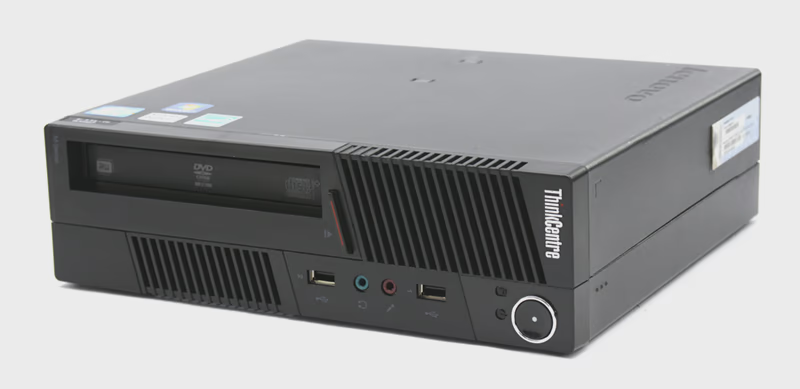 www.pcliquidations.comLenovo ThinkCentre M91 USFF Computer i3-2120 - Windows 10 - from PCLiquidationsRefurbished Lenovo ThinkCentre M91 USFF Computer i3-2120 - Windows 10 - Refurbished. Cleaned + tested. Free Shipping on purchases $500+. Click now to learn more.
Replying to @eurodyne@piefed.world
The ones I use are like this even my daily driver is a 6500T like that (m910q) where I do programming and stuff.
Good luck!
Is this denominated in strips of gold-pressed latinum? Because I don’t understand these numbers
Replying to @eurodyne@piefed.world
I don’t understand your post 😅 it’s an ebay link (works for me).
How entitled of you to think that I am responsible for your stupidity And ignorance. And how fucking dare you try to blame me for it.
Read the fucking book
child
Replying to @eurodyne@piefed.world
You said “advice please”, advice was given. No need to become aggressive, touch grass man.
I asked for some advice about my cat, not some asshole engaging in some legalistic here or there.
If you wanna be a Cunt, fuck off.
And because you have no concept of nuance, I’ll be very plain: you! Fuck off!
I have no interest in anything you may ever have to say, and I have therefore blocked you.
Fuck off! Is that clear enough for you, you fucking Cunt?
Don’t bother replying, because I want to see it as you’re blocked. Just deck, the shotgun in your face and pull the trigger. Because no one will ever care about anything you have to say, especially me.

Replying to @eurodyne@piefed.world
what’s it actually capable of nowadays?
I’ve got a Borg Backup server running on a Pi 2. I’m starting to play with Home Assistant on a Pi 4.
That Pi 4 has had a few lives so far. It served as a rather mediocre desktop running Ubuntu MATE for awhile. At the time I found RPi’s “Pixel” desktop to be pretty unlivable, almost everything they’d done to LXDE to make Pixel was an exercise in breaking LXDE. MATE was reasonably functional. Building a Ryzen 3600 machine was of course a vast improvement.
I then transitioned that Pi 4 to an HTPC running OSMC (basically Debian Kodi). I had a couple of problems with it: 1. to put audio out the built-in audio jack, you had to edit some config file to enable the option in the menu. Because this is Linux, a Linux developer can’t make his microdick hard enough to penetrate the layer of crust sealing the anus of his pinhole punctured blow-up doll if he ships a GUI that’s good enough. 2. That entry in that config file kept either undoing itself, or what the system was looking for changed. I swear I’d put that line in, it would work for awhile, something would happen, and then I’d have to go in and change the line that’s still in there to some other syntax to get it working again. 3. Driving a 4k60 display was another problem that kept unsolving itself. Sometimes it could do it through one HDMI port but not the other, oh no wait it’s max 4k30, oh wait it can do 1080p60 though, oh but it’s still driving the monitor at 4k30 in such a way that trying to play back 1080p60 gets out of sync with the audio, pauses for several seconds, then resumes. If you’ve got a 720p television and you intend to use its internal speakers maybe it’ll work.
Seems to run Home Assistant okay though the SD card is probably doomed.