posted in Catodon talks!

Catodon gets Manyfold compatibility for 3D prints

Merged this feature a couple of days ago, hasn't been tested much yet so there might be bugs (just report them to me and they'll be fixed). But, yeah, Catodon now allows you to download and share 3D prints, based on how Manyfold does it. It's a niche feature so it's relatively hidden, you have to "import" it to your Navigation bar, but it's there if you want it.
#catodon #manyfold #3dprinting #3dprint

Catodon rocksCatodon rocksOfficial server of the Catodon project - home of Catodon development. Things may occasionally break when we test new features. Everyone is welcome except fascists, racists, sexists, bigots and cops. No harassment, no hate speech. Be nice. Destroy capitalism.
:redstar@comuna.social.br:1💜1

Replying to an earlier post

Out of curiosity, I tried uploading both a .blend (Blender, specifically 3.6.22 in my case) and a .glb (glTF), but neither were shown as a preview (either navigatable using in-browser 3D viewer libraries like three.js) inside Catodon. I'm yet to try .obj, .stl and .fbx, though it seems like these are also going to appear as downloadable files with no embedded preview or thumbnail. Manyfold says the supported file formats can be checked at the instance's about page (the Manyfold article points to this About page as an example of such), but Catodon's About page doesn't specify what 3D file formats are supported. Upon uploading a 3D file in Catodon, is a preview/thumbnail supposed to appear? If so, what file formats are supported?

Edit: I also tested fetching a random 3D model from Manyfold (specifically,
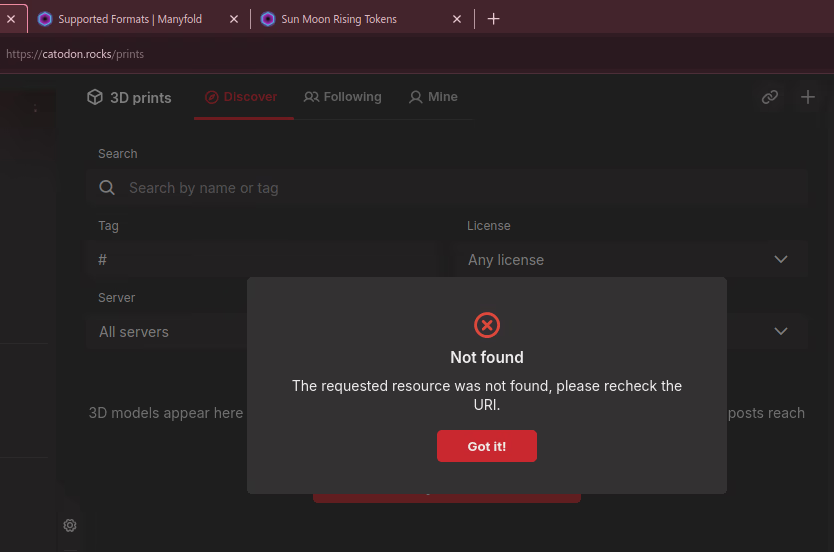
this one which called to my attention as the seemingly only esoteric item among the plethora of mechanical assets thereby), but neither the 3D model URL nor the direct file URL (https://3dprint.social/models/4l57z31ntnn8/model_files/6bw720ljd6rq) worked; the first returned "The request resource was not found" and the second returned something like "There was an error while trying to fetch the resource".

Screenshot showing Catodon's error "Not found: The requested resoure was not found, please recheck the URI." At the top, two other Firefox tabs can be seen: "Supported formats - Manyfold" and "Sun Moon Rising Tokens". — Open image attachment ⁨1⁩ of ⁨1⁩
Screenshot showing Catodon's error "Not found: The requested resoure was not found, please recheck the URI." At the top, two other Firefox tabs can be seen: "Supported formats - Manyfold" and "Sun Moon Rising Tokens".

Replying to an earlier post

Fetching from a remote Manyfold instance: now it fetched the remote URI successfully. Catodon didn't show an embedded preview for the remote model I tested (although I'm not sure if it has to do with file format incompatibility or wrong file format, as it's now a model I personally uploaded at 3dprint.social while simultaneously testing Manyfold), but it does offer a link to the model at the remote instance. I tested the "Share" button, which spawns the Note composer but doesn't seem to have any references to the model being shared (i.e. the resulting post ended up as a normal post, as if I composed it through the "Post" button). There's a "follow" button I tested clicked and it seemingly did "follow", but I'm not sure what exactly it's supposed to do (this seems like something inherent to Manyfold, something I'm yet to understand: 3D models have their own handles and 3D models can be "followed" as if these were users?). The model I fetched got listed in the "Discovery" feed for 3D Prints, akin to how books are listed inside the Library feeds, which is very nice!

Uploading a 3D Model in Catodon: now it brings a "View in 3D" button alongside the "(filename).ext" download link. The preview worked for .stl, .obj and (uncompressed) .glb files (in the case of the .glb, which contains material data, the preview doesn't feature any of the embedded materials/colors, but the mesh itself is correctly displayed; given Manyfold is made for 3D prints, the absense of materials/colors is likely a non-issue), except it didn't get to show a preview for the first, compressed .glb I tried ("This file could not be shown in 3D."). Taking a peek at the DevTools log, I spotted two silent problems: first, a CORS error (hel1.your-objectstorage.com doesn't seem to ship with a proper Access-Control-Allow-Origin for catodon.rocks), but then Catodon tries to proxify it through catodon.rocks/print-files/storage, which works... but then that glTF is compressed (I turned on compression during my export from Blender, as my uncompressed .glb has 775KiB, and turning on compression produced a .glb with just 92KiB), which uses a "Draco", which Three.js silently complains about inside DevTools (Error: THREE.GLTFLoader: No DRACOLoader instance provided).

Edit: oh, now I noticed there's a specific part inside "3D Print" for publishing 3D Print models. My aforementioned "Uploading a 3D Model in Catodon" involves using the normal "Post" composer with an embedded file. I'll try the "3D Print" publishing tool as well.


Replying to an earlier post

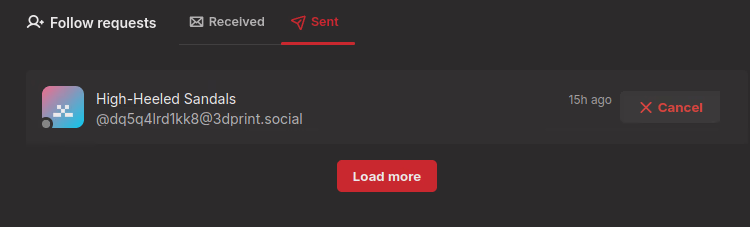
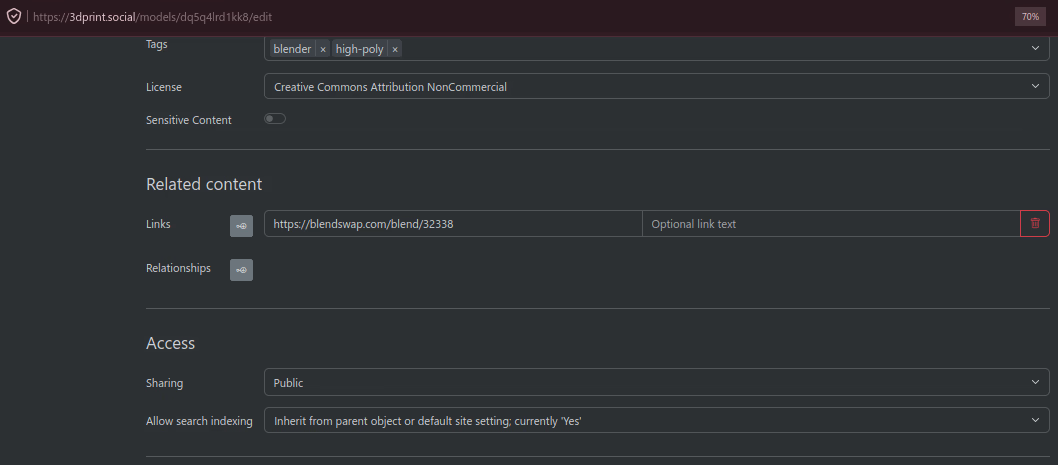
Something I only got to notice now: my attempt on following a Manyfold model seems to be pending, except... the specific model (a model I published myself on 3dprint.social) is set as public (in fact, my model seems to be the only model set to "public" across the entire 3dprint.social instance) so theoretically it means the 3D model could be followed with no need for approval. Furthermore, at the 3dprint.social side, there's no indication that someone (me) requested to follow my model (actually, there's not even a "notification" feature thereby). Not sure whether this is a Manyfold issue (as it seems to be in alpha/beta stage) or communication issues between Manyfold and Catodon.

Screenshot of Catodon's "Follow requests" showing a pending approval for "High-Heeled Sandals" (which is a 3D model I published on 3dprint.social). — Open image attachment ⁨1⁩ of ⁨3⁩
Screenshot of Catodon's "Follow requests" showing a pending approval for "High-Heeled Sandals" (which is a 3D model I published on 3dprint.social).
Screenshot of the settings for my "High-Heeled Sandals" published on 3dprint.social. Among the settings, "Sharing" is set to "Public" and "License" is set to "Creative Commons Attribution NonCommercial" (CC-BY-NC). There's no spcific setting for "follow requests". — Open image attachment ⁨2⁩ of ⁨3⁩
Screenshot of the settings for my "High-Heeled Sandals" published on 3dprint.social. Among the settings, "Sharing" is set to "Public" and "License" is set to "Creative Commons Attribution NonCommercial" (CC-BY-NC). There's no spcific setting for "follow requests".
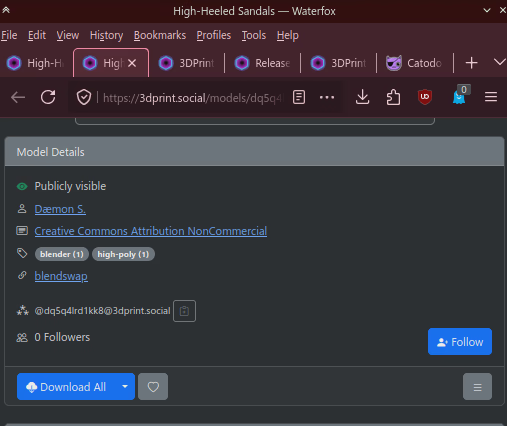
Screenshot of the public-facing side of my "High-Heeled Sandals" model I published on 3dprint.social. The "Model Details" section shows the model is "Publicly visible", was published by "Dæmon S." under "Creative Commons Attribution NonCommercial" license, has the tags "blender" and "high-poly", has an external link to Blendswap, has a Fediverse handle ("dq5q4lrd1kk8") and has zero followers (although I'm not sure whether this is  counter means "how many are following this 3D model" or "how many are following this creator"). — Open image attachment ⁨3⁩ of ⁨3⁩
Screenshot of the public-facing side of my "High-Heeled Sandals" model I published on 3dprint.social. The "Model Details" section shows the model is "Publicly visible", was published by "Dæmon S." under "Creative Commons Attribution NonCommercial" license, has the tags "blender" and "high-poly", has an external link to Blendswap, has a Fediverse handle ("dq5q4lrd1kk8") and has zero followers (although I'm not sure whether this is counter means "how many are following this 3D model" or "how many are following this creator").

Replying to an earlier post

Under the "Follow requests" page, I tried to click "Cancel", which became "Send follow request", then I clicked that, which became "Cancel" again; I awaited for three minutes and nothing happened (neither on Catodon nor on Manyfold). I clicked "Cancel" then I headed to its catodon.rocks/prints/m/ page, then I clicked the Follow button within that page. Once again, it got stuck into a pending state (the Model page on Catodon shows a spinning "Processing..." while Catodon's "Follow requests" page shows a pending approval).

en
👍1