Selfhosted

Group

!selfhosted@lemmy.world · Created ⁨Jun⁩ ⁨2023⁩

A place to share alternatives to popular online services that can be self-hosted without giving up privacy or locking you into a service you don’t control.

Rules:

Detailed Rules Post

  1. Be civil.

  2. No spam.

  3. Posts are to be related to self-hosting.

  4. Don’t duplicate the full text of your blog or readme if you’re providing a link.

  5. Submission headline should match the article title.

  6. No trolling.

  7. Promotion posts require active participation, with an account that is at least 30 days old. F/LOSS without a paywall has exceptions, with requirements. See the rules link for details. Tags [CBH] or [AIP] are required, see the links in Rule 8 for details.

  8. AI-related discussions and AI-involved promotional posts have additional requirements for tagging, as noted in Rule 7 and the AI & Promotional Post Expanded Rules post, and find example disclosures here.

Resources:

Any issues on the community? Report it using the report flag.

Questions? DM the mods!

posted in Selfhosted

Finally happish with my all-in-one homelab (20+ services and way too much tinkering)

After years of breaking things, I think I’m finally at a point where I’m genuinely proud of my setup -so naturally, I have to share it with you all.

This is my single-server do-everything box. The whole point was to kick as many big-tech cloud services out of my life as possible. Photos, passwords, code, chat, even ML -all running in my closet/corner.

The guts:

  • Ryzen 7 3800X (8 cores, 16 threads)
  • 48GB of RAM (Channel A: 16GB+8GB, Channel B: 16GB+8GB | still dual channel with stock timings and clocks.)
  • RTX 3050 8GB (handles GPU-accelerated processing with GPU passthrough to said LXC’s)
  • A couple of storage pools (Fast-Thin-LVM (Nvme) for stuff that needs speed, TB-Thin (Sata) for the bulk)
  • Proxmox 9.2.5, kernel 7.0.14

Nothing crazy by today’s standards, but honestly? It handles everything I throw at it without breaking a sweat.

The services:

Everything runs in LXC containers. If a service needs Docker, I run Docker inside the LXC - so each service gets its own dedicated container with its own Docker install. A couple of other things (like OpenWrt and DSM) live in VMs instead.

I’ve got the usual suspects - Immich for photos (goodbye Google Photos), Vaultwarden for passwords, and Matrix Synapse for chat. Networking side is Nginx Proxy Manager, WireGuard, Pi-hole, and OpenWrt routing traffic as well as DDNS-Updater to keep my domain up to date. Also running Gitea for my little coding projects, Kiwix for offline Wikipedia (because why not), Trilium for my scattered notes, homarr as the dashboard and of course lemmy, your reading this on it haha.

On the heavier side, I’ve got Ollama + Open WebUI running locally with GPU acceleration - the 3050 gets the job done.

Snapotter is in there too - it’s an open-source, self-hosted file toolkit with 200+ tools for images, video, audio, PDF, and document processing. I use it so I don’t have to rely on sketchy file conversion sites anymore. Convert, compress, OCR, strip metadata - all happens on my own hardware, files never leave my network. The GPU helps with some of the heavier image tasks too.

And yes - I’m running DSM (Arc Loader) in a VM with PCIe passthrough for the NAS. It’s a bit overkill, but I wanted proper storage virtualization with direct hardware access.

I also will not lie- the GPU sits idle most of the time, but it’s nice to have the acceleration.

Why LXC + Docker instead of just Docker?

I just like having each service in its own isolated container with its own Docker daemon. It makes backups and snapshots stupidly easy in Proxmox - when I inevitably screw something up at 1 AM (and I will), rolling back takes two clicks. Plus, it keeps dependency hell contained.

Dive into the Details

If you’re curious about the configs, the philosophy, or just want to see the messy reality behind the setup, head over to organic-server.org. You’ll find some more of my ramblings there.

Or, if you have a specific question, I’m always happy to chat here.

edit: I also forgot to mention I have degoog running. oops.
posted in Selfhosted

NAS case

Im in the market for a NAS solution. By NAS I don’t mean running Jellyfin and some homepage thing for vibes, I mean your old-style “it just provides network attached storage”.

I love the Jonsbo cases but I don’t want to drop as much coin as building out a NAS based on one of them entails. I’m looking for an older office/home/gaming PC or case that has room for atleatst 4 3.5" HDD’s. Something around ten years old with maybe an i5 7th+ gen CPU. I don’t need hardware RAID as I prefer ZFS anyway.

Ideas?

posted in Selfhosted

Navidrome can do lyrics now - but how?

With v63, audio streamer Navidrome finally got full lyrics support. I just wanted to try it out and fell flat on my face because… well, not even the official docs say anything about lyrics. Also, I’m not too familiar with how lyrics are added to songs in general. So my questions are these:

  1. How can I add any lyrics to my songs so the web client will display them?
  2. What formats would you recommend sticking with? (TTML, ELRC, SRT, YAML, LRC, or even TXT)
  3. Is there a way to automate adding lyrics in bulk (instead of tedious manual work)?
github.com/navidrome/navidrome/releases/tag/v0.63.0
Navidrome 0.63 brings a long-awaited upgrade to lyrics: full support for synced sidecar lyrics in multiple formats (TTML, ELRC, SRT, YAML and LRC), including word-by-word karaoke timing and multi-v...GitHubRelease v0.63.0 · navidrome/navidromeNavidrome 0.63 brings a long-awaited upgrade to lyrics: full support for synced sidecar lyrics in multiple formats (TTML, ELRC, SRT, YAML and LRC), including word-by-word karaoke timing and multi-v...

posted in Selfhosted

Hister: a private search engine [AIP]

Hi everyone,

I am the original author of Searx. I started Hister with a similar motivation: reducing our dependence on external search engines while keeping searches and personal data under our control.

Searx is a metasearch engine that forwards queries to other search providers. Hister takes a different approach. It builds a private full text index from content you choose, then searches that index entirely on your own infrastructure.

Hister can automatically index pages through its Firefox and Chrome extensions. It can also watch local directories, import browser history and bookmarks, index individual URLs, and crawl complete documentation sites.

The feature I find most useful is offline previews. Hister stores the readable content and HTML of indexed pages locally. You can open a result in a clean and sanitized preview beside the search results without visiting the original website again.

Some other features:

  1. Full text search across web pages, PDFs, docx files, Markdown, OrgMode and text files
  2. Phrase searches, field filters, date filters, wildcards, negation, aliases, labels, facets, and result priorities
  3. Optional semantic search using an embeddings endpoint you configure
  4. Persistent website crawls
  5. Imports from browser history, Linkwarden, Karakeep, Shaarli, Wallabag, and Linkding
  6. Web, terminal, command line, HTTP API, and MCP interfaces
  7. SQLite and PostgreSQL support, plus optional multiple user hosting

Hister cannot replace a global search engine (yet) for subjects you have never encountered because it only searches what you have indexed. My workflow is to search Hister first, then use its shortcut to fall back to traditional search when I need broader web results.

The project is free software under the AGPLv3+ license. It can be installed as a standalone binary or with Docker.

Project: github.com/asciimoo/hister

Website and documentation: hister.org

Small read-only demo: demo.hister.org

I’d appreciate feedback, questions, and suggestions as well as joining our growing community.

AI disclosure: AI assisted contributions are not strictly prohibited, but all contributions should be made by humans. More details: github.com/asciimoo/hister/…/CONTRIBUTING.md#ai-p…

github.com/asciimoo/hister
Your own search engine. Contribute to asciimoo/hister development by creating an account on GitHub.GitHubGitHub - asciimoo/hister: Your own search engineYour own search engine. Contribute to asciimoo/hister development by creating an account on GitHub.

posted in Selfhosted

I feel like people are sleeping on the Minisforum MS-R1 as a good value home server PC

For $600 the Minisforum MS-R1 gives you 64GB DDR5 ECC, 12 cores, dual 10GbE, a real PCIe 4.0 x8 slot, M.2 NVMe, Pi-compatible 40-pin GPIO, and actual UEFI boot. It runs Debian and Proxmox/KVM.

I’ve read that the CPU is trash compared to intel/amd in performance and in TDP, but you can’t build a mini pc/server on intel/amd right now for thaf price with that amount of RAM.

Even just buying the 64GB ddr5 RAM as sticks will be like over 800$…

In the low budget range you can go with a Pi 5 16GB which is now ~$300. Add PSU, case, NVMe HAT, PCIe HAT and you’re at $500+. It’s way too expensive for what you get, compared to spending a bit more and going with minisforum.

Yeah you can get old used boxes with that amount of RAM for maybe the same price, but they’ll such 200W and electricity is expensive where I live.

My current pine64 soquartz cluster draws 52W and over the past 5 years it has been dying node by node and I can’t run anything more demanding on it (like game servers or local AI). It cost me about 600$ back then with 5x blade + nvme + soquartz module, a poe switch and a case with fans. Kinda seems like a bad deal now, I’m stuck with all the docker swarm issues and the bad cpu cores and max 8gb ram per node.

Maybe i’m biased and trying to justify my own purchase … let me know if I’m wrong about it being good value.

posted in Selfhosted

Improve very slow library scans on Jellyfin 10.11 / 12 on spinning media

I’ve been trying to upgrade from 10.10 to 10.11 for a while now, as the Android TV app keeps nagging me, and every attempt ended with impossibly long library scan times.

After some thorough investigation, it appeared that a Home Videos type collection causes unending scan (yet to be solved), but also that Jellyfin does a lot of writes to the config directory (either database or metadata or both). Mine’s on spinning media part of a ZFS pool. I tried a few performance tuning options, such as testing the config dir with recordsize (similar to block size) of 4K, 8K, 64K, 128K and library scans fell from 30-40 minutes down to 8-13min with 4K-64K. The ZFS tuning wiki suggest 64K recordsize with LZ4 compression for SQLite workloads such as Jellyfin. That seems to work as well as 4K and 8K but likely is faster when reading thumbnails and such.

Note that upgrading to 12-rc3, which is supposed to speed up library scans did not improve scan times for me. Optimizing config/database write speed did. I cross-checked the culprit by experimenting with moving the config dir to NVMe and RAM. Both of those got the scan times down to 8-9 minutes compared to the optimized spinning media’s 12-13.

So if you had upgraded (or about to) to 10.11 your library scans are (about to get) dog slow and your Jellyfin’s config dir resides on spinning media, optimize its write performance for SQLite.

posted in Selfhosted

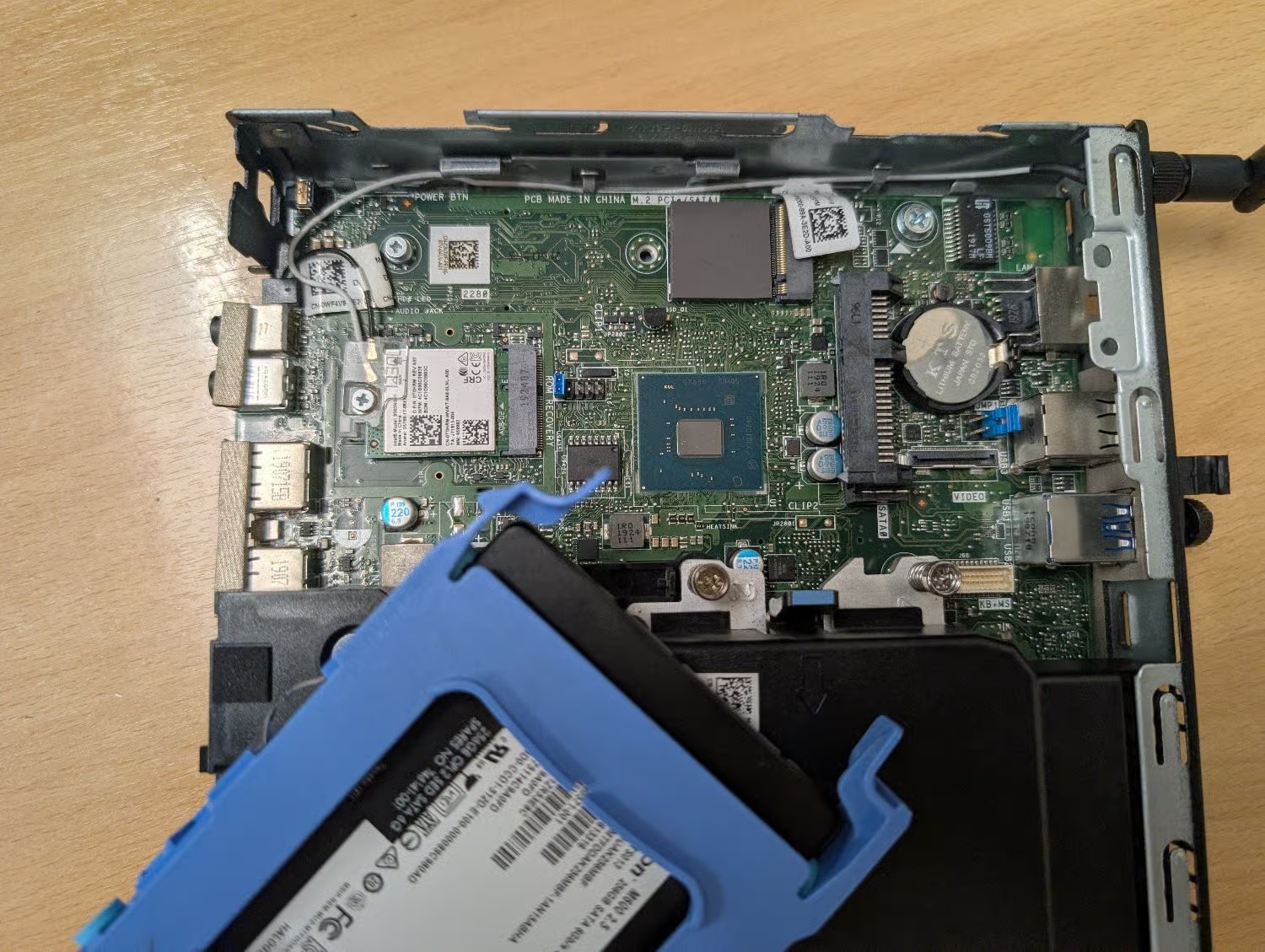
Can the M.2 slot in my Dell Optiplex 3070 micro be used for ethernet?

I don’t really know much about M.2 slots and the different capabilities and how the key type corresponds, so I don’t want to spend money on something that won’t work.

There’s an unused slot on the motherboard marked ‘M.2 PCIe / SATA1’. I believe it’s M-keyed.

Can it be used with an M+B keyed adapter like this one? Or will it physically fit, but the socket itself isn’t wired to work with an ethernet adapter?

My plan is to use this machine as an OpenWrt router to replace the shitty Linksys one my ISP supplied, but it would obviously need a second ethernet socket. My home wifi is dealt with by a TP-Link mesh network, so I don’t need it to have wifi and bluetooth. I could use the slot that the networking card is using, but if I can retain those then that would be ideal for any future flexibility I may need.

posted in Selfhosted

Please weigh in: Transfer of Docker stacks to Debian

I have 27 containers running with rancher on windows. Long story short, I’m tired of the resource use and stress on my machine by running the VM. My data folders are split up by duty (admin, utility, media, virtualization) each duty has its own folder, containing the services’ folder with data/config directories and one compose.yaml file for those services. All the compose files are connected to a master compose file in the parent directory that starts all of them. My compose files have references to the media hdds that are defined with an .env file next to the master compose.

I need to clone my docker setup to a Debian install I’ve been working on on its own ssd. I’ve been screwing with Linux unsuccessfully for almost 20 years, so my cli is weak. I’m looking for a tool that will clone my volumes and containers.

What do you use?

posted in Selfhosted

Creating a "maintenance" page for my self-hosted sites

I selfhost several public-facing sites, including my personal blog. I’ll be needing to relocate my servers soon, though, and I wanted something more “proper” to display in their place while the servers are offline.

I won’t repeat the whole post here (see link), but I ultimately set up a CF worker that I can enable with the flip of a switch whenever my server will be down.

It’s a temporary, hosted solution to a common self-hosting problem, so I think it still fits here… but no hard feelings if mods decide otherwise.

blog.k3can.us/posts/2026/jul/maintenancepage/
blog.k3can.usMaintenance Page - k3can blog

posted in Selfhosted

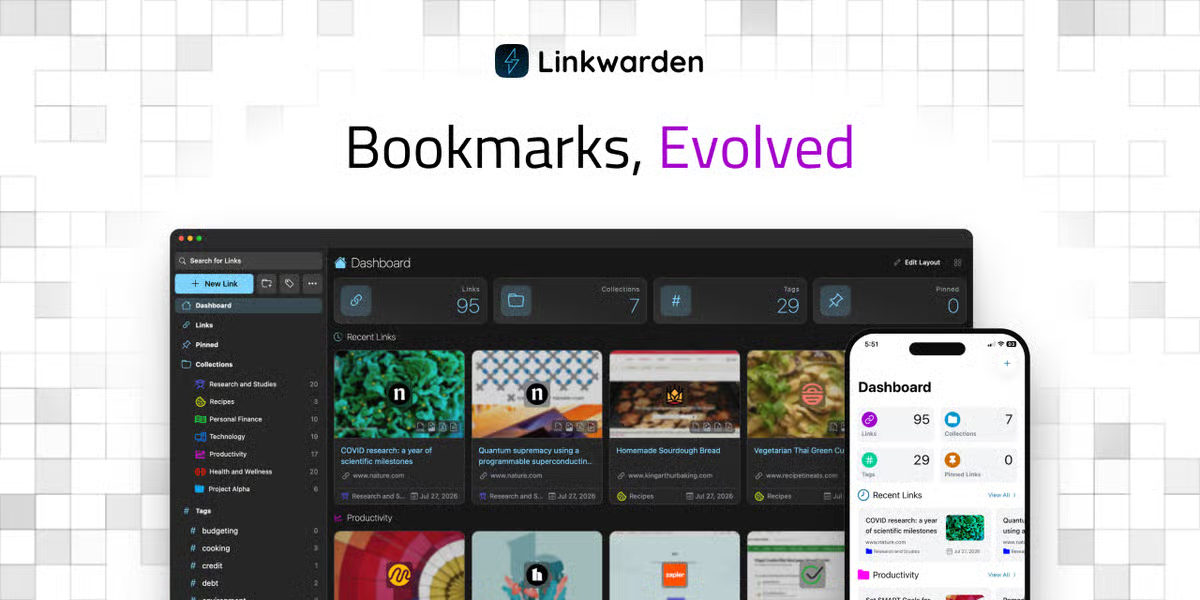
Linkwarden 2.16 - open-source collaborative bookmark manager to collect, read, annotate, and fully preserve what matters (tons of new features!) 🚀 [AIP]

Hello everyone! Daniel here, and I’m back with a new Linkwarden release across web and mobile.

For those who are wondering, Linkwarden is an open-source collaborative bookmarking tool that keeps permanent snapshot of the content of the links you save, so you can still access them even if the original content is no longer available. Linkwarden is available as a Cloud offering, or you can get the source code on GitHub and self-host it on your own server with no strings attached. If you find it useful, consider starring the repo so others can discover it too!

So let’s get into it.

What’s new in mobile:

  • Support for self-signed certificates and custom request headers: Android now accepts self-signed certificates, and you can add custom request headers to the app’s requests. This makes the app usable with instances behind a reverse proxy or auth layer like Authelia or Cloudflare Access.
  • Re-preserve link formats: You can now re-generate a link’s preserved formats (screenshot, PDF, readable view) from the mobile app, useful if the original preservation failed or the page has changed since.
  • Change link’s banner: You can now set a custom banner image for a link when editing it.
  • Access more account options in Settings: Settings now has a “More Account Settings” option that opens your full account settings inside the app, using your existing session.

(Android is out, iOS is still in review and it should be out later today.)

What’s new in web:

  • Refreshed, more modern design: The top navbar is removed and its functionality moved into the sidebar, plus a number of smaller UX fixes. 
  • New search modal with recent search history: Press ⌘K (or Ctrl+K) anywhere to open a search modal. It also keeps your recent searches stored locally in the browser. 
  • New “System” theme option: The theme can now follow your OS light/dark preference instead of being set manually. 
  • PNG support for link banners: Link banners now accept PNG uploads in addition to JPEG.

There’s more…

As always, there’s a long tail of smaller improvements across the web and the mobile app.

Full Changelog: github.com/linkwarden/…/v2.15.1...v2.16.0

Thanks!

Thanks to everyone using Linkwarden, reporting bugs, suggesting improvements, contributing to the project, responsibly disclosing security issues, and supporting its development. Your contributions genuinely shape every release. 💙

If you’d like to try Linkwarden without dealing with server setup and maintenance, our Cloud offering is the easiest way to get started.

Hope you enjoy the latest updates!

github.com/linkwarden/linkwarden
⚡️⚡️⚡️ Self-hosted collaborative bookmark manager to collect, read, annotate, and fully preserve what matters, all in one place. - linkwarden/linkwardenGitHubGitHub - linkwarden/linkwarden: ⚡️⚡️⚡️ Self-hosted collaborative bookmark manager to collect, read, annotate, and fully preserve what matters, all in one place.⚡️⚡️⚡️ Self-hosted collaborative bookmark manager to collect, read, annotate, and fully preserve what matters, all in one place. - linkwarden/linkwarden

posted in Selfhosted

DokuWiki supports markdown since the last update

Since the last release “Mort”, dokuwiki supports markdown natively in addition to the old syntax. This can be activated in the settings (incl. a combination of both).

I think this is a great step for dokuwiki. Markdown is the modern syntax for simple text based documents. This allows people to write dokuwiki pages without learning the old syntax (assuming most people already know markdown). Also a possible migration to or from dokuwiki gets way easier. But it also comes at a cost. There is a mode where dokuwiki allows both syntax in the same document. this leads do documents that are neither complete markdown nor complete dokuwiki and thus completely locked into dokuwiki.

posted in Selfhosted

Centralized SSL certificate management?

I’m not even sure this title makes sense. I’m looking to handle LE certificates in cloudflare automatically. Specifically multi level subdomains.

You can hand off subdomain certs to them for single level, but the moment you want multi level you need to manage the certs yourself.

What I’m hoping for is an open source/self hosted tool that is meant to handle certificate requests and distribution. I just don’t know if such a tool even exists, and searching around hasn’t yielded results.

Does anyone have any thoughts?

posted in Selfhosted

Selfhosting as a Linux newbie - Ubuntu Server LTS or Debian 13?

I use Debian as my daily driver, but I’m still a newbie. I would like to selfhost a few apps, initially on a VPS, but I will probably move to a local PC once I diagnose what is broken with my old computer.

The guides at https://selfhosting.sh/ always recommend Ubuntu Server LTS for newbies, but Ubuntu seems to have bad PR and I already run Debian on my home PC. On one hand, I am a newbie and I guess Ubuntu might be easier to set up and maintain. Though, I don’t HOW exactly? On the other hand, if I have Debian on my home PC and on my server, they are the same system, so I’d be learning the same system at two places and with two usage scenarios. But it might be easier to make mistakes on Debian..?

What is your opinion/recommendation?

EDIT: thank you everyone! My gut feeling was Debian and your responses were overwhelmingly in favor of Debian, so Debian it is :)

selfhosting.shselfhosting.shReplace your cloud subscriptions with stuff you run yourself. Self-hosting guides, comparisons, and setup tutorials.

posted in Selfhosted

PSA: Oracle Cloud Free Tier halved

In case you were one of the lucky ones able to snag a free account in the olden days, the terms have changed. Instead of 4 CPU and 24 RAM that you were free to whack up amongst 1-4 VPS, now you got 2 CPU and 12 GB RAM, so either one dual-core VPS or two single-core. If you keep using the old setup beyond a certain date (can’t be bothered to look up when that is) you’ll get billed; at reasonable rates, I’m sure.

If I’m reading this correctly, the block volume storage allotment hasn’t changed, but their whole setup is hella confusing, so might be off on that.

Was really a matter of days when they was gonna axe the thing, they fired half a planet’s worth of workers, I’m amazed they left even this much.

edit: I’m behind the times, this was reported more than a month ago: linuxiac.com/oracle-quietly-cuts-free-tier-ampere…

Oracle Quietly Cuts Free Tier Ampere A1 Resources in HalfLinuxiacOracle Quietly Cuts Free Tier Ampere A1 Resources in HalfOracle’s Always Free Ampere A1 allowance now lists 2 OCPUs and 12 GB RAM, down from the previous 4 OCPUs and 24 GB limit.