
I wake up
I want to upgrade Proxmox
Open Amazon
Check the price of my wishlisted RAM
Cry
Go back to sleep
When will this end? 😭😭
A lemm.ee refugee ;)
I wake up
I want to upgrade Proxmox
Open Amazon
Check the price of my wishlisted RAM
Cry
Go back to sleep
When will this end? 😭😭
Replying to @Imaginary_Stand4909@lemmy.blahaj.zone
Redirection errors, as per my my experience, can be due to
I have used caddy with immich but I didn’t require any modified redirection options.
Replying to @melroy@kbin.melroy.org
The trick is to not mess around with proxmox 😉
Replying to @Shadow@lemmy.ca
Currently it has 4 cores. No problems so far, but i’ll be on the lookout. Thanks!
posted in Selfhosted
OPNsense on top of Proxmox - Part 2
Hello beautiful people of this community!
I asked for your help a month back about setting up OPNsense on Proxmox. I went through all the comments in the post.
I got a bit distracted by IRL commitments but I sat down with it properly last week. After a lot of studying, and a bit of trial and error, I have done it!
This was my first time with Proxmox, so I spent a few weeks with Proxmox initially before undertaking OPNsense. OPNsense took me a week to install and deploy. I did a staggered deployment over multiple days, i.e., installed the VM first, check connectivity, check DHCP, and then make it part of my homelab.
The diagram might look complicated, but it’s simple.
I initially was thinking of going through the pass-through option, but after some research, I saw the upsides were very low and you lose a bit of flexibility.
drill, no dig.Their comments really helped me out (Technical and encouragement)
I am still documenting the entire process. I will publish the entire process of how I got a bare Lenovo M720Q working as a virtualized OPNsense router. Remember, if I can do it, anyone else can do it.
Edit: FreeBSD, not OpenBSD
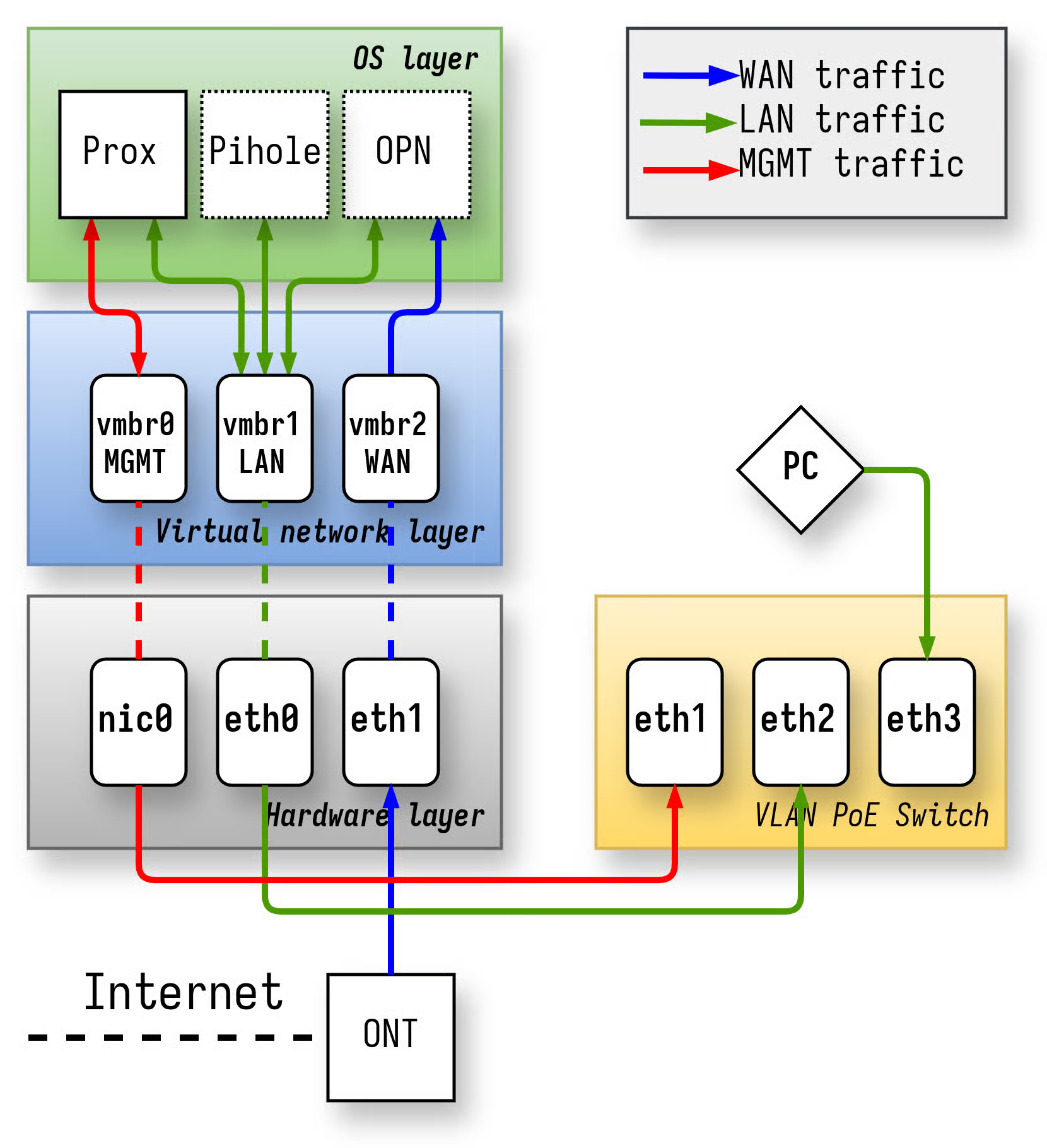
Replying to @Imaginary_Stand4909@lemmy.blahaj.zone
If you don’t mind the warning “Woah, I don’t trust this website”, you don’t need to buy any domains. Just use local certificates.
Sample caddyfile that I use
#------------- general options
{
    local_certs
}
#------------- services
service.server.lan {
	reverse_proxy <INTERNAL SERVER IP>:<INTERNAL SERVER PORT>
}
However, you need to have a DNS entry which points *.server.lan to the correct server.
You can now visit https://service.server.lan/ which should point correctly.
Best of luck!
Asus and Dell announce new mini PCs for Windows 365 | Goodbye local OS
www.notebookcheck.net/Asus-and-Dell-announce-new-mini-PCs-for-Windows-365.1236853.0.html NotebookcheckAsus and Dell announce new mini PCs for Windows 365Dell and Asus have announced new mini PCs intended for use with Windows 365. These systems will not power themselves, but will simply allow users to operate Windows running in the cloud.